Why Use Custom Headers?
Headers enable:- Authentication: API keys, bearer tokens, OAuth
- Routing: Direct requests to specific endpoints or versions
- Tracking: Add identifiers for analytics and logging
- Feature Flags: Enable/disable features per request
- Custom Metadata: Pass any additional information to your backend
Adding Headers
1
Open Integration Settings
Navigate to your integration and click Edit or create a new integration.
2
Scroll to Headers Section
Find the Headers configuration section.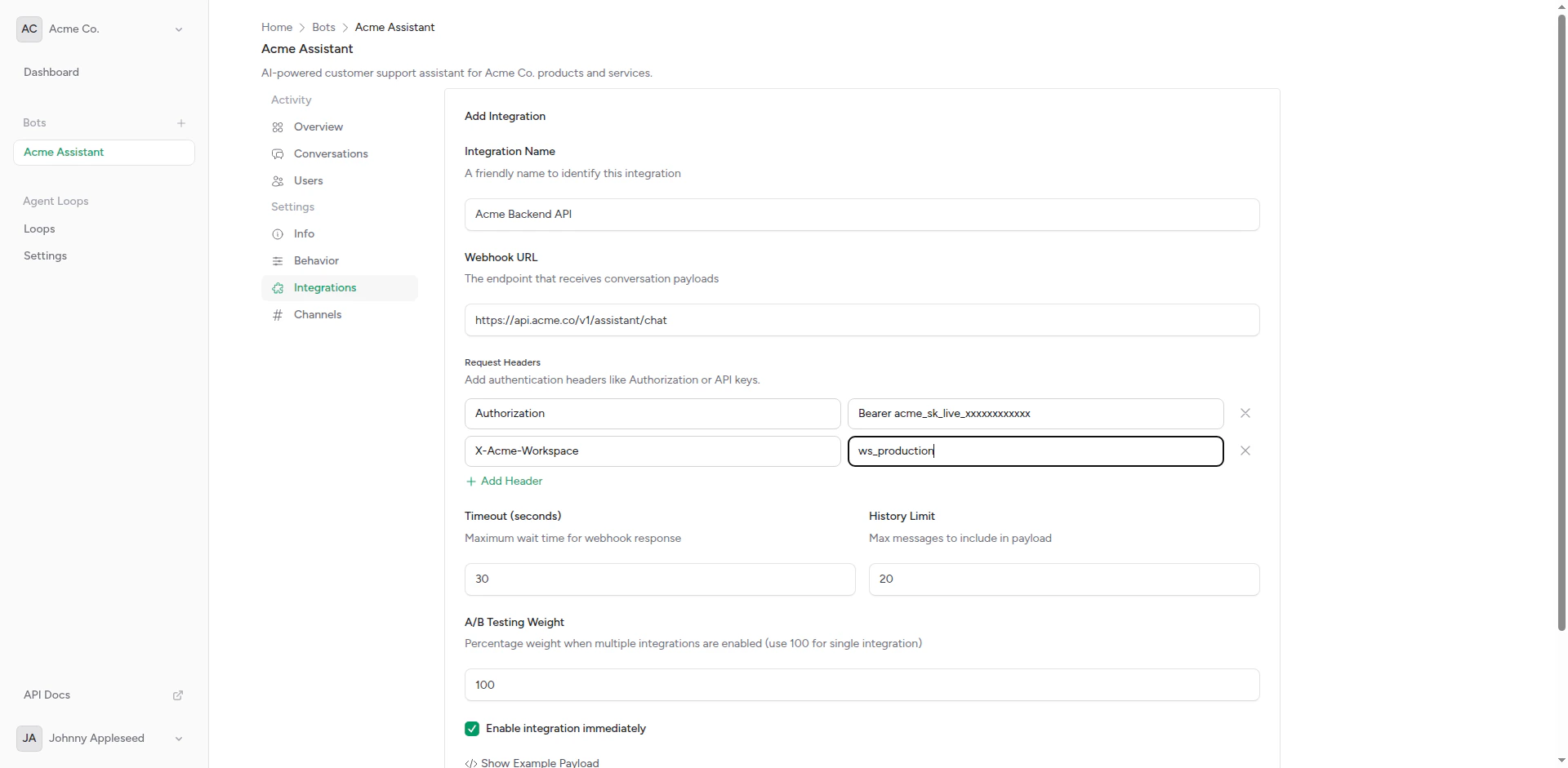
Integration with custom headers
3
Add Header Pairs
Enter header name and value pairs:
4
Add More Headers
Click Add Header to include additional headers.
5
Save
Click Save to apply the configuration.
Common Header Patterns
Authentication Headers
Bearer Token:API-Specific Headers
OpenAI:Tracking and Analytics
Request Identification:Feature Flags
Enable Features:Dynamic Headers
Some headers are automatically added by the platform:Platform-Added Headers
Request-Specific Headers
The platform may add context-specific headers:Security Best Practices
Never expose API keys in client-side code. Headers are configured server-side and never exposed to end users.
Protecting API Keys
Do:- Use environment variables for sensitive values
- Rotate keys regularly
- Use separate keys for development and production
- Restrict key permissions to minimum required
- Hardcode keys in application code
- Share keys in documentation or screenshots
- Use the same key across multiple services
- Grant excessive permissions to API keys
Header Validation
Your backend should validate:- Authentication: Verify token is valid and not expired
- Authorization: Check token has required permissions
- Origin: Optionally verify requests come from Chatbot Platform
- Rate Limiting: Implement per-key rate limits
Advanced Use Cases
Multi-Environment Setup
Use different headers for different environments: Development Integration:A/B Testing with Headers
Identify which variant is being tested: Integration A:User Tier Routing
Route premium users to better models:X-User-Tier and selects appropriate model.
Custom Timeout Headers
Some APIs support custom timeout headers:Testing Headers
View Request Headers
Use request inspection tools to verify headers are sent:- Webhook.site: Create a temporary endpoint
- RequestBin: Capture and inspect requests
- Your Backend Logs: Log incoming headers
1
Create Test Endpoint
Go to webhook.site and copy your unique URL.
2
Configure Integration
Create a test integration with your webhook.site URL and add headers.
3
Send Test Message
Trigger a message to the bot.
4
Inspect Request
Check webhook.site to see all headers sent.
Verify Authentication
Test that authentication works:Troubleshooting
Headers Not Working
If your backend doesn’t receive headers: Check:- Header names are spelled correctly (case-sensitive)
- No extra whitespace in names or values
- Headers are saved in integration settings
- Your backend logs incoming headers
Authentication Fails
If you get 401 errors: Common Issues:- API key is incorrect or expired
- Header name is wrong (e.g.,
X-API-Keyvs.Authorization) - Token format is wrong (missing
Bearerprefix) - Key doesn’t have required permissions
- Verify key in your AI service dashboard
- Check API documentation for correct header format
- Test with curl before configuring in platform
- Generate a new API key if needed
Headers Are Cut Off
If header values are truncated:- Check for length limits (usually 8KB total)
- Very long tokens may need to be split
- Use shorter identifiers where possible
Header Limits
Be aware of these limits:These limits are generous and should accommodate all standard use cases.
Examples by Platform
OpenAI Chat Completions
Anthropic Messages API
Google Vertex AI
Azure OpenAI
Hugging Face
Next Steps
Webhook Setup
Complete integration configuration
A/B Testing
Test headers with multiple integrations