Overview
Reply detection determines whether a bot should generate a response for a given message. Without proper detection, bots might:- Respond to every message in a busy group chat
- Interrupt conversations not meant for them
- Miss messages they should respond to
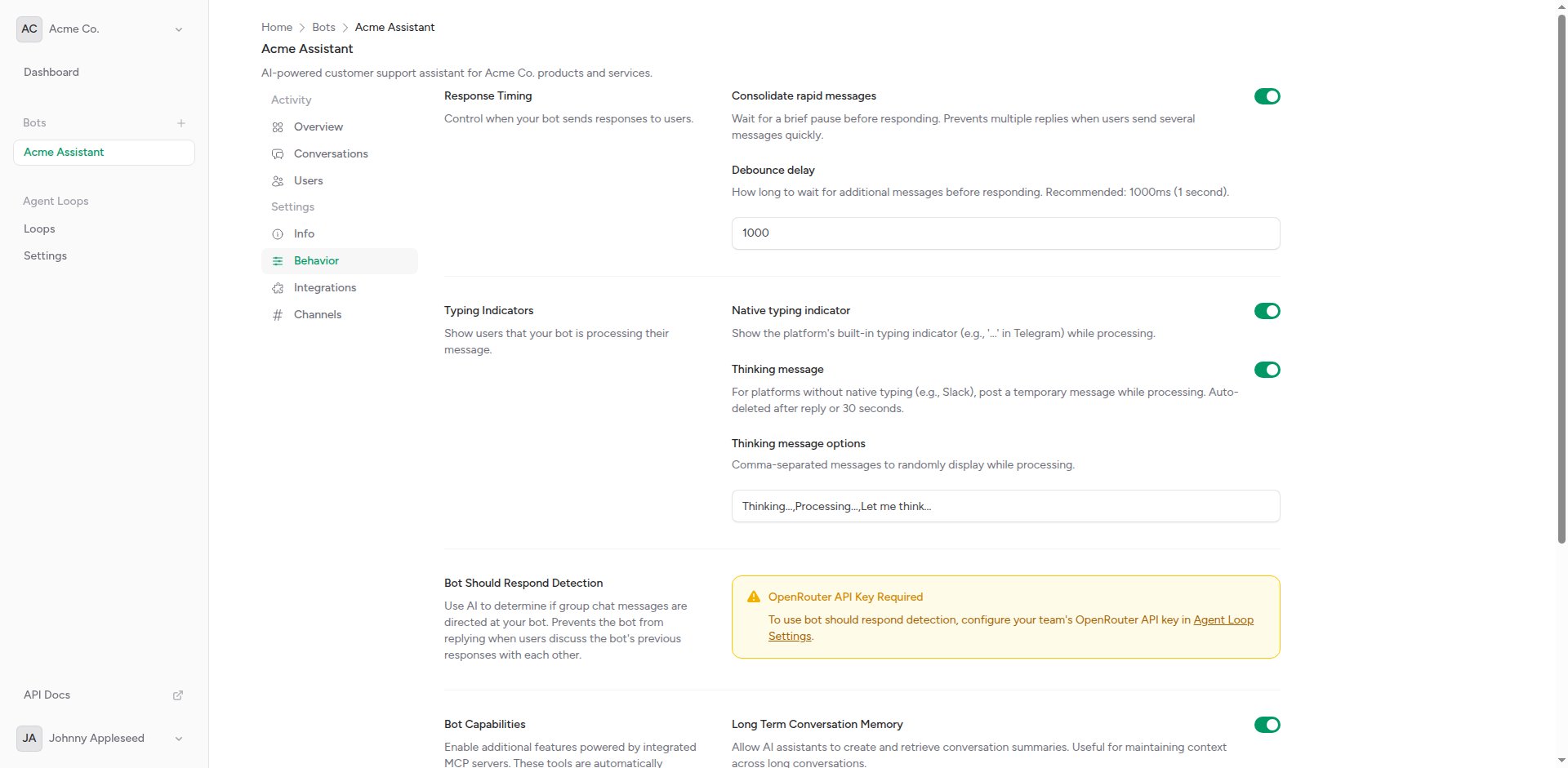
Reply detection settings
Detection Strategies
Direct Messages
In private 1:1 chats, detection is simple:Group Chats
In groups, detection uses multiple signals: Explicit Mentions:Configuration
bot_should_reply Setting
Thebot_should_reply setting determines detection behavior:
1
Navigate to Bot Behaviors
Go to your bot settings and click Behaviors.
2
Find Reply Detection
Look for the Should Respond or Reply Detection setting.
3
Choose Strategy
Select the appropriate detection strategy for your use case.
4
Save
Click Save to apply changes.
detect_addressed: AI-Powered Detection
For advanced use cases, enabledetect_addressed to use AI to determine if a message is directed at the bot:
When to Use detect_addressed
Good fits:- Natural language support channels
- Conversational bots that should “understand” when they’re needed
- Reducing false positives in group chats
- Simple command-based bots
- Channels where explicit @mentions are preferred
- High-volume groups (adds latency)
AI detection adds a small delay to message processing as the system analyzes the message content.
Platform-Specific Behavior
Telegram
Private Chats:- Bot responds to all messages
- No detection needed
- Responds to @mentions
- Responds to replies to bot messages
- Optionally responds to commands (/start, /help)
- Privacy mode setting affects visibility
- Bot can only respond if admin
- All messages visible
Slack
Direct Messages:- Bot responds to all messages
- Simple 1:1 context
- Responds to @mentions
- Responds in threads when mentioned
- Can be configured to respond to all channel messages
- Each thread is separate context
- Bot responds within threads when addressed
- Thread replies maintain conversation context
Discord
Direct Messages:- Bot responds to all DMs
- No detection needed
- Responds to @mentions
- Responds to replies to bot messages
- Optionally responds to slash commands
- Role-based permissions can control visibility
Testing Reply Detection
1
Test Direct Messages
Send a DM to your bot. It should always respond.
2
Test Group Mentions
In a group, @mention your bot. It should respond.
3
Test Group Without Mention
Send a message in a group without mentioning the bot. It should NOT respond (unless configured otherwise).
4
Test Replies
Reply to a bot message in a group. Bot should respond even without @mention.
Common Patterns
Support Bot in Shared Channel
Always-On Assistant
Smart Detection
Advanced Configuration
Per-Channel Detection
Configure different detection strategies per channel:Custom Detection Logic
For advanced use cases, implement custom detection in your integration webhook:Troubleshooting
Bot Not Responding in Groups
Check:- Reply detection is not set to “never”
- Bot is properly mentioned with @
- Platform privacy settings allow bot to see messages
- Bot has permissions to respond in the channel
Bot Responding Too Often
Possible causes:- Detection set to “always” in a shared channel
- AI detection being too aggressive
- Multiple bots responding to same messages
- Change to “mentioned” or “replied” detection
- Adjust AI detection sensitivity
- Review bot configuration
Bot Missing Messages
Check:- User is properly mentioning bot
- Reply detection is not set too restrictively
- Bot has permissions to read messages
- Platform webhooks are properly configured
Best Practices
Match Context
Use “always” for DMs, “replied” for groups
Test Thoroughly
Test all detection scenarios before deploying
Be Predictable
Users should understand when bot will respond
Monitor Behavior
Review logs to ensure detection works as expected
Start with “replied” detection in groups - it provides a good balance between responsiveness and not being intrusive.
API Configuration
Configure reply detection programmatically.Update bot reply detection
Update bot reply detection
- cURL
- JavaScript
- PHP
- Python
Complete API Reference
View the full API specification with all endpoints, parameters, and response schemas.
Next Steps
Typing Indicators
Configure visual feedback
Response Timing
Control response delays