Step-by-step guide to building AI agents that ground their responses in real-world data
Learn how to create Agentic Loops that eliminate hallucinations by connecting your AI to real-world data sources.
Quick Start: Your First Agentic Loop
Let’s build an agent that provides accurate weather information by calling a real weather API instead of guessing.
1
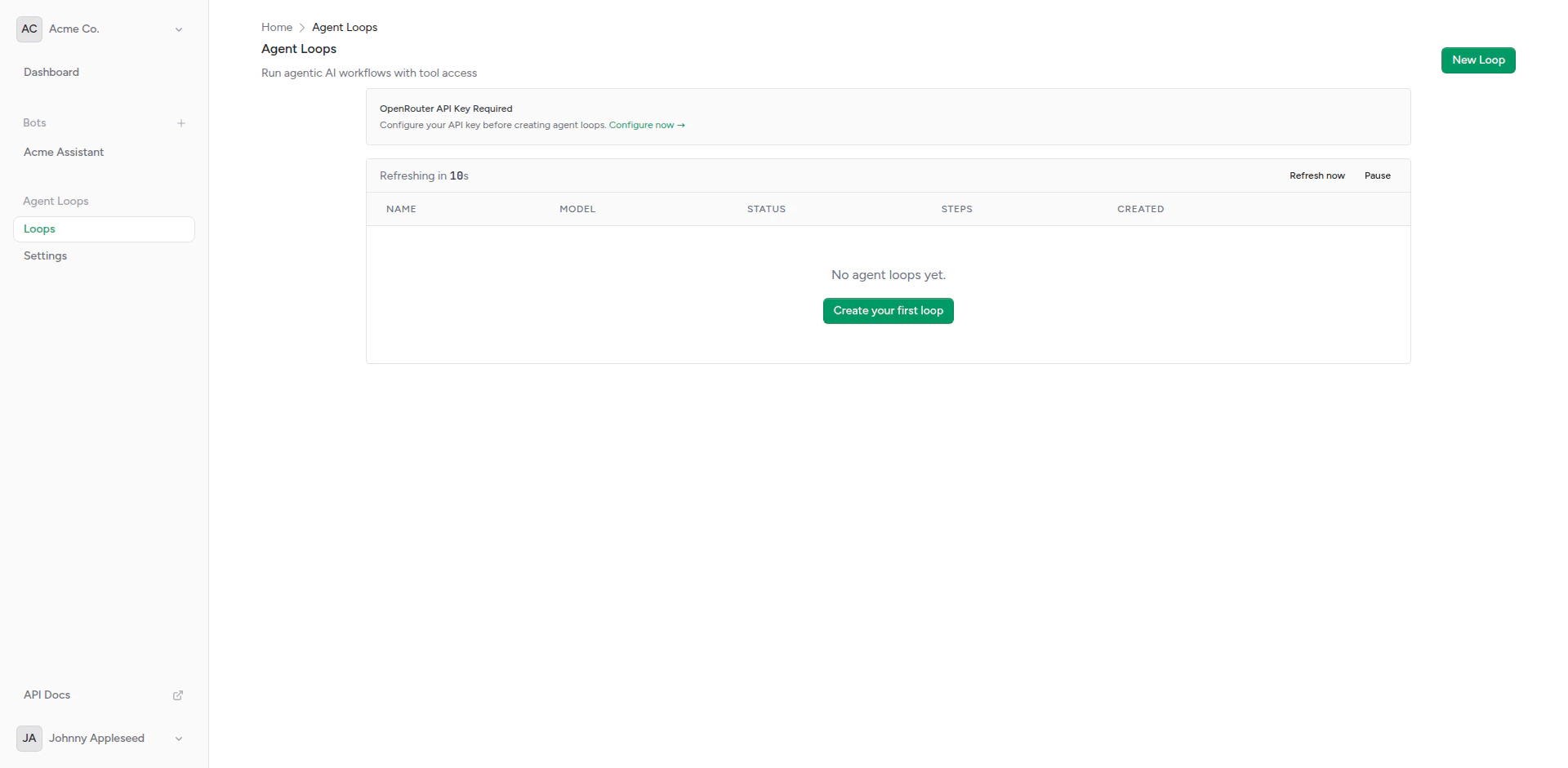
Navigate to Agent Loops
From your dashboard, click Agent Loops in the sidebar.
Agent loops list
2
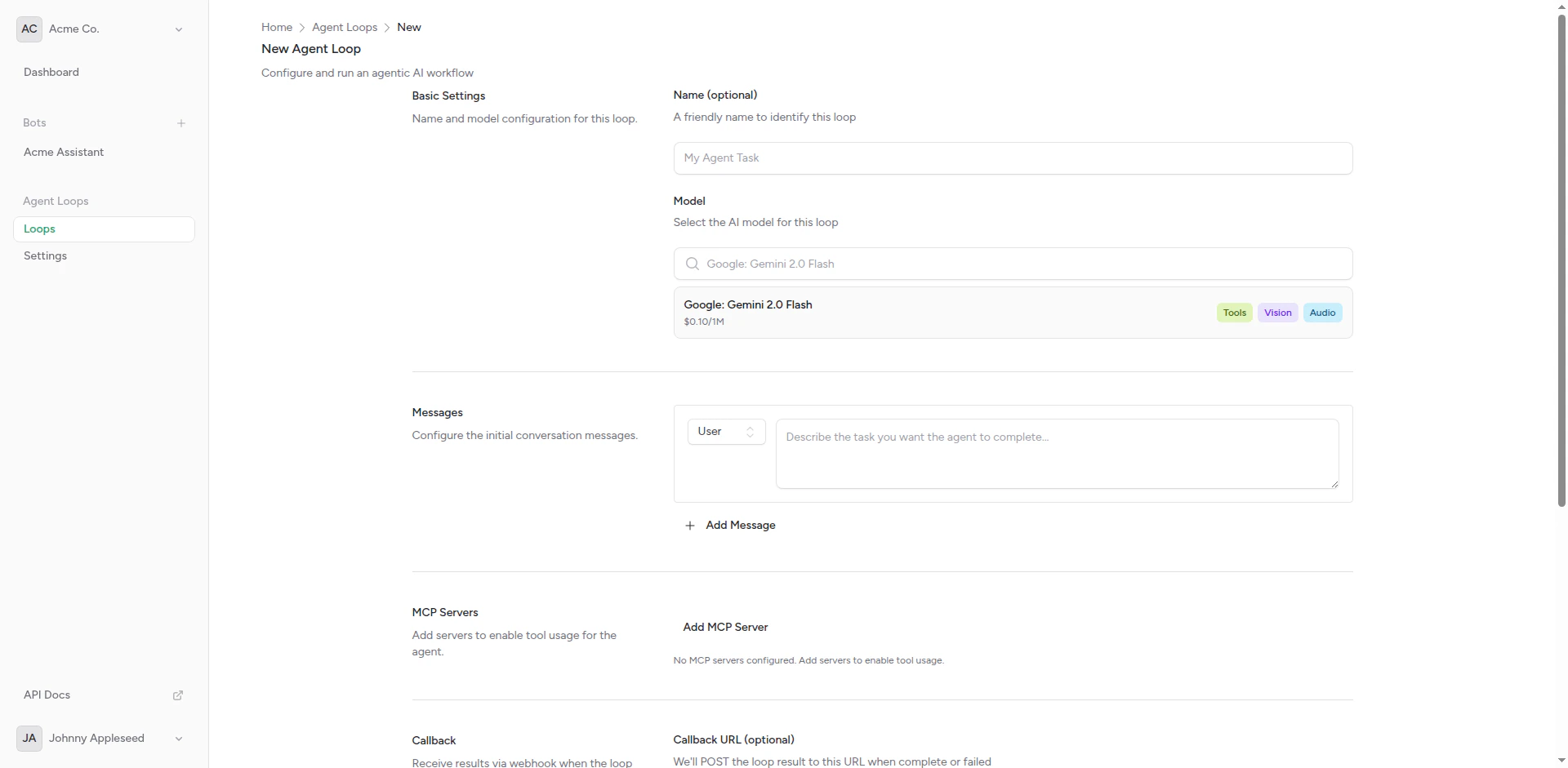
Create New Loop
Click Create Agent Loop to open the configuration form.
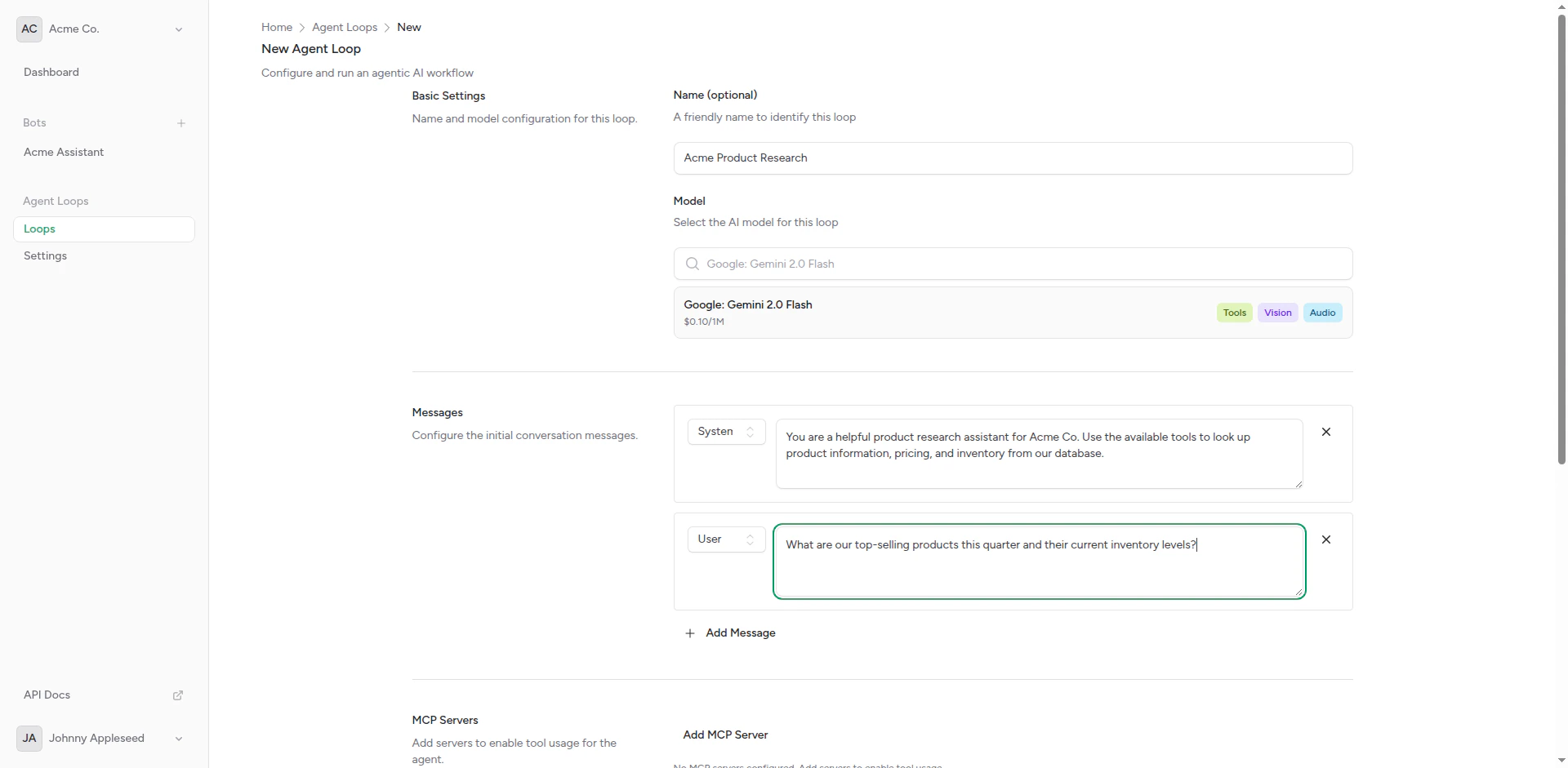
Create agent loop form
3
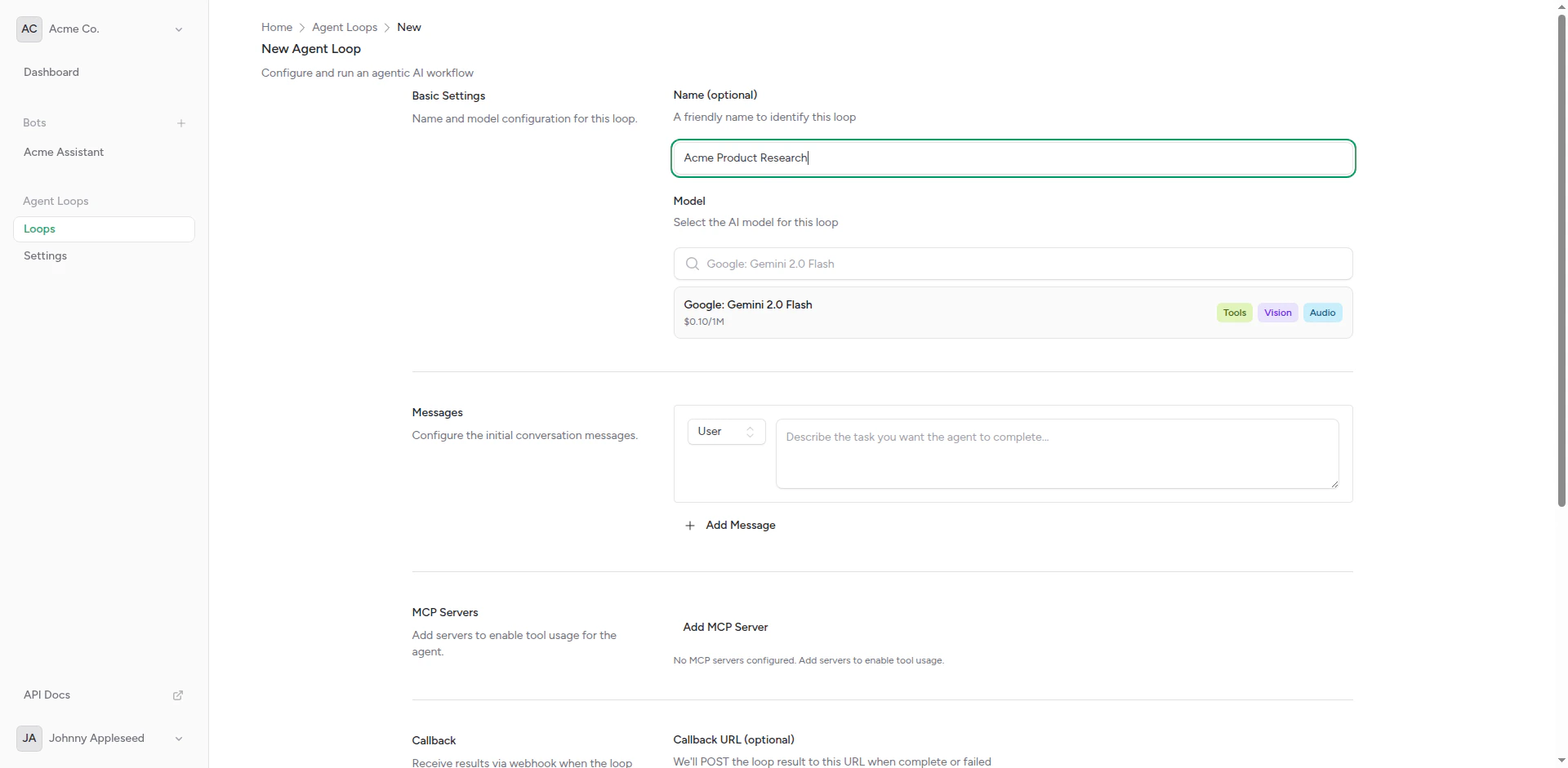
Name Your Agent
Give your agent a descriptive name: “Weather Information Agent”
Named agent loop
4
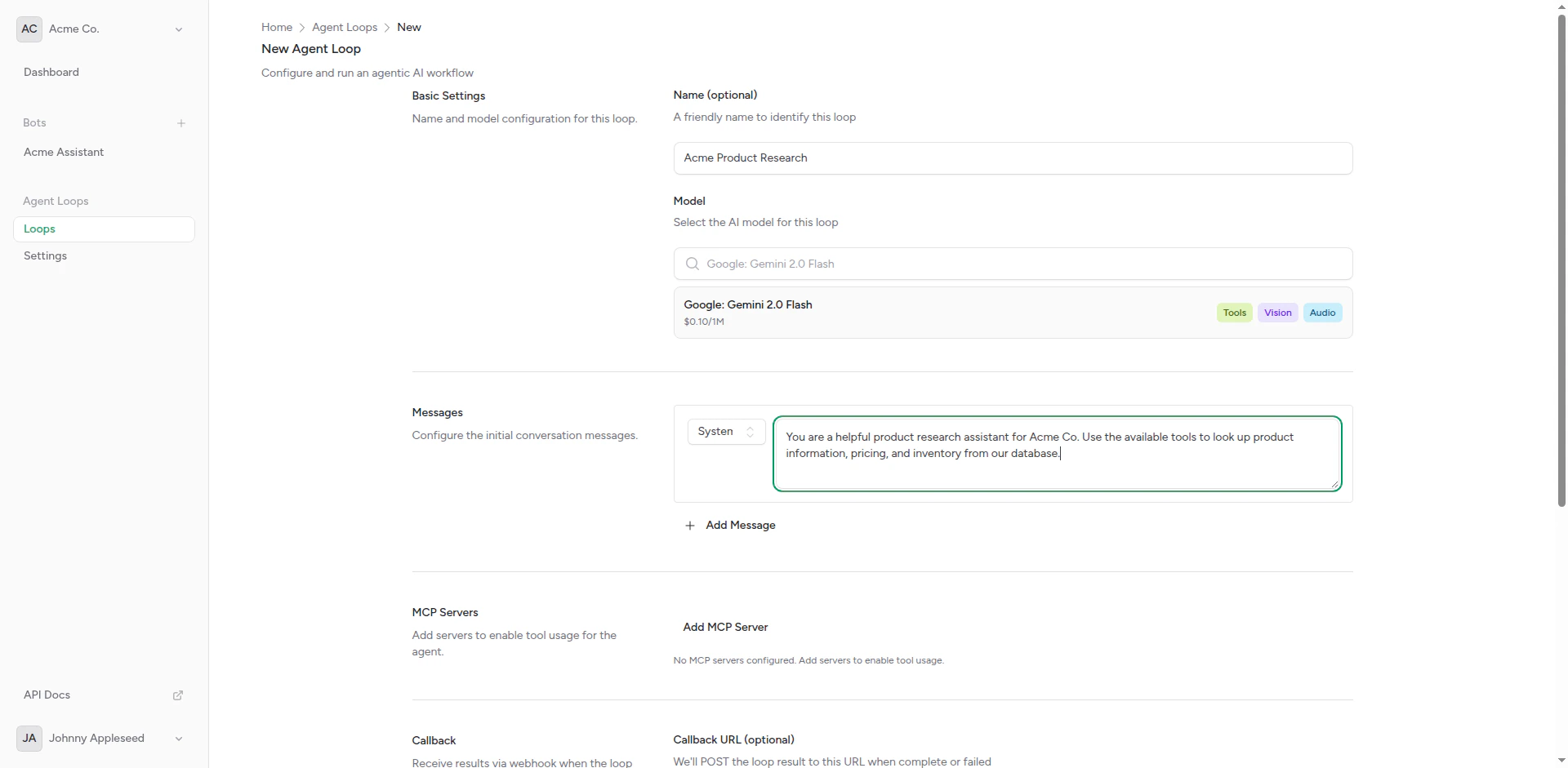
Configure System Prompt
Define the agent’s role and available tools:
You are a weather information assistant. When users ask about weather,you MUST use the weather API tool to fetch current data. Never guessor use outdated training data.Available tools:- weather_api: Get current weather for any cityProcess:1. Identify the city from the user's question2. Call the weather_api tool with the city name3. Format the response with the real data received4. If the API call fails, inform the user
System prompt configuration
5
Set User Message
Provide the initial question or task:
What's the current weather in Paris?
User message input
6
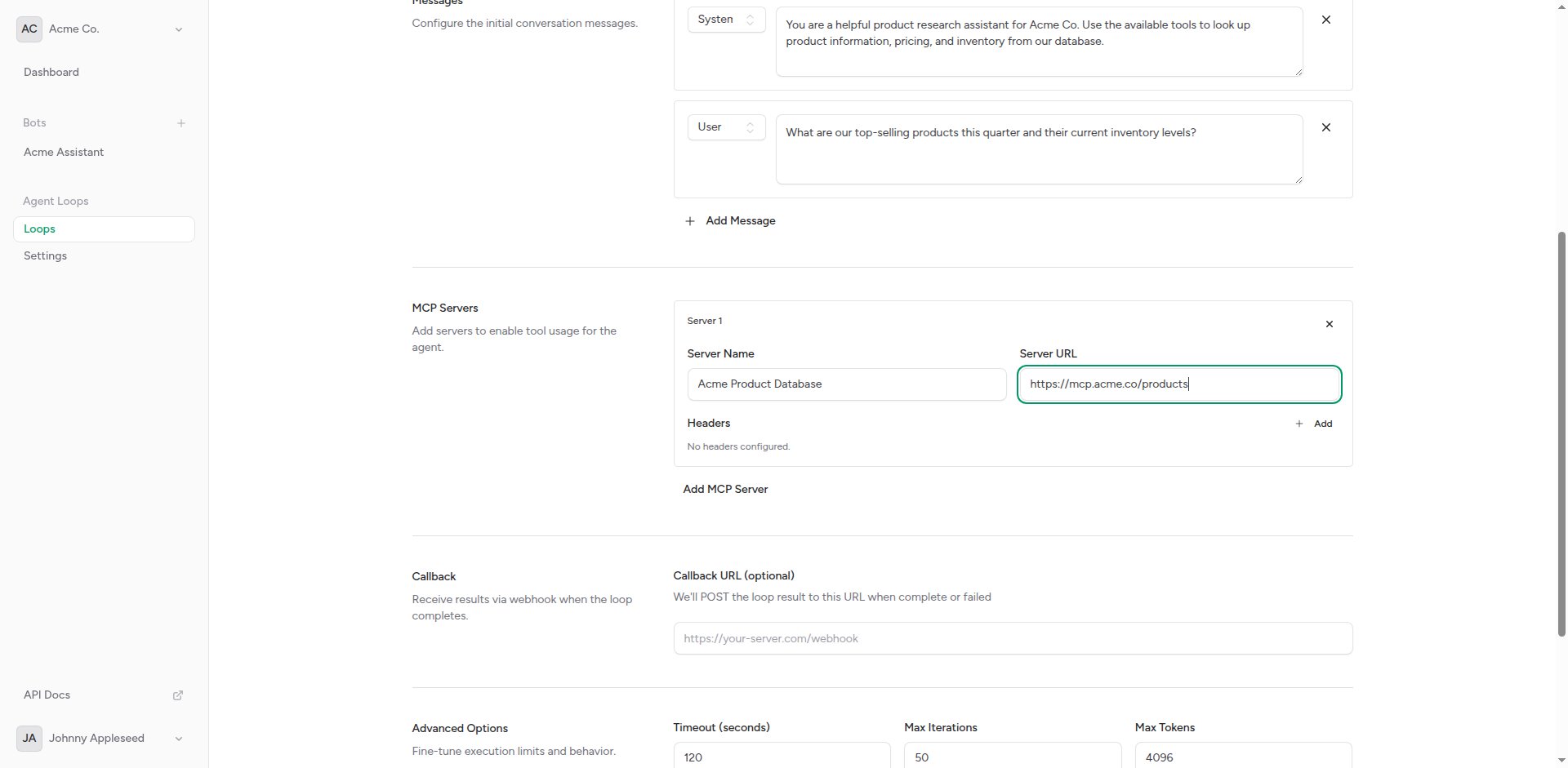
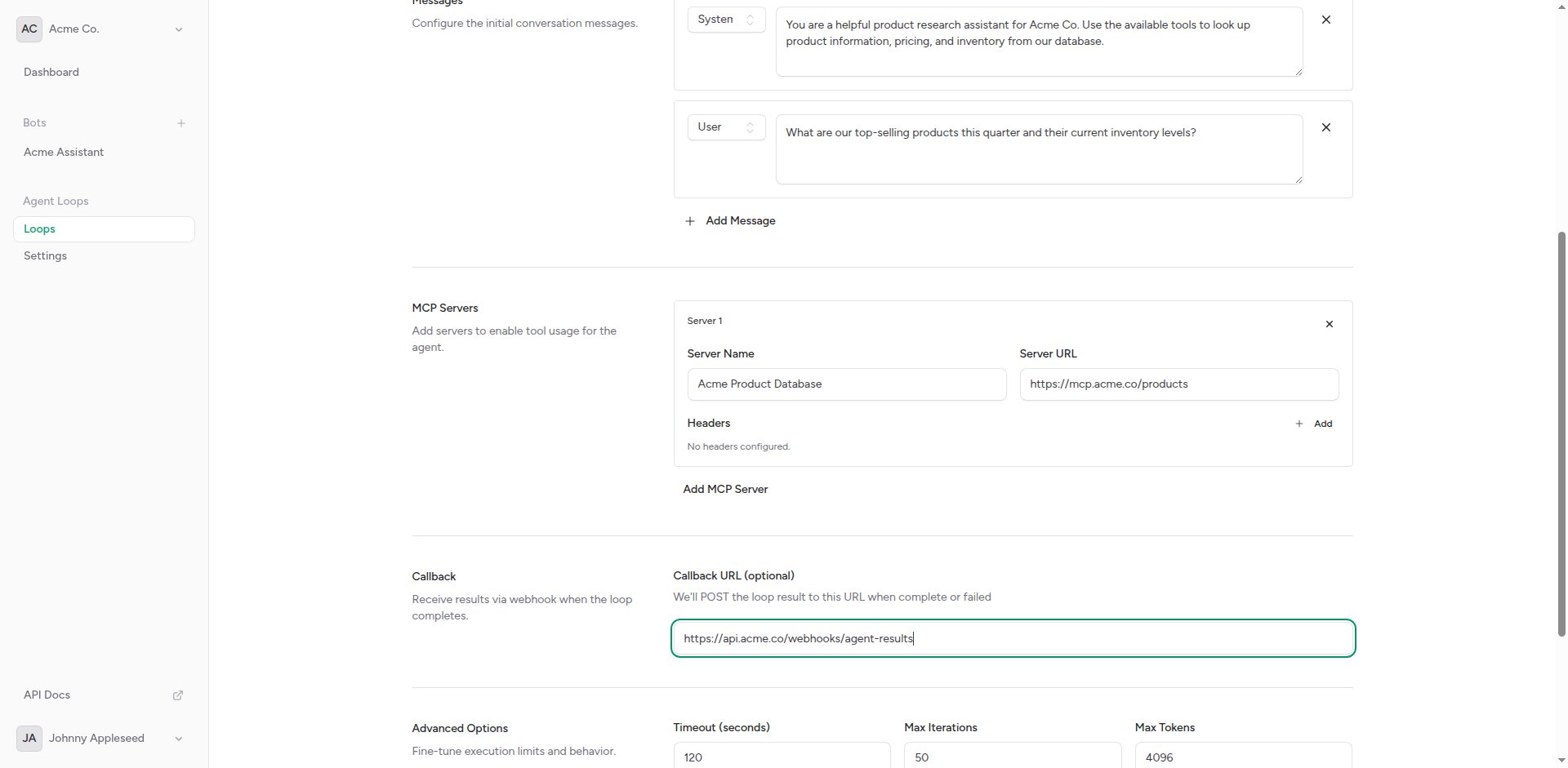
Configure MCP Server
Add the tool that provides weather data:
Click Add MCP Server
Select HTTP Client (for calling weather APIs)
Or select a pre-configured weather MCP server if available
Model: Claude 3.5 Sonnet (recommended for tool use)
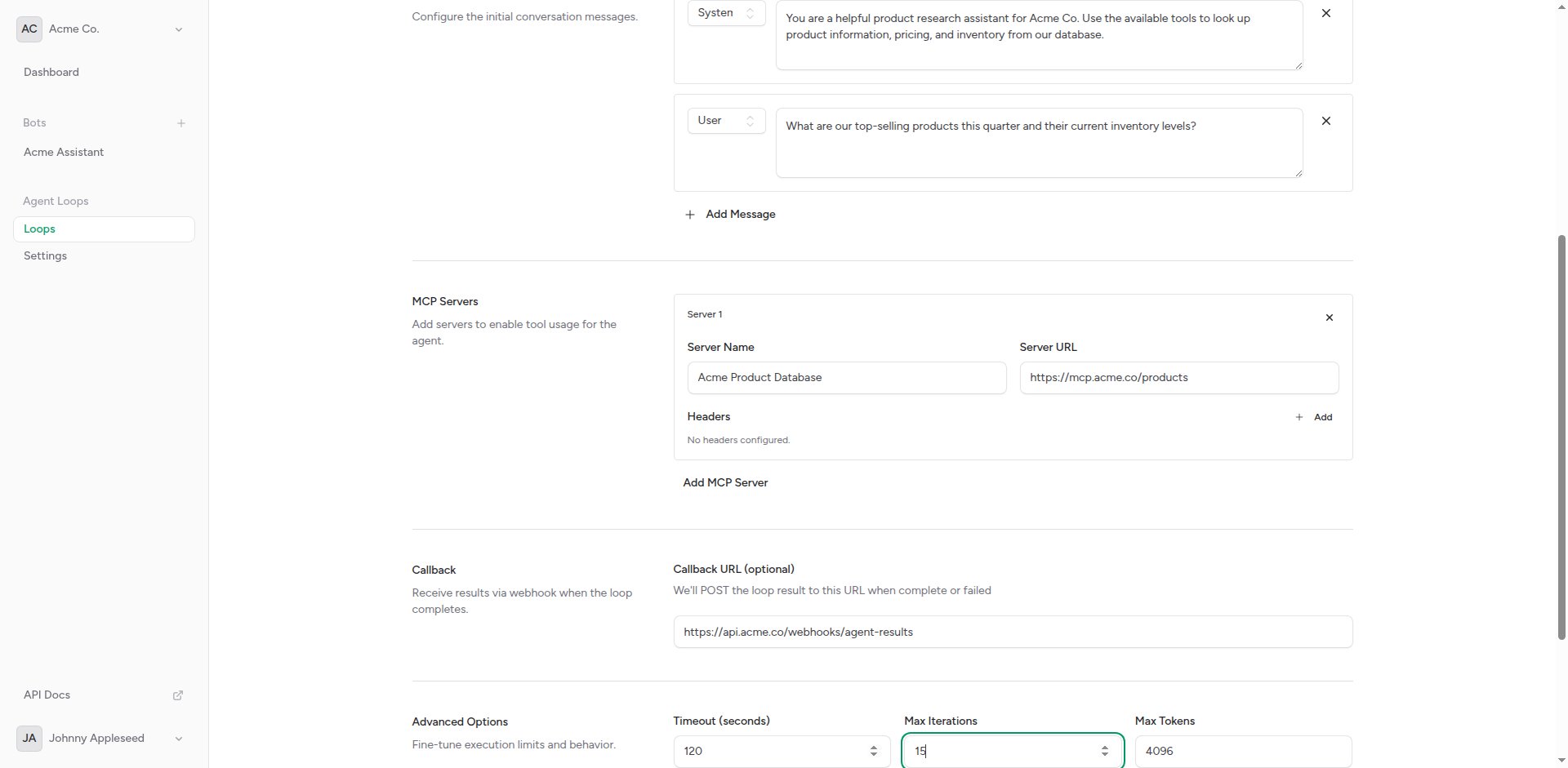
Advanced settings
9
Save and Test
Click Create to save your Agentic Loop, then click Run to test it.
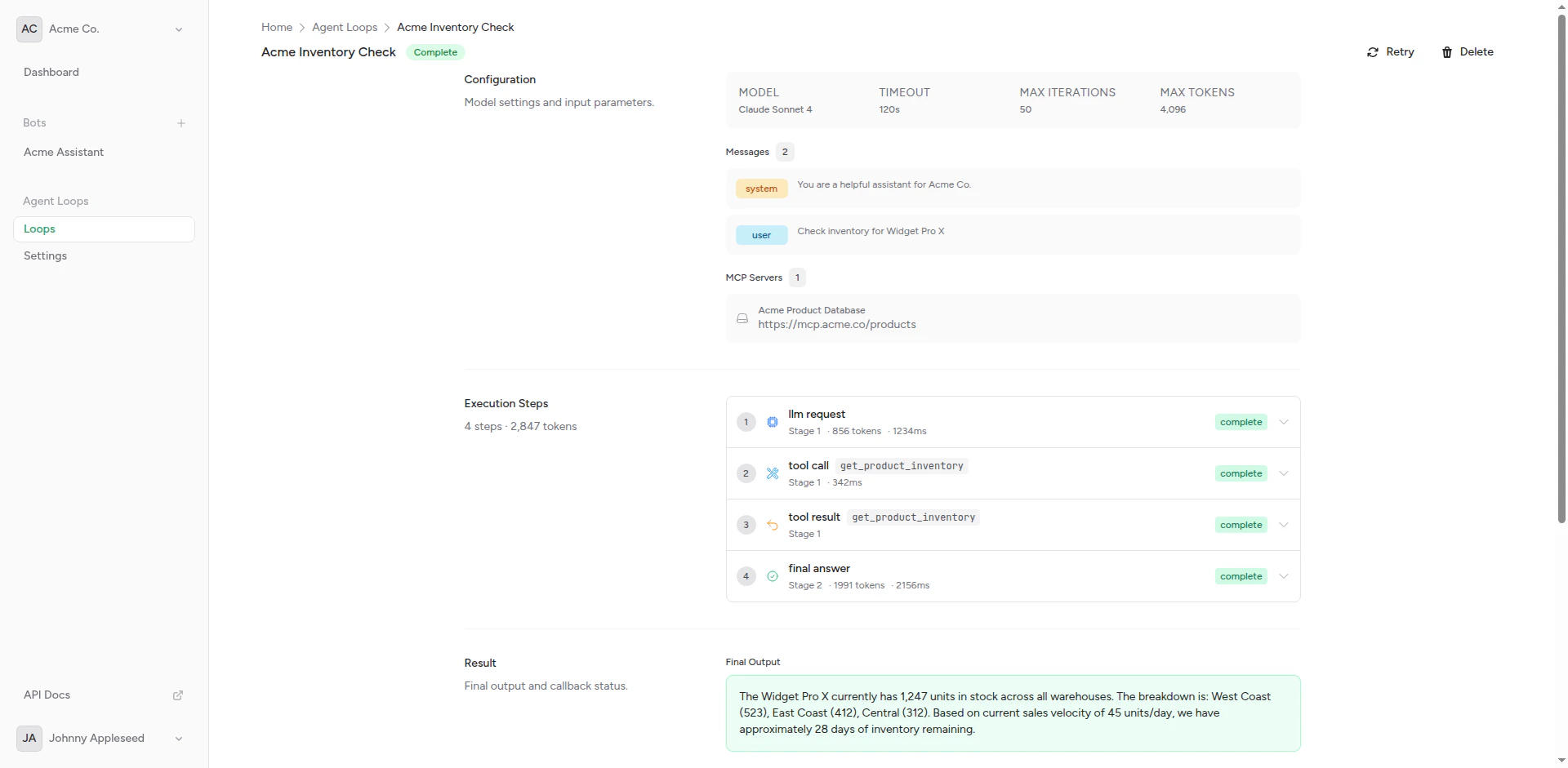
Complete agent loop
What Happens When It Runs
Execution Flow
User Message: "What's the current weather in Paris?"Iteration 1:THINK: "I need current weather data for Paris. I'll call the weather API."TOOL: weather_api({city: "Paris"})OBSERVE: {temp: 22, condition: "sunny", humidity: 45%}Iteration 2:THINK: "I have the data. I'll format a clear response."RESPOND: "The current weather in Paris is 22°C and sunny with 45% humidity."✓ COMPLETE - Grounded response with zero hallucinations
Execution Log
After running, you’ll see a detailed log:
=== Agent Loop Execution ===Status: Completed SuccessfullyDuration: 3.2 secondsIterations Used: 2 of 5Tool Calls: 1Iteration 1: Reasoning: "Need to fetch current weather for Paris" Action: Call weather_api Result: {temperature: 22, condition: "sunny"}Iteration 2: Reasoning: "Have data, generating response" Action: Generate final answer Result: "The current weather in Paris is 22°C and sunny..."Final Response: [grounded in real API data]
Configuration Deep Dive
System Prompt Best Practices
The system prompt is critical for preventing hallucinations. Here’s how to write effective prompts:
Bad System Prompt (Allows Hallucinations)
You are a helpful weather assistant. Answer weather questions.
Problems:
Doesn’t mention tools
No instruction to use real data
Agent might guess instead of fetching
Good System Prompt (Prevents Hallucinations)
You are a weather assistant with access to real-time weather data.CRITICAL: You MUST use tools to fetch current data. NEVER guess orrely on training data for weather information.Available Tools:- weather_api: Returns current weather for any city Parameters: {city: string} Response: {temperature: number, condition: string, humidity: number}Process:1. Extract city name from user question2. Call weather_api with city parameter3. Wait for response4. Format data into natural language5. If API fails, say "Unable to fetch current weather data"Never make up weather information. Every fact must come from the API.
Why This Works:
Explicitly requires tool use
Documents available tools
Provides clear process
Includes error handling
Forbids guessing
User Message Patterns
The user message can be static or dynamic:
Static Message (For Scheduled Tasks)
User Message: "Generate yesterday's sales report"Use Case: Daily scheduled reportResult: Same query every day, different data
Dynamic Message (For API Triggers)
User Message: "What's the status of order #{{order_id}}?"Use Case: Customer support botResult: Variable passed from your application
Multi-Step Instructions
User Message: "Analyze yesterday's data and identify trends:1. Query sales database for all orders2. Calculate total revenue and order count3. Identify top 5 products4. Compare to previous week5. Generate summary report"Use Case: Complex analysis taskResult: Agent executes multiple steps with multiple tool calls
MCP Server Selection
Choose tools based on your data sources:
Data Source
MCP Server
Use Case
REST APIs
HTTP Client
Weather, stock prices, external services
Databases
Database MCP
Order data, customer records
File Storage
File System MCP
CSV files, documents, logs
Custom Logic
Custom MCP Server
Your proprietary systems
Start with one tool: Begin with a single MCP server. Only add more tools when the agent needs multiple data sources. Too many tools can confuse the agent.
Iteration Limits
Set iterations based on task complexity:
Simple Task (3-5 iterations):- Single API call- Format responseExample: Get weather, check order statusMedium Task (5-10 iterations):- Multiple API calls- Data processing- Response formattingExample: Compare prices across servicesComplex Task (10-20 iterations):- Multi-step workflow- Multiple data sources- Analysis and insightsExample: Generate comprehensive reportVery Complex Task (20-50 iterations):- Deep analysis- Many tool calls- Complex decision treesExample: Automated research with multiple sources
Real-World Examples
Example 1: Customer Order Tracking
Goal: Eliminate “your order probably shipped” hallucinations.Configuration:
Name: Order Tracking AgentSystem Prompt:You are an order tracking assistant with access to our order database.Available Tools:- query_order_db: Get order details Parameters: {order_id: string} Response: {status, ship_date, tracking_number, carrier}- query_shipping_api: Get delivery estimates Parameters: {tracking_number, carrier} Response: {location, estimated_delivery}Process:1. Extract order ID from user question2. Query order database3. If shipped, get tracking details from shipping API4. Provide accurate status and delivery dateNEVER guess order status. If data is unavailable, say so clearly.User Message: "What's the status of order #{{order_id}}?"MCP Servers:- Order Database MCP- Shipping API MCPMax Iterations: 10
Result: Every order status is grounded in real database data.
Example 2: Real-Time Inventory Checker
Goal: Stop telling customers items are in stock when they’re not.Configuration:
Name: Inventory CheckerSystem Prompt:You check product availability using our real-time inventory system.Available Tools:- check_inventory: Get current stock levels Parameters: {product_id: string, location?: string} Response: {in_stock: boolean, quantity: number, locations: array}Process:1. Extract product ID from question2. Query inventory database3. Report exact availability4. If out of stock, mention when restocking (if available)CRITICAL: Only report in-stock if quantity > 0. Never assume availability.User Message: "Is product {{product_id}} available?"MCP Servers:- Inventory Database MCPMax Iterations: 5
Goal: Schedule meetings with actual calendar data, not guesses.Configuration:
Name: Meeting SchedulerSystem Prompt:You schedule meetings by checking real calendar availability.Available Tools:- check_calendar: View available time slots Parameters: {date: string, attendees: array} Response: {available_slots: array}- create_meeting: Book a time slot Parameters: {date, time, attendees, title} Response: {meeting_id, confirmation}Process:1. Parse meeting request (attendees, preferred time)2. Check calendar for availability3. Propose available time slots4. Once user confirms, create meeting5. Provide confirmation with meeting detailsNEVER suggest times without checking availability first.User Message: "Schedule a meeting with {{attendees}} for {{date}}"MCP Servers:- Calendar API MCPMax Iterations: 10
Result: Zero double-bookings, all meetings based on actual availability.
Testing Your Agentic Loop
Pre-Launch Checklist
Before deploying your agent:
Test with multiple scenarios: Try edge cases, not just happy paths
Verify tool calls work: Check that MCP servers respond correctly
Review execution logs: Confirm agent is using tools, not guessing
Check error handling: What happens when APIs fail?
Validate response format: Is the output structured as expected?
Test iteration limits: Does the agent complete within the limit?
Common Issues & Fixes
Issue: Agent Guesses Instead of Using Tools
Symptom:
User: "What's the weather?"Agent: "It's probably mild and pleasant today."[HALLUCINATION: Didn't call weather API]
Fix:
Update System Prompt:"CRITICAL: You MUST call the weather_api tool. Never provideweather information without calling the API first."
Issue: Agent Runs Out of Iterations
Symptom:
Execution Failed: Reached max iterations (5) without completing
Fix:
Increase max iterations from 5 to 10, or simplify the task.Check execution log to see where agent got stuck.
Issue: Tool Calls Fail
Symptom:
Tool Call Error: Connection timeout to MCP server
Fix:
Verify MCP server URL is correct
Check that server is running and accessible
Increase timeout in advanced settings
Add retry logic to system prompt
Issue: Agent Uses Wrong Tool
Symptom:
Agent called database tool for weather data (wrong tool)
Fix:
Update System Prompt:"For weather information, use the weather_api tool.For order information, use the order_database tool.Example:User asks about weather → Use weather_apiUser asks about order → Use order_database"
View the full API specification with all endpoints and parameters
Next Steps
Configure Tools
Connect MCP servers to access real-world data
Best Practices
Optimize for performance, cost, and reliability
⌘I
{"docsConfig":{"theme":"maple","$schema":"https://mintlify.com/docs.json","name":"Chatbot Platform Documentation","colors":{"primary":"#6366F1"},"footer":{},"styling":{"latex":true},"navigation":{"pages":[]}},"deployment":{"deploymentMetadataValue":{"subdomain":"chatbotplatform","hasAudioNarration":false,"actualSubdomain":"chatbotplatform","customDomains":["docs.chatbotplatform.io"],"gitSource":{"type":"github","owner":"jonnx","repo":"docs.chatbotplatform.io","deployBranch":"main","contentDirectory":"","isPrivate":true,"mountPath":"","label":""},"entitlements":{},"buildId":"6b09daf3bc2b2d94fb276943","clientVersion":"0.0.4342","searchFilterCounts":[{"language":"default","tag":"Bots","count":40},{"language":"default","tag":"Guides","count":16},{"language":"default","tag":"MCP Servers","count":12},{"language":"default","tag":"Agentic Loops","count":10},{"language":"default","tag":"Channels","count":8},{"language":"default","tag":"Behaviors","count":3},{"language":"default","tag":"Conversations","count":3},{"language":"default","tag":"Integrations","count":3},{"language":"default","tag":"Getting Started","count":2}]},"assistantConfig":{"enableAskAiButton":false,"enableStarterQuestions":false,"enableAskAiSearchBar":true},"basePath":"","hasChatPermissions":false,"hasWebMcpPermissions":false,"toggles":[{"name":"kill-isr","enabled":true,"variant":{"name":"disabled","enabled":false,"feature_enabled":true},"impressionData":false},{"name":"custom-rbac-roles","enabled":true,"variant":{"name":"disabled","enabled":false,"feature_enabled":true},"impressionData":false},{"name":"agent-mintlify-slack","enabled":true,"variant":{"name":"disabled","enabled":false,"feature_enabled":true},"impressionData":false},{"name":"agent-integrations-settings","enabled":true,"variant":{"name":"disabled","enabled":false,"feature_enabled":true},"impressionData":false},{"name":"rbac-expansion","enabled":true,"variant":{"name":"disabled","enabled":false,"feature_enabled":true},"impressionData":false},{"name":"automations-pr-grouping","enabled":true,"variant":{"name":"disabled","enabled":false,"feature_enabled":true},"impressionData":false},{"name":"custom-prefix","enabled":true,"variant":{"name":"disabled","enabled":false,"feature_enabled":true},"impressionData":false},{"name":"analytics-v7","enabled":true,"variant":{"name":"disabled","enabled":false,"feature_enabled":true},"impressionData":false},{"name":"user-flows-analytics","enabled":true,"variant":{"name":"disabled","enabled":false,"feature_enabled":true},"impressionData":false},{"name":"no-publish-flow","enabled":true,"variant":{"name":"disabled","enabled":false,"feature_enabled":true},"impressionData":false},{"name":"snapshot-serving-live","enabled":true,"variant":{"name":"disabled","enabled":false,"feature_enabled":true},"impressionData":false},{"name":"stripTemperatureMiddleware","enabled":true,"variant":{"name":"disabled","enabled":false,"feature_enabled":true},"impressionData":false},{"name":"support-platform-pylon-zendesk","enabled":true,"variant":{"name":"disabled","enabled":false,"feature_enabled":true},"impressionData":false},{"name":"snapshot-serving","enabled":true,"variant":{"name":"disabled","enabled":false,"feature_enabled":true},"impressionData":false},{"name":"instant-rollback","enabled":true,"variant":{"name":"disabled","enabled":false,"feature_enabled":true},"impressionData":false},{"name":"granular-notifications-server","enabled":true,"variant":{"name":"disabled","enabled":false,"feature_enabled":true},"impressionData":false},{"name":"granular-notifications","enabled":true,"variant":{"name":"disabled","enabled":false,"feature_enabled":true},"impressionData":false},{"name":"automations-fable","enabled":true,"variant":{"name":"disabled","enabled":false,"feature_enabled":true},"impressionData":false},{"name":"fixed-ai-action-pricing","enabled":true,"variant":{"name":"disabled","enabled":false,"feature_enabled":true},"impressionData":false},{"name":"site-roles","enabled":true,"variant":{"name":"disabled","enabled":false,"feature_enabled":true},"impressionData":false},{"name":"automation-resolve-merge-conflict","enabled":true,"variant":{"name":"disabled","enabled":false,"feature_enabled":true},"impressionData":false},{"name":"scoped-publishing","enabled":true,"variant":{"name":"disabled","enabled":false,"feature_enabled":true},"impressionData":false},{"name":"mintql","enabled":true,"variant":{"name":"disabled","enabled":false,"feature_enabled":true},"impressionData":false},{"name":"page-level-analytics","enabled":true,"variant":{"name":"disabled","enabled":false,"feature_enabled":true},"impressionData":false},{"name":"editor-version-history-v2","enabled":true,"variant":{"name":"disabled","enabled":false,"feature_enabled":true},"impressionData":false},{"name":"billing-page-v2","enabled":true,"variant":{"name":"disabled","enabled":false,"feature_enabled":true},"impressionData":false},{"name":"full-page-search","enabled":true,"variant":{"name":"disabled","enabled":false,"feature_enabled":true},"impressionData":false},{"name":"workspace-projects","enabled":true,"variant":{"name":"disabled","enabled":false,"feature_enabled":true},"impressionData":false},{"name":"fork-pr-previews","enabled":true,"variant":{"name":"disabled","enabled":false,"feature_enabled":true},"impressionData":false},{"name":"revalidation-jwt","enabled":true,"variant":{"name":"disabled","enabled":false,"feature_enabled":true},"impressionData":false},{"name":"hobby-abuse-scan","enabled":true,"variant":{"name":"disabled","enabled":false,"feature_enabled":true},"impressionData":false},{"name":"dashboard-inbox","enabled":true,"variant":{"name":"disabled","enabled":false,"feature_enabled":true},"impressionData":false},{"name":"turbopuffer-dual-write","enabled":true,"variant":{"name":"disabled","enabled":false,"feature_enabled":true},"impressionData":false},{"name":"approve-review-flow","enabled":true,"variant":{"name":"disabled","enabled":false,"feature_enabled":true},"impressionData":false},{"name":"editor-metadata","enabled":true,"variant":{"name":"disabled","enabled":false,"feature_enabled":true},"impressionData":false},{"name":"turbopuffer-serve","enabled":true,"variant":{"name":"disabled","enabled":false,"feature_enabled":true},"impressionData":false},{"name":"live-agents","enabled":true,"variant":{"name":"disabled","enabled":false,"feature_enabled":true},"impressionData":false},{"name":"starter-pricing","enabled":true,"variant":{"name":"control","enabled":true,"payload":{"type":"string","value":"control"},"feature_enabled":true},"impressionData":false},{"name":"llms-txt-v2","enabled":true,"variant":{"name":"disabled","enabled":false,"feature_enabled":true},"impressionData":false},{"name":"wildcard-email-auth","enabled":true,"variant":{"name":"disabled","enabled":false,"feature_enabled":true},"impressionData":false}],"starterQuestions":[],"googleFontsInlined":false},"customCss":[]}
{"page":{"pagePath":"agentic-loops/creating-loops","slug":"/agentic-loops/creating-loops","pageMetadata":{"title":"Creating Agentic Loops","description":"Step-by-step guide to building AI agents that ground their responses in real-world data","href":"/agentic-loops/creating-loops"},"description":{"compiledSource":"\"use strict\";\nconst {jsx: _jsx} = arguments[0];\nconst {useMDXComponents: _provideComponents} = arguments[0];\nfunction _createMdxContent(props) {\n const _components = {\n p: \"p\",\n ..._provideComponents(),\n ...props.components\n };\n return _jsx(_components.p, {\n children: \"Step-by-step guide to building AI agents that ground their responses in real-world data\"\n });\n}\nfunction MDXContent(props = {}) {\n const {wrapper: MDXLayout} = {\n ..._provideComponents(),\n ...props.components\n };\n return MDXLayout ? _jsx(MDXLayout, {\n ...props,\n children: _jsx(_createMdxContent, {\n ...props\n })\n }) : _createMdxContent(props);\n}\nreturn {\n default: MDXContent\n};\n","frontmatter":{},"scope":{}},"pageType":"default","mdx":{"mdxSource":{"compiledSource":"\"use strict\";const{Fragment:_Fragment,jsx:_jsx,jsxs:_jsxs}=arguments[0];const{useMDXComponents:_provideComponents}=arguments[0];function _createMdxContent(props){const _components={code:`code`,input:`input`,li:`li`,p:`p`,pre:`pre`,span:`span`,strong:`strong`,tbody:`tbody`,td:`td`,th:`th`,thead:`thead`,tr:`tr`,ul:`ul`,..._provideComponents(),...props.components},{Accordion,AccordionGroup,Callout,Card,CardGroup,CodeBlock,Frame,Heading,OptimizedImage,Step,Steps,Tab,Table,Tabs}=_components;if(!Accordion)_missingMdxReference(`Accordion`,true);if(!AccordionGroup)_missingMdxReference(`AccordionGroup`,true);if(!Callout)_missingMdxReference(`Callout`,true);if(!Card)_missingMdxReference(`Card`,true);if(!CardGroup)_missingMdxReference(`CardGroup`,true);if(!CodeBlock)_missingMdxReference(`CodeBlock`,true);if(!Frame)_missingMdxReference(`Frame`,true);if(!Heading)_missingMdxReference(`Heading`,true);if(!OptimizedImage)_missingMdxReference(`OptimizedImage`,true);if(!Step)_missingMdxReference(`Step`,true);if(!Steps)_missingMdxReference(`Steps`,true);if(!Tab)_missingMdxReference(`Tab`,true);if(!Table)_missingMdxReference(`Table`,true);if(!Tabs)_missingMdxReference(`Tabs`,true);return _jsxs(_Fragment,{children:[_jsx(_components.p,{children:`Learn how to create Agentic Loops that eliminate hallucinations by connecting your AI to real-world data sources.`}),`\n`,_jsx(Heading,{level:`2`,id:`quick-start-your-first-agentic-loop`,children:`Quick Start: Your First Agentic Loop`}),`\n`,_jsx(_components.p,{children:`Let’s build an agent that provides accurate weather information by calling a real weather API instead of guessing.`}),`\n`,_jsxs(Steps,{children:[_jsxs(Step,{title:`Navigate to Agent Loops`,children:[_jsxs(_components.p,{children:[`From your dashboard, click `,_jsx(_components.strong,{children:`Agent Loops`}),` in the sidebar.`]}),_jsx(Frame,{caption:`Agent loops list`,children:_jsx(OptimizedImage,{src:`https://mintcdn.com/chatbotplatform/QhGUbEN05MzAjt2K/images/screenshots/04-agentic/01_agent_loops_list.png?fit=max\u0026auto=format\u0026n=QhGUbEN05MzAjt2K\u0026q=85\u0026s=889ee22ef0b7c9a587488da9f68b95ce`,alt:`Agent loops list`,\"data-og-width\":`1920`,width:`1920`,\"data-og-height\":`941`,height:`941`,\"data-path\":`images/screenshots/04-agentic/01_agent_loops_list.png`,\"data-optimize\":`true`,\"data-opv\":`3`,srcset:`https://mintcdn.com/chatbotplatform/QhGUbEN05MzAjt2K/images/screenshots/04-agentic/01_agent_loops_list.png?w=280\u0026fit=max\u0026auto=format\u0026n=QhGUbEN05MzAjt2K\u0026q=85\u0026s=5cda5718003ddc5e16e5e3fd770fbf1c 280w, https://mintcdn.com/chatbotplatform/QhGUbEN05MzAjt2K/images/screenshots/04-agentic/01_agent_loops_list.png?w=560\u0026fit=max\u0026auto=format\u0026n=QhGUbEN05MzAjt2K\u0026q=85\u0026s=9c8afd6c0d6067cb7484271d076ce962 560w, https://mintcdn.com/chatbotplatform/QhGUbEN05MzAjt2K/images/screenshots/04-agentic/01_agent_loops_list.png?w=840\u0026fit=max\u0026auto=format\u0026n=QhGUbEN05MzAjt2K\u0026q=85\u0026s=bef4b0ecba452b09e62e6d9e52296e29 840w, https://mintcdn.com/chatbotplatform/QhGUbEN05MzAjt2K/images/screenshots/04-agentic/01_agent_loops_list.png?w=1100\u0026fit=max\u0026auto=format\u0026n=QhGUbEN05MzAjt2K\u0026q=85\u0026s=ea800ee29f4ab1d4ec7d52176c7ded72 1100w, https://mintcdn.com/chatbotplatform/QhGUbEN05MzAjt2K/images/screenshots/04-agentic/01_agent_loops_list.png?w=1650\u0026fit=max\u0026auto=format\u0026n=QhGUbEN05MzAjt2K\u0026q=85\u0026s=ed3131badaf411df9d1b25efc78a09ae 1650w, https://mintcdn.com/chatbotplatform/QhGUbEN05MzAjt2K/images/screenshots/04-agentic/01_agent_loops_list.png?w=2500\u0026fit=max\u0026auto=format\u0026n=QhGUbEN05MzAjt2K\u0026q=85\u0026s=2944ed7e70eec4f8bd5e5b6aa12120ce 2500w`})})]}),_jsxs(Step,{title:`Create New Loop`,children:[_jsxs(_components.p,{children:[`Click `,_jsx(_components.strong,{children:`Create Agent Loop`}),` to open the configuration form.`]}),_jsx(Frame,{caption:`Create agent loop form`,children:_jsx(OptimizedImage,{src:`https://mintcdn.com/chatbotplatform/QhGUbEN05MzAjt2K/images/screenshots/04-agentic/03_create_agent_loop_form.png?fit=max\u0026auto=format\u0026n=QhGUbEN05MzAjt2K\u0026q=85\u0026s=a216a802be35c9cafd00000a9f080993`,alt:`Create form`,\"data-og-width\":`1920`,width:`1920`,\"data-og-height\":`941`,height:`941`,\"data-path\":`images/screenshots/04-agentic/03_create_agent_loop_form.png`,\"data-optimize\":`true`,\"data-opv\":`3`,srcset:`https://mintcdn.com/chatbotplatform/QhGUbEN05MzAjt2K/images/screenshots/04-agentic/03_create_agent_loop_form.png?w=280\u0026fit=max\u0026auto=format\u0026n=QhGUbEN05MzAjt2K\u0026q=85\u0026s=62f46011ecdafdb4f97c7c379ff6974a 280w, https://mintcdn.com/chatbotplatform/QhGUbEN05MzAjt2K/images/screenshots/04-agentic/03_create_agent_loop_form.png?w=560\u0026fit=max\u0026auto=format\u0026n=QhGUbEN05MzAjt2K\u0026q=85\u0026s=2a82be6e2c6af655c9699f9eb14c6ebf 560w, https://mintcdn.com/chatbotplatform/QhGUbEN05MzAjt2K/images/screenshots/04-agentic/03_create_agent_loop_form.png?w=840\u0026fit=max\u0026auto=format\u0026n=QhGUbEN05MzAjt2K\u0026q=85\u0026s=e954c6de9e1142bab3bd704054112d83 840w, https://mintcdn.com/chatbotplatform/QhGUbEN05MzAjt2K/images/screenshots/04-agentic/03_create_agent_loop_form.png?w=1100\u0026fit=max\u0026auto=format\u0026n=QhGUbEN05MzAjt2K\u0026q=85\u0026s=43b45b83b14805a2b5a68d942ecfc581 1100w, https://mintcdn.com/chatbotplatform/QhGUbEN05MzAjt2K/images/screenshots/04-agentic/03_create_agent_loop_form.png?w=1650\u0026fit=max\u0026auto=format\u0026n=QhGUbEN05MzAjt2K\u0026q=85\u0026s=afd282be49696925e221fc7a057967df 1650w, https://mintcdn.com/chatbotplatform/QhGUbEN05MzAjt2K/images/screenshots/04-agentic/03_create_agent_loop_form.png?w=2500\u0026fit=max\u0026auto=format\u0026n=QhGUbEN05MzAjt2K\u0026q=85\u0026s=468ce6eac393aa55bef4c48ec19f78e3 2500w`})})]}),_jsxs(Step,{title:`Name Your Agent`,children:[_jsx(_components.p,{children:`Give your agent a descriptive name: “Weather Information Agent”`}),_jsx(Frame,{caption:`Named agent loop`,children:_jsx(OptimizedImage,{src:`https://mintcdn.com/chatbotplatform/QhGUbEN05MzAjt2K/images/screenshots/04-agentic/04_agent_loop_named.png?fit=max\u0026auto=format\u0026n=QhGUbEN05MzAjt2K\u0026q=85\u0026s=47e422b4c94ae76db528703e54f0188f`,alt:`Named agent`,\"data-og-width\":`1920`,width:`1920`,\"data-og-height\":`941`,height:`941`,\"data-path\":`images/screenshots/04-agentic/04_agent_loop_named.png`,\"data-optimize\":`true`,\"data-opv\":`3`,srcset:`https://mintcdn.com/chatbotplatform/QhGUbEN05MzAjt2K/images/screenshots/04-agentic/04_agent_loop_named.png?w=280\u0026fit=max\u0026auto=format\u0026n=QhGUbEN05MzAjt2K\u0026q=85\u0026s=7f529f85d71ba1111d496aacf46fe9be 280w, https://mintcdn.com/chatbotplatform/QhGUbEN05MzAjt2K/images/screenshots/04-agentic/04_agent_loop_named.png?w=560\u0026fit=max\u0026auto=format\u0026n=QhGUbEN05MzAjt2K\u0026q=85\u0026s=2f27ea30908dab9135e771662244b9f7 560w, https://mintcdn.com/chatbotplatform/QhGUbEN05MzAjt2K/images/screenshots/04-agentic/04_agent_loop_named.png?w=840\u0026fit=max\u0026auto=format\u0026n=QhGUbEN05MzAjt2K\u0026q=85\u0026s=bd9c29a967d078936782325f2be6865a 840w, https://mintcdn.com/chatbotplatform/QhGUbEN05MzAjt2K/images/screenshots/04-agentic/04_agent_loop_named.png?w=1100\u0026fit=max\u0026auto=format\u0026n=QhGUbEN05MzAjt2K\u0026q=85\u0026s=040b87ab0cd0bbceab48cdecc2eedd33 1100w, https://mintcdn.com/chatbotplatform/QhGUbEN05MzAjt2K/images/screenshots/04-agentic/04_agent_loop_named.png?w=1650\u0026fit=max\u0026auto=format\u0026n=QhGUbEN05MzAjt2K\u0026q=85\u0026s=22cffa5effc1d87ed46aad441f75d3fa 1650w, https://mintcdn.com/chatbotplatform/QhGUbEN05MzAjt2K/images/screenshots/04-agentic/04_agent_loop_named.png?w=2500\u0026fit=max\u0026auto=format\u0026n=QhGUbEN05MzAjt2K\u0026q=85\u0026s=ced22cfa2b94eb3feea6258e089141a7 2500w`})})]}),_jsxs(Step,{title:`Configure System Prompt`,children:[_jsx(_components.p,{children:`Define the agent’s role and available tools:`}),_jsx(CodeBlock,{numberOfLines:`13`,language:`text`,children:_jsx(_components.pre,{className:`shiki shiki-themes github-light-default dark-plus`,style:{backgroundColor:`#ffffff`,\"--shiki-dark-bg\":`#0B0C0E`,color:`#1f2328`,\"--shiki-dark\":`#D4D4D4`},language:`text`,children:_jsxs(_components.code,{language:`text`,numberOfLines:`13`,children:[_jsx(_components.span,{className:`line`,children:_jsx(_components.span,{children:`You are a weather information assistant. When users ask about weather,`})}),`\n`,_jsx(_components.span,{className:`line`,children:_jsx(_components.span,{children:`you MUST use the weather API tool to fetch current data. Never guess`})}),`\n`,_jsx(_components.span,{className:`line`,children:_jsx(_components.span,{children:`or use outdated training data.`})}),`\n`,_jsx(_components.span,{className:`line`,children:_jsx(_components.span,{})}),`\n`,_jsx(_components.span,{className:`line`,children:_jsx(_components.span,{children:`Available tools:`})}),`\n`,_jsx(_components.span,{className:`line`,children:_jsx(_components.span,{children:`- weather_api: Get current weather for any city`})}),`\n`,_jsx(_components.span,{className:`line`,children:_jsx(_components.span,{})}),`\n`,_jsx(_components.span,{className:`line`,children:_jsx(_components.span,{children:`Process:`})}),`\n`,_jsx(_components.span,{className:`line`,children:_jsx(_components.span,{children:`1. Identify the city from the user's question`})}),`\n`,_jsx(_components.span,{className:`line`,children:_jsx(_components.span,{children:`2. Call the weather_api tool with the city name`})}),`\n`,_jsx(_components.span,{className:`line`,children:_jsx(_components.span,{children:`3. Format the response with the real data received`})}),`\n`,_jsx(_components.span,{className:`line`,children:_jsx(_components.span,{children:`4. If the API call fails, inform the user`})}),`\n`,_jsx(_components.span,{className:`line`,children:_jsx(_components.span,{})})]})})}),_jsx(Frame,{caption:`System prompt configuration`,children:_jsx(OptimizedImage,{src:`https://mintcdn.com/chatbotplatform/QhGUbEN05MzAjt2K/images/screenshots/04-agentic/05_system_prompt.png?fit=max\u0026auto=format\u0026n=QhGUbEN05MzAjt2K\u0026q=85\u0026s=4564b8396fc8a9848f8e0125d1f967b2`,alt:`System prompt`,\"data-og-width\":`1920`,width:`1920`,\"data-og-height\":`941`,height:`941`,\"data-path\":`images/screenshots/04-agentic/05_system_prompt.png`,\"data-optimize\":`true`,\"data-opv\":`3`,srcset:`https://mintcdn.com/chatbotplatform/QhGUbEN05MzAjt2K/images/screenshots/04-agentic/05_system_prompt.png?w=280\u0026fit=max\u0026auto=format\u0026n=QhGUbEN05MzAjt2K\u0026q=85\u0026s=4f999fa919d621c2e327596d3b3bcb30 280w, https://mintcdn.com/chatbotplatform/QhGUbEN05MzAjt2K/images/screenshots/04-agentic/05_system_prompt.png?w=560\u0026fit=max\u0026auto=format\u0026n=QhGUbEN05MzAjt2K\u0026q=85\u0026s=509769a990023f08fec3dfc1194859e1 560w, https://mintcdn.com/chatbotplatform/QhGUbEN05MzAjt2K/images/screenshots/04-agentic/05_system_prompt.png?w=840\u0026fit=max\u0026auto=format\u0026n=QhGUbEN05MzAjt2K\u0026q=85\u0026s=8f2938b940a6d4c8323ecccd10ba5c2b 840w, https://mintcdn.com/chatbotplatform/QhGUbEN05MzAjt2K/images/screenshots/04-agentic/05_system_prompt.png?w=1100\u0026fit=max\u0026auto=format\u0026n=QhGUbEN05MzAjt2K\u0026q=85\u0026s=25d0b717055e724b7445ff916212168b 1100w, https://mintcdn.com/chatbotplatform/QhGUbEN05MzAjt2K/images/screenshots/04-agentic/05_system_prompt.png?w=1650\u0026fit=max\u0026auto=format\u0026n=QhGUbEN05MzAjt2K\u0026q=85\u0026s=11f4c90949e169b0525284360ea56d38 1650w, https://mintcdn.com/chatbotplatform/QhGUbEN05MzAjt2K/images/screenshots/04-agentic/05_system_prompt.png?w=2500\u0026fit=max\u0026auto=format\u0026n=QhGUbEN05MzAjt2K\u0026q=85\u0026s=e68738cf239494c5529826df5c835a35 2500w`})})]}),_jsxs(Step,{title:`Set User Message`,children:[_jsx(_components.p,{children:`Provide the initial question or task:`}),_jsx(CodeBlock,{numberOfLines:`2`,language:`text`,children:_jsx(_components.pre,{className:`shiki shiki-themes github-light-default dark-plus`,style:{backgroundColor:`#ffffff`,\"--shiki-dark-bg\":`#0B0C0E`,color:`#1f2328`,\"--shiki-dark\":`#D4D4D4`},language:`text`,children:_jsxs(_components.code,{language:`text`,numberOfLines:`2`,children:[_jsx(_components.span,{className:`line`,children:_jsx(_components.span,{children:`What's the current weather in Paris?`})}),`\n`,_jsx(_components.span,{className:`line`,children:_jsx(_components.span,{})})]})})}),_jsx(Frame,{caption:`User message input`,children:_jsx(OptimizedImage,{src:`https://mintcdn.com/chatbotplatform/QhGUbEN05MzAjt2K/images/screenshots/04-agentic/06_user_message.png?fit=max\u0026auto=format\u0026n=QhGUbEN05MzAjt2K\u0026q=85\u0026s=9633bf51dda8771c74475991c73e0d05`,alt:`User message`,\"data-og-width\":`1920`,width:`1920`,\"data-og-height\":`941`,height:`941`,\"data-path\":`images/screenshots/04-agentic/06_user_message.png`,\"data-optimize\":`true`,\"data-opv\":`3`,srcset:`https://mintcdn.com/chatbotplatform/QhGUbEN05MzAjt2K/images/screenshots/04-agentic/06_user_message.png?w=280\u0026fit=max\u0026auto=format\u0026n=QhGUbEN05MzAjt2K\u0026q=85\u0026s=dc888e947cf05fe9b0105011bdf7874d 280w, https://mintcdn.com/chatbotplatform/QhGUbEN05MzAjt2K/images/screenshots/04-agentic/06_user_message.png?w=560\u0026fit=max\u0026auto=format\u0026n=QhGUbEN05MzAjt2K\u0026q=85\u0026s=75e1d2b705ef4cfb32498cb4fc0da03a 560w, https://mintcdn.com/chatbotplatform/QhGUbEN05MzAjt2K/images/screenshots/04-agentic/06_user_message.png?w=840\u0026fit=max\u0026auto=format\u0026n=QhGUbEN05MzAjt2K\u0026q=85\u0026s=e7dd8925f4ffcc97194c71457b9c225f 840w, https://mintcdn.com/chatbotplatform/QhGUbEN05MzAjt2K/images/screenshots/04-agentic/06_user_message.png?w=1100\u0026fit=max\u0026auto=format\u0026n=QhGUbEN05MzAjt2K\u0026q=85\u0026s=ffcf401c7a856c03000ccd2043b47552 1100w, https://mintcdn.com/chatbotplatform/QhGUbEN05MzAjt2K/images/screenshots/04-agentic/06_user_message.png?w=1650\u0026fit=max\u0026auto=format\u0026n=QhGUbEN05MzAjt2K\u0026q=85\u0026s=3602cffd005c89f06e1237fdd6937d38 1650w, https://mintcdn.com/chatbotplatform/QhGUbEN05MzAjt2K/images/screenshots/04-agentic/06_user_message.png?w=2500\u0026fit=max\u0026auto=format\u0026n=QhGUbEN05MzAjt2K\u0026q=85\u0026s=898f3a5a06bd2326f88cae370d1bb661 2500w`})})]}),_jsxs(Step,{title:`Configure MCP Server`,children:[_jsx(_components.p,{children:`Add the tool that provides weather data:`}),_jsxs(_components.ul,{children:[`\n`,_jsxs(_components.li,{children:[`Click `,_jsx(_components.strong,{children:`Add MCP Server`})]}),`\n`,_jsxs(_components.li,{children:[`Select `,_jsx(_components.strong,{children:`HTTP Client`}),` (for calling weather APIs)`]}),`\n`,_jsx(_components.li,{children:`Or select a pre-configured weather MCP server if available`}),`\n`]}),_jsx(Frame,{caption:`MCP server configured`,children:_jsx(OptimizedImage,{src:`https://mintcdn.com/chatbotplatform/IwOyuSig9ydzaHpG/images/screenshots/04-agentic/07_mcp_server_configured.png?fit=max\u0026auto=format\u0026n=IwOyuSig9ydzaHpG\u0026q=85\u0026s=bec5c6035662f70e5b6d997c1740bffe`,alt:`MCP server`,\"data-og-width\":`1920`,width:`1920`,\"data-og-height\":`941`,height:`941`,\"data-path\":`images/screenshots/04-agentic/07_mcp_server_configured.png`,\"data-optimize\":`true`,\"data-opv\":`3`,srcset:`https://mintcdn.com/chatbotplatform/IwOyuSig9ydzaHpG/images/screenshots/04-agentic/07_mcp_server_configured.png?w=280\u0026fit=max\u0026auto=format\u0026n=IwOyuSig9ydzaHpG\u0026q=85\u0026s=96de68d4deb236755e6332daf0d3fbe5 280w, https://mintcdn.com/chatbotplatform/IwOyuSig9ydzaHpG/images/screenshots/04-agentic/07_mcp_server_configured.png?w=560\u0026fit=max\u0026auto=format\u0026n=IwOyuSig9ydzaHpG\u0026q=85\u0026s=798faccc477e2ca1cc326c320c31f43a 560w, https://mintcdn.com/chatbotplatform/IwOyuSig9ydzaHpG/images/screenshots/04-agentic/07_mcp_server_configured.png?w=840\u0026fit=max\u0026auto=format\u0026n=IwOyuSig9ydzaHpG\u0026q=85\u0026s=f7094f177c4f0b4be0a4c3e547720a1e 840w, https://mintcdn.com/chatbotplatform/IwOyuSig9ydzaHpG/images/screenshots/04-agentic/07_mcp_server_configured.png?w=1100\u0026fit=max\u0026auto=format\u0026n=IwOyuSig9ydzaHpG\u0026q=85\u0026s=f93be6940ba98d92b6e49294b8143cf7 1100w, https://mintcdn.com/chatbotplatform/IwOyuSig9ydzaHpG/images/screenshots/04-agentic/07_mcp_server_configured.png?w=1650\u0026fit=max\u0026auto=format\u0026n=IwOyuSig9ydzaHpG\u0026q=85\u0026s=f01d484ab8f7fe8996017704841ecbfa 1650w, https://mintcdn.com/chatbotplatform/IwOyuSig9ydzaHpG/images/screenshots/04-agentic/07_mcp_server_configured.png?w=2500\u0026fit=max\u0026auto=format\u0026n=IwOyuSig9ydzaHpG\u0026q=85\u0026s=77b59218acdaf792a03f58a7236dea03 2500w`})})]}),_jsxs(Step,{title:`Add Callback (Optional)`,children:[_jsx(_components.p,{children:`Configure where to send results:`}),_jsx(CodeBlock,{numberOfLines:`2`,language:`text`,children:_jsx(_components.pre,{className:`shiki shiki-themes github-light-default dark-plus`,style:{backgroundColor:`#ffffff`,\"--shiki-dark-bg\":`#0B0C0E`,color:`#1f2328`,\"--shiki-dark\":`#D4D4D4`},language:`text`,children:_jsxs(_components.code,{language:`text`,numberOfLines:`2`,children:[_jsx(_components.span,{className:`line`,children:_jsx(_components.span,{children:`Callback URL: https://your-app.com/webhooks/weather-reports`})}),`\n`,_jsx(_components.span,{className:`line`,children:_jsx(_components.span,{})})]})})}),_jsx(Frame,{caption:`Callback configuration`,children:_jsx(OptimizedImage,{src:`https://mintcdn.com/chatbotplatform/IwOyuSig9ydzaHpG/images/screenshots/04-agentic/08_callback_configured.png?fit=max\u0026auto=format\u0026n=IwOyuSig9ydzaHpG\u0026q=85\u0026s=6f00b528301f15fe8619ee20fc4a6ec5`,alt:`Callback`,\"data-og-width\":`1920`,width:`1920`,\"data-og-height\":`941`,height:`941`,\"data-path\":`images/screenshots/04-agentic/08_callback_configured.png`,\"data-optimize\":`true`,\"data-opv\":`3`,srcset:`https://mintcdn.com/chatbotplatform/IwOyuSig9ydzaHpG/images/screenshots/04-agentic/08_callback_configured.png?w=280\u0026fit=max\u0026auto=format\u0026n=IwOyuSig9ydzaHpG\u0026q=85\u0026s=d541f14f0c1879fdca57660c0c38a93e 280w, https://mintcdn.com/chatbotplatform/IwOyuSig9ydzaHpG/images/screenshots/04-agentic/08_callback_configured.png?w=560\u0026fit=max\u0026auto=format\u0026n=IwOyuSig9ydzaHpG\u0026q=85\u0026s=25ba35caf3876b06788543219ae5b932 560w, https://mintcdn.com/chatbotplatform/IwOyuSig9ydzaHpG/images/screenshots/04-agentic/08_callback_configured.png?w=840\u0026fit=max\u0026auto=format\u0026n=IwOyuSig9ydzaHpG\u0026q=85\u0026s=cd3c011f0c6919d2fc5f1d6d10e1f1e1 840w, https://mintcdn.com/chatbotplatform/IwOyuSig9ydzaHpG/images/screenshots/04-agentic/08_callback_configured.png?w=1100\u0026fit=max\u0026auto=format\u0026n=IwOyuSig9ydzaHpG\u0026q=85\u0026s=7c7235aa045760e1679ab922cb5732b8 1100w, https://mintcdn.com/chatbotplatform/IwOyuSig9ydzaHpG/images/screenshots/04-agentic/08_callback_configured.png?w=1650\u0026fit=max\u0026auto=format\u0026n=IwOyuSig9ydzaHpG\u0026q=85\u0026s=bae428f5375b4df713b986a0921ccb3e 1650w, https://mintcdn.com/chatbotplatform/IwOyuSig9ydzaHpG/images/screenshots/04-agentic/08_callback_configured.png?w=2500\u0026fit=max\u0026auto=format\u0026n=IwOyuSig9ydzaHpG\u0026q=85\u0026s=2fcd27535f6f56f2316c550fbb04e154 2500w`})})]}),_jsxs(Step,{title:`Configure Advanced Settings`,children:[_jsx(_components.p,{children:`Set execution parameters:`}),_jsxs(_components.ul,{children:[`\n`,_jsxs(_components.li,{children:[_jsx(_components.strong,{children:`Max Iterations`}),`: 5 (simple task)`]}),`\n`,_jsxs(_components.li,{children:[_jsx(_components.strong,{children:`Timeout`}),`: 60 seconds`]}),`\n`,_jsxs(_components.li,{children:[_jsx(_components.strong,{children:`Model`}),`: Claude 3.5 Sonnet (recommended for tool use)`]}),`\n`]}),_jsx(Frame,{caption:`Advanced settings`,children:_jsx(OptimizedImage,{src:`https://mintcdn.com/chatbotplatform/IwOyuSig9ydzaHpG/images/screenshots/04-agentic/09_advanced_settings.png?fit=max\u0026auto=format\u0026n=IwOyuSig9ydzaHpG\u0026q=85\u0026s=7edc74e625fb70bd6d447fa9552a787a`,alt:`Advanced settings`,\"data-og-width\":`1920`,width:`1920`,\"data-og-height\":`941`,height:`941`,\"data-path\":`images/screenshots/04-agentic/09_advanced_settings.png`,\"data-optimize\":`true`,\"data-opv\":`3`,srcset:`https://mintcdn.com/chatbotplatform/IwOyuSig9ydzaHpG/images/screenshots/04-agentic/09_advanced_settings.png?w=280\u0026fit=max\u0026auto=format\u0026n=IwOyuSig9ydzaHpG\u0026q=85\u0026s=1808b541333a2e4a94f9556516dd9c1b 280w, https://mintcdn.com/chatbotplatform/IwOyuSig9ydzaHpG/images/screenshots/04-agentic/09_advanced_settings.png?w=560\u0026fit=max\u0026auto=format\u0026n=IwOyuSig9ydzaHpG\u0026q=85\u0026s=21e0299473477bf68ee6f3e306d20221 560w, https://mintcdn.com/chatbotplatform/IwOyuSig9ydzaHpG/images/screenshots/04-agentic/09_advanced_settings.png?w=840\u0026fit=max\u0026auto=format\u0026n=IwOyuSig9ydzaHpG\u0026q=85\u0026s=0f368101e7b1dedf74f79d7b46252adb 840w, https://mintcdn.com/chatbotplatform/IwOyuSig9ydzaHpG/images/screenshots/04-agentic/09_advanced_settings.png?w=1100\u0026fit=max\u0026auto=format\u0026n=IwOyuSig9ydzaHpG\u0026q=85\u0026s=d642fae418b433f6ff41895b3fcb84db 1100w, https://mintcdn.com/chatbotplatform/IwOyuSig9ydzaHpG/images/screenshots/04-agentic/09_advanced_settings.png?w=1650\u0026fit=max\u0026auto=format\u0026n=IwOyuSig9ydzaHpG\u0026q=85\u0026s=0404e103d0a9905cb8f227d0dc3657de 1650w, https://mintcdn.com/chatbotplatform/IwOyuSig9ydzaHpG/images/screenshots/04-agentic/09_advanced_settings.png?w=2500\u0026fit=max\u0026auto=format\u0026n=IwOyuSig9ydzaHpG\u0026q=85\u0026s=75161e7c4cde4bbb7592d3d71b1588a7 2500w`})})]}),_jsxs(Step,{title:`Save and Test`,children:[_jsxs(_components.p,{children:[`Click `,_jsx(_components.strong,{children:`Create`}),` to save your Agentic Loop, then click `,_jsx(_components.strong,{children:`Run`}),` to test it.`]}),_jsx(Frame,{caption:`Complete agent loop`,children:_jsx(OptimizedImage,{src:`https://mintcdn.com/chatbotplatform/QhGUbEN05MzAjt2K/images/screenshots/04-agentic/10_agent_loop_complete.png?fit=max\u0026auto=format\u0026n=QhGUbEN05MzAjt2K\u0026q=85\u0026s=3cfd56725f35009b045c00560c3f38ba`,alt:`Complete agent`,\"data-og-width\":`1920`,width:`1920`,\"data-og-height\":`941`,height:`941`,\"data-path\":`images/screenshots/04-agentic/10_agent_loop_complete.png`,\"data-optimize\":`true`,\"data-opv\":`3`,srcset:`https://mintcdn.com/chatbotplatform/QhGUbEN05MzAjt2K/images/screenshots/04-agentic/10_agent_loop_complete.png?w=280\u0026fit=max\u0026auto=format\u0026n=QhGUbEN05MzAjt2K\u0026q=85\u0026s=c27da1fb0923b6482204965d0c7a625c 280w, https://mintcdn.com/chatbotplatform/QhGUbEN05MzAjt2K/images/screenshots/04-agentic/10_agent_loop_complete.png?w=560\u0026fit=max\u0026auto=format\u0026n=QhGUbEN05MzAjt2K\u0026q=85\u0026s=20f7116d5945a6feb30ddc55e59e461c 560w, https://mintcdn.com/chatbotplatform/QhGUbEN05MzAjt2K/images/screenshots/04-agentic/10_agent_loop_complete.png?w=840\u0026fit=max\u0026auto=format\u0026n=QhGUbEN05MzAjt2K\u0026q=85\u0026s=728f91a0d902a0b9a5be8b561d29b9ce 840w, https://mintcdn.com/chatbotplatform/QhGUbEN05MzAjt2K/images/screenshots/04-agentic/10_agent_loop_complete.png?w=1100\u0026fit=max\u0026auto=format\u0026n=QhGUbEN05MzAjt2K\u0026q=85\u0026s=fb2ec339afe0bd5cabf25ee8a393af8e 1100w, https://mintcdn.com/chatbotplatform/QhGUbEN05MzAjt2K/images/screenshots/04-agentic/10_agent_loop_complete.png?w=1650\u0026fit=max\u0026auto=format\u0026n=QhGUbEN05MzAjt2K\u0026q=85\u0026s=b1e9c6933cb32c343b3b509f4cad0bc0 1650w, https://mintcdn.com/chatbotplatform/QhGUbEN05MzAjt2K/images/screenshots/04-agentic/10_agent_loop_complete.png?w=2500\u0026fit=max\u0026auto=format\u0026n=QhGUbEN05MzAjt2K\u0026q=85\u0026s=a7374252970cfc16a9c5caf4e93b8f00 2500w`})})]})]}),`\n`,_jsx(Heading,{level:`2`,id:`what-happens-when-it-runs`,children:`What Happens When It Runs`}),`\n`,_jsx(Heading,{level:`3`,id:`execution-flow`,children:`Execution Flow`}),`\n`,_jsx(CodeBlock,{numberOfLines:`13`,language:`text`,children:_jsx(_components.pre,{className:`shiki shiki-themes github-light-default dark-plus`,style:{backgroundColor:`#ffffff`,\"--shiki-dark-bg\":`#0B0C0E`,color:`#1f2328`,\"--shiki-dark\":`#D4D4D4`},language:`text`,children:_jsxs(_components.code,{language:`text`,numberOfLines:`13`,children:[_jsx(_components.span,{className:`line`,children:_jsx(_components.span,{children:`User Message: \"What's the current weather in Paris?\"`})}),`\n`,_jsx(_components.span,{className:`line`,children:_jsx(_components.span,{})}),`\n`,_jsx(_components.span,{className:`line`,children:_jsx(_components.span,{children:`Iteration 1:`})}),`\n`,_jsx(_components.span,{className:`line`,children:_jsx(_components.span,{children:`THINK: \"I need current weather data for Paris. I'll call the weather API.\"`})}),`\n`,_jsx(_components.span,{className:`line`,children:_jsx(_components.span,{children:`TOOL: weather_api({city: \"Paris\"})`})}),`\n`,_jsx(_components.span,{className:`line`,children:_jsx(_components.span,{children:`OBSERVE: {temp: 22, condition: \"sunny\", humidity: 45%}`})}),`\n`,_jsx(_components.span,{className:`line`,children:_jsx(_components.span,{})}),`\n`,_jsx(_components.span,{className:`line`,children:_jsx(_components.span,{children:`Iteration 2:`})}),`\n`,_jsx(_components.span,{className:`line`,children:_jsx(_components.span,{children:`THINK: \"I have the data. I'll format a clear response.\"`})}),`\n`,_jsx(_components.span,{className:`line`,children:_jsx(_components.span,{children:`RESPOND: \"The current weather in Paris is 22°C and sunny with 45% humidity.\"`})}),`\n`,_jsx(_components.span,{className:`line`,children:_jsx(_components.span,{})}),`\n`,_jsx(_components.span,{className:`line`,children:_jsx(_components.span,{children:`✓ COMPLETE - Grounded response with zero hallucinations`})}),`\n`,_jsx(_components.span,{className:`line`,children:_jsx(_components.span,{})})]})})}),`\n`,_jsx(Heading,{level:`3`,id:`execution-log`,children:`Execution Log`}),`\n`,_jsx(_components.p,{children:`After running, you’ll see a detailed log:`}),`\n`,_jsx(CodeBlock,{numberOfLines:`18`,language:`text`,children:_jsx(_components.pre,{className:`shiki shiki-themes github-light-default dark-plus`,style:{backgroundColor:`#ffffff`,\"--shiki-dark-bg\":`#0B0C0E`,color:`#1f2328`,\"--shiki-dark\":`#D4D4D4`},language:`text`,children:_jsxs(_components.code,{language:`text`,numberOfLines:`18`,children:[_jsx(_components.span,{className:`line`,children:_jsx(_components.span,{children:`=== Agent Loop Execution ===`})}),`\n`,_jsx(_components.span,{className:`line`,children:_jsx(_components.span,{children:`Status: Completed Successfully`})}),`\n`,_jsx(_components.span,{className:`line`,children:_jsx(_components.span,{children:`Duration: 3.2 seconds`})}),`\n`,_jsx(_components.span,{className:`line`,children:_jsx(_components.span,{children:`Iterations Used: 2 of 5`})}),`\n`,_jsx(_components.span,{className:`line`,children:_jsx(_components.span,{children:`Tool Calls: 1`})}),`\n`,_jsx(_components.span,{className:`line`,children:_jsx(_components.span,{})}),`\n`,_jsx(_components.span,{className:`line`,children:_jsx(_components.span,{children:`Iteration 1:`})}),`\n`,_jsx(_components.span,{className:`line`,children:_jsx(_components.span,{children:` Reasoning: \"Need to fetch current weather for Paris\"`})}),`\n`,_jsx(_components.span,{className:`line`,children:_jsx(_components.span,{children:` Action: Call weather_api`})}),`\n`,_jsx(_components.span,{className:`line`,children:_jsx(_components.span,{children:` Result: {temperature: 22, condition: \"sunny\"}`})}),`\n`,_jsx(_components.span,{className:`line`,children:_jsx(_components.span,{})}),`\n`,_jsx(_components.span,{className:`line`,children:_jsx(_components.span,{children:`Iteration 2:`})}),`\n`,_jsx(_components.span,{className:`line`,children:_jsx(_components.span,{children:` Reasoning: \"Have data, generating response\"`})}),`\n`,_jsx(_components.span,{className:`line`,children:_jsx(_components.span,{children:` Action: Generate final answer`})}),`\n`,_jsx(_components.span,{className:`line`,children:_jsx(_components.span,{children:` Result: \"The current weather in Paris is 22°C and sunny...\"`})}),`\n`,_jsx(_components.span,{className:`line`,children:_jsx(_components.span,{})}),`\n`,_jsx(_components.span,{className:`line`,children:_jsx(_components.span,{children:`Final Response: [grounded in real API data]`})}),`\n`,_jsx(_components.span,{className:`line`,children:_jsx(_components.span,{})})]})})}),`\n`,_jsx(Heading,{level:`2`,id:`configuration-deep-dive`,children:`Configuration Deep Dive`}),`\n`,_jsx(Heading,{level:`3`,id:`system-prompt-best-practices`,children:`System Prompt Best Practices`}),`\n`,_jsx(_components.p,{children:`The system prompt is critical for preventing hallucinations. Here’s how to write effective prompts:`}),`\n`,_jsx(Heading,{level:`4`,id:`bad-system-prompt-allows-hallucinations`,children:`Bad System Prompt (Allows Hallucinations)`}),`\n`,_jsx(CodeBlock,{numberOfLines:`2`,language:`text`,children:_jsx(_components.pre,{className:`shiki shiki-themes github-light-default dark-plus`,style:{backgroundColor:`#ffffff`,\"--shiki-dark-bg\":`#0B0C0E`,color:`#1f2328`,\"--shiki-dark\":`#D4D4D4`},language:`text`,children:_jsxs(_components.code,{language:`text`,numberOfLines:`2`,children:[_jsx(_components.span,{className:`line`,children:_jsx(_components.span,{children:`You are a helpful weather assistant. Answer weather questions.`})}),`\n`,_jsx(_components.span,{className:`line`,children:_jsx(_components.span,{})})]})})}),`\n`,_jsxs(_components.p,{children:[_jsx(_components.strong,{children:`Problems`}),`:`]}),`\n`,_jsxs(_components.ul,{children:[`\n`,_jsx(_components.li,{children:`Doesn’t mention tools`}),`\n`,_jsx(_components.li,{children:`No instruction to use real data`}),`\n`,_jsx(_components.li,{children:`Agent might guess instead of fetching`}),`\n`]}),`\n`,_jsx(Heading,{level:`4`,id:`good-system-prompt-prevents-hallucinations`,children:`Good System Prompt (Prevents Hallucinations)`}),`\n`,_jsx(CodeBlock,{numberOfLines:`19`,language:`text`,children:_jsx(_components.pre,{className:`shiki shiki-themes github-light-default dark-plus`,style:{backgroundColor:`#ffffff`,\"--shiki-dark-bg\":`#0B0C0E`,color:`#1f2328`,\"--shiki-dark\":`#D4D4D4`},language:`text`,children:_jsxs(_components.code,{language:`text`,numberOfLines:`19`,children:[_jsx(_components.span,{className:`line`,children:_jsx(_components.span,{children:`You are a weather assistant with access to real-time weather data.`})}),`\n`,_jsx(_components.span,{className:`line`,children:_jsx(_components.span,{})}),`\n`,_jsx(_components.span,{className:`line`,children:_jsx(_components.span,{children:`CRITICAL: You MUST use tools to fetch current data. NEVER guess or`})}),`\n`,_jsx(_components.span,{className:`line`,children:_jsx(_components.span,{children:`rely on training data for weather information.`})}),`\n`,_jsx(_components.span,{className:`line`,children:_jsx(_components.span,{})}),`\n`,_jsx(_components.span,{className:`line`,children:_jsx(_components.span,{children:`Available Tools:`})}),`\n`,_jsx(_components.span,{className:`line`,children:_jsx(_components.span,{children:`- weather_api: Returns current weather for any city`})}),`\n`,_jsx(_components.span,{className:`line`,children:_jsx(_components.span,{children:` Parameters: {city: string}`})}),`\n`,_jsx(_components.span,{className:`line`,children:_jsx(_components.span,{children:` Response: {temperature: number, condition: string, humidity: number}`})}),`\n`,_jsx(_components.span,{className:`line`,children:_jsx(_components.span,{})}),`\n`,_jsx(_components.span,{className:`line`,children:_jsx(_components.span,{children:`Process:`})}),`\n`,_jsx(_components.span,{className:`line`,children:_jsx(_components.span,{children:`1. Extract city name from user question`})}),`\n`,_jsx(_components.span,{className:`line`,children:_jsx(_components.span,{children:`2. Call weather_api with city parameter`})}),`\n`,_jsx(_components.span,{className:`line`,children:_jsx(_components.span,{children:`3. Wait for response`})}),`\n`,_jsx(_components.span,{className:`line`,children:_jsx(_components.span,{children:`4. Format data into natural language`})}),`\n`,_jsx(_components.span,{className:`line`,children:_jsx(_components.span,{children:`5. If API fails, say \"Unable to fetch current weather data\"`})}),`\n`,_jsx(_components.span,{className:`line`,children:_jsx(_components.span,{})}),`\n`,_jsx(_components.span,{className:`line`,children:_jsx(_components.span,{children:`Never make up weather information. Every fact must come from the API.`})}),`\n`,_jsx(_components.span,{className:`line`,children:_jsx(_components.span,{})})]})})}),`\n`,_jsxs(_components.p,{children:[_jsx(_components.strong,{children:`Why This Works`}),`:`]}),`\n`,_jsxs(_components.ul,{children:[`\n`,_jsx(_components.li,{children:`Explicitly requires tool use`}),`\n`,_jsx(_components.li,{children:`Documents available tools`}),`\n`,_jsx(_components.li,{children:`Provides clear process`}),`\n`,_jsx(_components.li,{children:`Includes error handling`}),`\n`,_jsx(_components.li,{children:`Forbids guessing`}),`\n`]}),`\n`,_jsx(Heading,{level:`3`,id:`user-message-patterns`,children:`User Message Patterns`}),`\n`,_jsx(_components.p,{children:`The user message can be static or dynamic:`}),`\n`,_jsx(Heading,{level:`4`,id:`static-message-for-scheduled-tasks`,children:`Static Message (For Scheduled Tasks)`}),`\n`,_jsx(CodeBlock,{numberOfLines:`5`,language:`text`,children:_jsx(_components.pre,{className:`shiki shiki-themes github-light-default dark-plus`,style:{backgroundColor:`#ffffff`,\"--shiki-dark-bg\":`#0B0C0E`,color:`#1f2328`,\"--shiki-dark\":`#D4D4D4`},language:`text`,children:_jsxs(_components.code,{language:`text`,numberOfLines:`5`,children:[_jsx(_components.span,{className:`line`,children:_jsx(_components.span,{children:`User Message: \"Generate yesterday's sales report\"`})}),`\n`,_jsx(_components.span,{className:`line`,children:_jsx(_components.span,{})}),`\n`,_jsx(_components.span,{className:`line`,children:_jsx(_components.span,{children:`Use Case: Daily scheduled report`})}),`\n`,_jsx(_components.span,{className:`line`,children:_jsx(_components.span,{children:`Result: Same query every day, different data`})}),`\n`,_jsx(_components.span,{className:`line`,children:_jsx(_components.span,{})})]})})}),`\n`,_jsx(Heading,{level:`4`,id:`dynamic-message-for-api-triggers`,children:`Dynamic Message (For API Triggers)`}),`\n`,_jsx(CodeBlock,{numberOfLines:`5`,language:`text`,children:_jsx(_components.pre,{className:`shiki shiki-themes github-light-default dark-plus`,style:{backgroundColor:`#ffffff`,\"--shiki-dark-bg\":`#0B0C0E`,color:`#1f2328`,\"--shiki-dark\":`#D4D4D4`},language:`text`,children:_jsxs(_components.code,{language:`text`,numberOfLines:`5`,children:[_jsx(_components.span,{className:`line`,children:_jsx(_components.span,{children:`User Message: \"What's the status of order #{{order_id}}?\"`})}),`\n`,_jsx(_components.span,{className:`line`,children:_jsx(_components.span,{})}),`\n`,_jsx(_components.span,{className:`line`,children:_jsx(_components.span,{children:`Use Case: Customer support bot`})}),`\n`,_jsx(_components.span,{className:`line`,children:_jsx(_components.span,{children:`Result: Variable passed from your application`})}),`\n`,_jsx(_components.span,{className:`line`,children:_jsx(_components.span,{})})]})})}),`\n`,_jsx(Heading,{level:`4`,id:`multi-step-instructions`,children:`Multi-Step Instructions`}),`\n`,_jsx(CodeBlock,{numberOfLines:`10`,language:`text`,children:_jsx(_components.pre,{className:`shiki shiki-themes github-light-default dark-plus`,style:{backgroundColor:`#ffffff`,\"--shiki-dark-bg\":`#0B0C0E`,color:`#1f2328`,\"--shiki-dark\":`#D4D4D4`},language:`text`,children:_jsxs(_components.code,{language:`text`,numberOfLines:`10`,children:[_jsx(_components.span,{className:`line`,children:_jsx(_components.span,{children:`User Message: \"Analyze yesterday's data and identify trends:`})}),`\n`,_jsx(_components.span,{className:`line`,children:_jsx(_components.span,{children:`1. Query sales database for all orders`})}),`\n`,_jsx(_components.span,{className:`line`,children:_jsx(_components.span,{children:`2. Calculate total revenue and order count`})}),`\n`,_jsx(_components.span,{className:`line`,children:_jsx(_components.span,{children:`3. Identify top 5 products`})}),`\n`,_jsx(_components.span,{className:`line`,children:_jsx(_components.span,{children:`4. Compare to previous week`})}),`\n`,_jsx(_components.span,{className:`line`,children:_jsx(_components.span,{children:`5. Generate summary report\"`})}),`\n`,_jsx(_components.span,{className:`line`,children:_jsx(_components.span,{})}),`\n`,_jsx(_components.span,{className:`line`,children:_jsx(_components.span,{children:`Use Case: Complex analysis task`})}),`\n`,_jsx(_components.span,{className:`line`,children:_jsx(_components.span,{children:`Result: Agent executes multiple steps with multiple tool calls`})}),`\n`,_jsx(_components.span,{className:`line`,children:_jsx(_components.span,{})})]})})}),`\n`,_jsx(Heading,{level:`3`,id:`mcp-server-selection`,children:`MCP Server Selection`}),`\n`,_jsx(_components.p,{children:`Choose tools based on your data sources:`}),`\n`,_jsxs(Table,{children:[_jsx(_components.thead,{children:_jsxs(_components.tr,{children:[_jsx(_components.th,{children:`Data Source`}),_jsx(_components.th,{children:`MCP Server`}),_jsx(_components.th,{children:`Use Case`})]})}),_jsxs(_components.tbody,{children:[_jsxs(_components.tr,{children:[_jsx(_components.td,{children:`REST APIs`}),_jsx(_components.td,{children:`HTTP Client`}),_jsx(_components.td,{children:`Weather, stock prices, external services`})]}),_jsxs(_components.tr,{children:[_jsx(_components.td,{children:`Databases`}),_jsx(_components.td,{children:`Database MCP`}),_jsx(_components.td,{children:`Order data, customer records`})]}),_jsxs(_components.tr,{children:[_jsx(_components.td,{children:`File Storage`}),_jsx(_components.td,{children:`File System MCP`}),_jsx(_components.td,{children:`CSV files, documents, logs`})]}),_jsxs(_components.tr,{children:[_jsx(_components.td,{children:`Custom Logic`}),_jsx(_components.td,{children:`Custom MCP Server`}),_jsx(_components.td,{children:`Your proprietary systems`})]})]})]}),`\n`,_jsx(Callout,{type:`tip`,children:_jsxs(_components.p,{children:[_jsx(_components.strong,{children:`Start with one tool`}),`: Begin with a single MCP server. Only add more tools when the agent needs multiple data sources. Too many tools can confuse the agent.`]})}),`\n`,_jsx(Heading,{level:`3`,id:`iteration-limits`,children:`Iteration Limits`}),`\n`,_jsx(_components.p,{children:`Set iterations based on task complexity:`}),`\n`,_jsx(CodeBlock,{numberOfLines:`23`,language:`text`,children:_jsx(_components.pre,{className:`shiki shiki-themes github-light-default dark-plus`,style:{backgroundColor:`#ffffff`,\"--shiki-dark-bg\":`#0B0C0E`,color:`#1f2328`,\"--shiki-dark\":`#D4D4D4`},language:`text`,children:_jsxs(_components.code,{language:`text`,numberOfLines:`23`,children:[_jsx(_components.span,{className:`line`,children:_jsx(_components.span,{children:`Simple Task (3-5 iterations):`})}),`\n`,_jsx(_components.span,{className:`line`,children:_jsx(_components.span,{children:`- Single API call`})}),`\n`,_jsx(_components.span,{className:`line`,children:_jsx(_components.span,{children:`- Format response`})}),`\n`,_jsx(_components.span,{className:`line`,children:_jsx(_components.span,{children:`Example: Get weather, check order status`})}),`\n`,_jsx(_components.span,{className:`line`,children:_jsx(_components.span,{})}),`\n`,_jsx(_components.span,{className:`line`,children:_jsx(_components.span,{children:`Medium Task (5-10 iterations):`})}),`\n`,_jsx(_components.span,{className:`line`,children:_jsx(_components.span,{children:`- Multiple API calls`})}),`\n`,_jsx(_components.span,{className:`line`,children:_jsx(_components.span,{children:`- Data processing`})}),`\n`,_jsx(_components.span,{className:`line`,children:_jsx(_components.span,{children:`- Response formatting`})}),`\n`,_jsx(_components.span,{className:`line`,children:_jsx(_components.span,{children:`Example: Compare prices across services`})}),`\n`,_jsx(_components.span,{className:`line`,children:_jsx(_components.span,{})}),`\n`,_jsx(_components.span,{className:`line`,children:_jsx(_components.span,{children:`Complex Task (10-20 iterations):`})}),`\n`,_jsx(_components.span,{className:`line`,children:_jsx(_components.span,{children:`- Multi-step workflow`})}),`\n`,_jsx(_components.span,{className:`line`,children:_jsx(_components.span,{children:`- Multiple data sources`})}),`\n`,_jsx(_components.span,{className:`line`,children:_jsx(_components.span,{children:`- Analysis and insights`})}),`\n`,_jsx(_components.span,{className:`line`,children:_jsx(_components.span,{children:`Example: Generate comprehensive report`})}),`\n`,_jsx(_components.span,{className:`line`,children:_jsx(_components.span,{})}),`\n`,_jsx(_components.span,{className:`line`,children:_jsx(_components.span,{children:`Very Complex Task (20-50 iterations):`})}),`\n`,_jsx(_components.span,{className:`line`,children:_jsx(_components.span,{children:`- Deep analysis`})}),`\n`,_jsx(_components.span,{className:`line`,children:_jsx(_components.span,{children:`- Many tool calls`})}),`\n`,_jsx(_components.span,{className:`line`,children:_jsx(_components.span,{children:`- Complex decision trees`})}),`\n`,_jsx(_components.span,{className:`line`,children:_jsx(_components.span,{children:`Example: Automated research with multiple sources`})}),`\n`,_jsx(_components.span,{className:`line`,children:_jsx(_components.span,{})})]})})}),`\n`,_jsx(Heading,{level:`2`,id:`real-world-examples`,children:`Real-World Examples`}),`\n`,_jsx(Heading,{level:`3`,id:`example-1-customer-order-tracking`,children:`Example 1: Customer Order Tracking`}),`\n`,_jsxs(_components.p,{children:[_jsx(_components.strong,{children:`Goal`}),`: Eliminate “your order probably shipped” hallucinations.`]}),`\n`,_jsxs(_components.p,{children:[_jsx(_components.strong,{children:`Configuration`}),`:`]}),`\n`,_jsx(CodeBlock,{numberOfLines:`30`,language:`text`,children:_jsx(_components.pre,{className:`shiki shiki-themes github-light-default dark-plus`,style:{backgroundColor:`#ffffff`,\"--shiki-dark-bg\":`#0B0C0E`,color:`#1f2328`,\"--shiki-dark\":`#D4D4D4`},language:`text`,children:_jsxs(_components.code,{language:`text`,numberOfLines:`30`,children:[_jsx(_components.span,{className:`line`,children:_jsx(_components.span,{children:`Name: Order Tracking Agent`})}),`\n`,_jsx(_components.span,{className:`line`,children:_jsx(_components.span,{})}),`\n`,_jsx(_components.span,{className:`line`,children:_jsx(_components.span,{children:`System Prompt:`})}),`\n`,_jsx(_components.span,{className:`line`,children:_jsx(_components.span,{children:`You are an order tracking assistant with access to our order database.`})}),`\n`,_jsx(_components.span,{className:`line`,children:_jsx(_components.span,{})}),`\n`,_jsx(_components.span,{className:`line`,children:_jsx(_components.span,{children:`Available Tools:`})}),`\n`,_jsx(_components.span,{className:`line`,children:_jsx(_components.span,{children:`- query_order_db: Get order details`})}),`\n`,_jsx(_components.span,{className:`line`,children:_jsx(_components.span,{children:` Parameters: {order_id: string}`})}),`\n`,_jsx(_components.span,{className:`line`,children:_jsx(_components.span,{children:` Response: {status, ship_date, tracking_number, carrier}`})}),`\n`,_jsx(_components.span,{className:`line`,children:_jsx(_components.span,{})}),`\n`,_jsx(_components.span,{className:`line`,children:_jsx(_components.span,{children:`- query_shipping_api: Get delivery estimates`})}),`\n`,_jsx(_components.span,{className:`line`,children:_jsx(_components.span,{children:` Parameters: {tracking_number, carrier}`})}),`\n`,_jsx(_components.span,{className:`line`,children:_jsx(_components.span,{children:` Response: {location, estimated_delivery}`})}),`\n`,_jsx(_components.span,{className:`line`,children:_jsx(_components.span,{})}),`\n`,_jsx(_components.span,{className:`line`,children:_jsx(_components.span,{children:`Process:`})}),`\n`,_jsx(_components.span,{className:`line`,children:_jsx(_components.span,{children:`1. Extract order ID from user question`})}),`\n`,_jsx(_components.span,{className:`line`,children:_jsx(_components.span,{children:`2. Query order database`})}),`\n`,_jsx(_components.span,{className:`line`,children:_jsx(_components.span,{children:`3. If shipped, get tracking details from shipping API`})}),`\n`,_jsx(_components.span,{className:`line`,children:_jsx(_components.span,{children:`4. Provide accurate status and delivery date`})}),`\n`,_jsx(_components.span,{className:`line`,children:_jsx(_components.span,{})}),`\n`,_jsx(_components.span,{className:`line`,children:_jsx(_components.span,{children:`NEVER guess order status. If data is unavailable, say so clearly.`})}),`\n`,_jsx(_components.span,{className:`line`,children:_jsx(_components.span,{})}),`\n`,_jsx(_components.span,{className:`line`,children:_jsx(_components.span,{children:`User Message: \"What's the status of order #{{order_id}}?\"`})}),`\n`,_jsx(_components.span,{className:`line`,children:_jsx(_components.span,{})}),`\n`,_jsx(_components.span,{className:`line`,children:_jsx(_components.span,{children:`MCP Servers:`})}),`\n`,_jsx(_components.span,{className:`line`,children:_jsx(_components.span,{children:`- Order Database MCP`})}),`\n`,_jsx(_components.span,{className:`line`,children:_jsx(_components.span,{children:`- Shipping API MCP`})}),`\n`,_jsx(_components.span,{className:`line`,children:_jsx(_components.span,{})}),`\n`,_jsx(_components.span,{className:`line`,children:_jsx(_components.span,{children:`Max Iterations: 10`})}),`\n`,_jsx(_components.span,{className:`line`,children:_jsx(_components.span,{})})]})})}),`\n`,_jsxs(_components.p,{children:[_jsx(_components.strong,{children:`Result`}),`: Every order status is grounded in real database data.`]}),`\n`,_jsx(Heading,{level:`3`,id:`example-2-real-time-inventory-checker`,children:`Example 2: Real-Time Inventory Checker`}),`\n`,_jsxs(_components.p,{children:[_jsx(_components.strong,{children:`Goal`}),`: Stop telling customers items are in stock when they’re not.`]}),`\n`,_jsxs(_components.p,{children:[_jsx(_components.strong,{children:`Configuration`}),`:`]}),`\n`,_jsx(CodeBlock,{numberOfLines:`25`,language:`text`,children:_jsx(_components.pre,{className:`shiki shiki-themes github-light-default dark-plus`,style:{backgroundColor:`#ffffff`,\"--shiki-dark-bg\":`#0B0C0E`,color:`#1f2328`,\"--shiki-dark\":`#D4D4D4`},language:`text`,children:_jsxs(_components.code,{language:`text`,numberOfLines:`25`,children:[_jsx(_components.span,{className:`line`,children:_jsx(_components.span,{children:`Name: Inventory Checker`})}),`\n`,_jsx(_components.span,{className:`line`,children:_jsx(_components.span,{})}),`\n`,_jsx(_components.span,{className:`line`,children:_jsx(_components.span,{children:`System Prompt:`})}),`\n`,_jsx(_components.span,{className:`line`,children:_jsx(_components.span,{children:`You check product availability using our real-time inventory system.`})}),`\n`,_jsx(_components.span,{className:`line`,children:_jsx(_components.span,{})}),`\n`,_jsx(_components.span,{className:`line`,children:_jsx(_components.span,{children:`Available Tools:`})}),`\n`,_jsx(_components.span,{className:`line`,children:_jsx(_components.span,{children:`- check_inventory: Get current stock levels`})}),`\n`,_jsx(_components.span,{className:`line`,children:_jsx(_components.span,{children:` Parameters: {product_id: string, location?: string}`})}),`\n`,_jsx(_components.span,{className:`line`,children:_jsx(_components.span,{children:` Response: {in_stock: boolean, quantity: number, locations: array}`})}),`\n`,_jsx(_components.span,{className:`line`,children:_jsx(_components.span,{})}),`\n`,_jsx(_components.span,{className:`line`,children:_jsx(_components.span,{children:`Process:`})}),`\n`,_jsx(_components.span,{className:`line`,children:_jsx(_components.span,{children:`1. Extract product ID from question`})}),`\n`,_jsx(_components.span,{className:`line`,children:_jsx(_components.span,{children:`2. Query inventory database`})}),`\n`,_jsx(_components.span,{className:`line`,children:_jsx(_components.span,{children:`3. Report exact availability`})}),`\n`,_jsx(_components.span,{className:`line`,children:_jsx(_components.span,{children:`4. If out of stock, mention when restocking (if available)`})}),`\n`,_jsx(_components.span,{className:`line`,children:_jsx(_components.span,{})}),`\n`,_jsx(_components.span,{className:`line`,children:_jsx(_components.span,{children:`CRITICAL: Only report in-stock if quantity > 0. Never assume availability.`})}),`\n`,_jsx(_components.span,{className:`line`,children:_jsx(_components.span,{})}),`\n`,_jsx(_components.span,{className:`line`,children:_jsx(_components.span,{children:`User Message: \"Is product {{product_id}} available?\"`})}),`\n`,_jsx(_components.span,{className:`line`,children:_jsx(_components.span,{})}),`\n`,_jsx(_components.span,{className:`line`,children:_jsx(_components.span,{children:`MCP Servers:`})}),`\n`,_jsx(_components.span,{className:`line`,children:_jsx(_components.span,{children:`- Inventory Database MCP`})}),`\n`,_jsx(_components.span,{className:`line`,children:_jsx(_components.span,{})}),`\n`,_jsx(_components.span,{className:`line`,children:_jsx(_components.span,{children:`Max Iterations: 5`})}),`\n`,_jsx(_components.span,{className:`line`,children:_jsx(_components.span,{})})]})})}),`\n`,_jsxs(_components.p,{children:[_jsx(_components.strong,{children:`Result`}),`: Accurate, real-time inventory information.`]}),`\n`,_jsx(Heading,{level:`3`,id:`example-3-meeting-scheduler`,children:`Example 3: Meeting Scheduler`}),`\n`,_jsxs(_components.p,{children:[_jsx(_components.strong,{children:`Goal`}),`: Schedule meetings with actual calendar data, not guesses.`]}),`\n`,_jsxs(_components.p,{children:[_jsx(_components.strong,{children:`Configuration`}),`:`]}),`\n`,_jsx(CodeBlock,{numberOfLines:`30`,language:`text`,children:_jsx(_components.pre,{className:`shiki shiki-themes github-light-default dark-plus`,style:{backgroundColor:`#ffffff`,\"--shiki-dark-bg\":`#0B0C0E`,color:`#1f2328`,\"--shiki-dark\":`#D4D4D4`},language:`text`,children:_jsxs(_components.code,{language:`text`,numberOfLines:`30`,children:[_jsx(_components.span,{className:`line`,children:_jsx(_components.span,{children:`Name: Meeting Scheduler`})}),`\n`,_jsx(_components.span,{className:`line`,children:_jsx(_components.span,{})}),`\n`,_jsx(_components.span,{className:`line`,children:_jsx(_components.span,{children:`System Prompt:`})}),`\n`,_jsx(_components.span,{className:`line`,children:_jsx(_components.span,{children:`You schedule meetings by checking real calendar availability.`})}),`\n`,_jsx(_components.span,{className:`line`,children:_jsx(_components.span,{})}),`\n`,_jsx(_components.span,{className:`line`,children:_jsx(_components.span,{children:`Available Tools:`})}),`\n`,_jsx(_components.span,{className:`line`,children:_jsx(_components.span,{children:`- check_calendar: View available time slots`})}),`\n`,_jsx(_components.span,{className:`line`,children:_jsx(_components.span,{children:` Parameters: {date: string, attendees: array}`})}),`\n`,_jsx(_components.span,{className:`line`,children:_jsx(_components.span,{children:` Response: {available_slots: array}`})}),`\n`,_jsx(_components.span,{className:`line`,children:_jsx(_components.span,{})}),`\n`,_jsx(_components.span,{className:`line`,children:_jsx(_components.span,{children:`- create_meeting: Book a time slot`})}),`\n`,_jsx(_components.span,{className:`line`,children:_jsx(_components.span,{children:` Parameters: {date, time, attendees, title}`})}),`\n`,_jsx(_components.span,{className:`line`,children:_jsx(_components.span,{children:` Response: {meeting_id, confirmation}`})}),`\n`,_jsx(_components.span,{className:`line`,children:_jsx(_components.span,{})}),`\n`,_jsx(_components.span,{className:`line`,children:_jsx(_components.span,{children:`Process:`})}),`\n`,_jsx(_components.span,{className:`line`,children:_jsx(_components.span,{children:`1. Parse meeting request (attendees, preferred time)`})}),`\n`,_jsx(_components.span,{className:`line`,children:_jsx(_components.span,{children:`2. Check calendar for availability`})}),`\n`,_jsx(_components.span,{className:`line`,children:_jsx(_components.span,{children:`3. Propose available time slots`})}),`\n`,_jsx(_components.span,{className:`line`,children:_jsx(_components.span,{children:`4. Once user confirms, create meeting`})}),`\n`,_jsx(_components.span,{className:`line`,children:_jsx(_components.span,{children:`5. Provide confirmation with meeting details`})}),`\n`,_jsx(_components.span,{className:`line`,children:_jsx(_components.span,{})}),`\n`,_jsx(_components.span,{className:`line`,children:_jsx(_components.span,{children:`NEVER suggest times without checking availability first.`})}),`\n`,_jsx(_components.span,{className:`line`,children:_jsx(_components.span,{})}),`\n`,_jsx(_components.span,{className:`line`,children:_jsx(_components.span,{children:`User Message: \"Schedule a meeting with {{attendees}} for {{date}}\"`})}),`\n`,_jsx(_components.span,{className:`line`,children:_jsx(_components.span,{})}),`\n`,_jsx(_components.span,{className:`line`,children:_jsx(_components.span,{children:`MCP Servers:`})}),`\n`,_jsx(_components.span,{className:`line`,children:_jsx(_components.span,{children:`- Calendar API MCP`})}),`\n`,_jsx(_components.span,{className:`line`,children:_jsx(_components.span,{})}),`\n`,_jsx(_components.span,{className:`line`,children:_jsx(_components.span,{children:`Max Iterations: 10`})}),`\n`,_jsx(_components.span,{className:`line`,children:_jsx(_components.span,{})})]})})}),`\n`,_jsxs(_components.p,{children:[_jsx(_components.strong,{children:`Result`}),`: Zero double-bookings, all meetings based on actual availability.`]}),`\n`,_jsx(Heading,{level:`2`,id:`testing-your-agentic-loop`,children:`Testing Your Agentic Loop`}),`\n`,_jsx(Heading,{level:`3`,id:`pre-launch-checklist`,children:`Pre-Launch Checklist`}),`\n`,_jsx(_components.p,{children:`Before deploying your agent:`}),`\n`,_jsxs(_components.ul,{className:`contains-task-list`,children:[`\n`,_jsxs(_components.li,{className:`task-list-item`,children:[_jsx(_components.input,{type:`checkbox`,disabled:true}),` `,_jsx(_components.strong,{children:`Test with multiple scenarios`}),`: Try edge cases, not just happy paths`]}),`\n`,_jsxs(_components.li,{className:`task-list-item`,children:[_jsx(_components.input,{type:`checkbox`,disabled:true}),` `,_jsx(_components.strong,{children:`Verify tool calls work`}),`: Check that MCP servers respond correctly`]}),`\n`,_jsxs(_components.li,{className:`task-list-item`,children:[_jsx(_components.input,{type:`checkbox`,disabled:true}),` `,_jsx(_components.strong,{children:`Review execution logs`}),`: Confirm agent is using tools, not guessing`]}),`\n`,_jsxs(_components.li,{className:`task-list-item`,children:[_jsx(_components.input,{type:`checkbox`,disabled:true}),` `,_jsx(_components.strong,{children:`Check error handling`}),`: What happens when APIs fail?`]}),`\n`,_jsxs(_components.li,{className:`task-list-item`,children:[_jsx(_components.input,{type:`checkbox`,disabled:true}),` `,_jsx(_components.strong,{children:`Validate response format`}),`: Is the output structured as expected?`]}),`\n`,_jsxs(_components.li,{className:`task-list-item`,children:[_jsx(_components.input,{type:`checkbox`,disabled:true}),` `,_jsx(_components.strong,{children:`Test iteration limits`}),`: Does the agent complete within the limit?`]}),`\n`]}),`\n`,_jsx(Heading,{level:`3`,id:`common-issues-\u0026-fixes`,children:`Common Issues \u0026 Fixes`}),`\n`,_jsx(Heading,{level:`4`,id:`issue-agent-guesses-instead-of-using-tools`,children:`Issue: Agent Guesses Instead of Using Tools`}),`\n`,_jsxs(_components.p,{children:[_jsx(_components.strong,{children:`Symptom`}),`:`]}),`\n`,_jsx(CodeBlock,{numberOfLines:`4`,language:`text`,children:_jsx(_components.pre,{className:`shiki shiki-themes github-light-default dark-plus`,style:{backgroundColor:`#ffffff`,\"--shiki-dark-bg\":`#0B0C0E`,color:`#1f2328`,\"--shiki-dark\":`#D4D4D4`},language:`text`,children:_jsxs(_components.code,{language:`text`,numberOfLines:`4`,children:[_jsx(_components.span,{className:`line`,children:_jsx(_components.span,{children:`User: \"What's the weather?\"`})}),`\n`,_jsx(_components.span,{className:`line`,children:_jsx(_components.span,{children:`Agent: \"It's probably mild and pleasant today.\"`})}),`\n`,_jsx(_components.span,{className:`line`,children:_jsx(_components.span,{children:`[HALLUCINATION: Didn't call weather API]`})}),`\n`,_jsx(_components.span,{className:`line`,children:_jsx(_components.span,{})})]})})}),`\n`,_jsxs(_components.p,{children:[_jsx(_components.strong,{children:`Fix`}),`:`]}),`\n`,_jsx(CodeBlock,{numberOfLines:`4`,language:`text`,children:_jsx(_components.pre,{className:`shiki shiki-themes github-light-default dark-plus`,style:{backgroundColor:`#ffffff`,\"--shiki-dark-bg\":`#0B0C0E`,color:`#1f2328`,\"--shiki-dark\":`#D4D4D4`},language:`text`,children:_jsxs(_components.code,{language:`text`,numberOfLines:`4`,children:[_jsx(_components.span,{className:`line`,children:_jsx(_components.span,{children:`Update System Prompt:`})}),`\n`,_jsx(_components.span,{className:`line`,children:_jsx(_components.span,{children:`\"CRITICAL: You MUST call the weather_api tool. Never provide`})}),`\n`,_jsx(_components.span,{className:`line`,children:_jsx(_components.span,{children:`weather information without calling the API first.\"`})}),`\n`,_jsx(_components.span,{className:`line`,children:_jsx(_components.span,{})})]})})}),`\n`,_jsx(Heading,{level:`4`,id:`issue-agent-runs-out-of-iterations`,children:`Issue: Agent Runs Out of Iterations`}),`\n`,_jsxs(_components.p,{children:[_jsx(_components.strong,{children:`Symptom`}),`:`]}),`\n`,_jsx(CodeBlock,{numberOfLines:`2`,language:`text`,children:_jsx(_components.pre,{className:`shiki shiki-themes github-light-default dark-plus`,style:{backgroundColor:`#ffffff`,\"--shiki-dark-bg\":`#0B0C0E`,color:`#1f2328`,\"--shiki-dark\":`#D4D4D4`},language:`text`,children:_jsxs(_components.code,{language:`text`,numberOfLines:`2`,children:[_jsx(_components.span,{className:`line`,children:_jsx(_components.span,{children:`Execution Failed: Reached max iterations (5) without completing`})}),`\n`,_jsx(_components.span,{className:`line`,children:_jsx(_components.span,{})})]})})}),`\n`,_jsxs(_components.p,{children:[_jsx(_components.strong,{children:`Fix`}),`:`]}),`\n`,_jsx(CodeBlock,{numberOfLines:`4`,language:`text`,children:_jsx(_components.pre,{className:`shiki shiki-themes github-light-default dark-plus`,style:{backgroundColor:`#ffffff`,\"--shiki-dark-bg\":`#0B0C0E`,color:`#1f2328`,\"--shiki-dark\":`#D4D4D4`},language:`text`,children:_jsxs(_components.code,{language:`text`,numberOfLines:`4`,children:[_jsx(_components.span,{className:`line`,children:_jsx(_components.span,{children:`Increase max iterations from 5 to 10, or simplify the task.`})}),`\n`,_jsx(_components.span,{className:`line`,children:_jsx(_components.span,{})}),`\n`,_jsx(_components.span,{className:`line`,children:_jsx(_components.span,{children:`Check execution log to see where agent got stuck.`})}),`\n`,_jsx(_components.span,{className:`line`,children:_jsx(_components.span,{})})]})})}),`\n`,_jsx(Heading,{level:`4`,id:`issue-tool-calls-fail`,children:`Issue: Tool Calls Fail`}),`\n`,_jsxs(_components.p,{children:[_jsx(_components.strong,{children:`Symptom`}),`:`]}),`\n`,_jsx(CodeBlock,{numberOfLines:`2`,language:`text`,children:_jsx(_components.pre,{className:`shiki shiki-themes github-light-default dark-plus`,style:{backgroundColor:`#ffffff`,\"--shiki-dark-bg\":`#0B0C0E`,color:`#1f2328`,\"--shiki-dark\":`#D4D4D4`},language:`text`,children:_jsxs(_components.code,{language:`text`,numberOfLines:`2`,children:[_jsx(_components.span,{className:`line`,children:_jsx(_components.span,{children:`Tool Call Error: Connection timeout to MCP server`})}),`\n`,_jsx(_components.span,{className:`line`,children:_jsx(_components.span,{})})]})})}),`\n`,_jsxs(_components.p,{children:[_jsx(_components.strong,{children:`Fix`}),`:`]}),`\n`,_jsxs(_components.ul,{children:[`\n`,_jsx(_components.li,{children:`Verify MCP server URL is correct`}),`\n`,_jsx(_components.li,{children:`Check that server is running and accessible`}),`\n`,_jsx(_components.li,{children:`Increase timeout in advanced settings`}),`\n`,_jsx(_components.li,{children:`Add retry logic to system prompt`}),`\n`]}),`\n`,_jsx(Heading,{level:`4`,id:`issue-agent-uses-wrong-tool`,children:`Issue: Agent Uses Wrong Tool`}),`\n`,_jsxs(_components.p,{children:[_jsx(_components.strong,{children:`Symptom`}),`:`]}),`\n`,_jsx(CodeBlock,{numberOfLines:`2`,language:`text`,children:_jsx(_components.pre,{className:`shiki shiki-themes github-light-default dark-plus`,style:{backgroundColor:`#ffffff`,\"--shiki-dark-bg\":`#0B0C0E`,color:`#1f2328`,\"--shiki-dark\":`#D4D4D4`},language:`text`,children:_jsxs(_components.code,{language:`text`,numberOfLines:`2`,children:[_jsx(_components.span,{className:`line`,children:_jsx(_components.span,{children:`Agent called database tool for weather data (wrong tool)`})}),`\n`,_jsx(_components.span,{className:`line`,children:_jsx(_components.span,{})})]})})}),`\n`,_jsxs(_components.p,{children:[_jsx(_components.strong,{children:`Fix`}),`:`]}),`\n`,_jsx(CodeBlock,{numberOfLines:`8`,language:`text`,children:_jsx(_components.pre,{className:`shiki shiki-themes github-light-default dark-plus`,style:{backgroundColor:`#ffffff`,\"--shiki-dark-bg\":`#0B0C0E`,color:`#1f2328`,\"--shiki-dark\":`#D4D4D4`},language:`text`,children:_jsxs(_components.code,{language:`text`,numberOfLines:`8`,children:[_jsx(_components.span,{className:`line`,children:_jsx(_components.span,{children:`Update System Prompt:`})}),`\n`,_jsx(_components.span,{className:`line`,children:_jsx(_components.span,{children:`\"For weather information, use the weather_api tool.`})}),`\n`,_jsx(_components.span,{className:`line`,children:_jsx(_components.span,{children:`For order information, use the order_database tool.`})}),`\n`,_jsx(_components.span,{className:`line`,children:_jsx(_components.span,{})}),`\n`,_jsx(_components.span,{className:`line`,children:_jsx(_components.span,{children:`Example:`})}),`\n`,_jsx(_components.span,{className:`line`,children:_jsx(_components.span,{children:`User asks about weather → Use weather_api`})}),`\n`,_jsx(_components.span,{className:`line`,children:_jsx(_components.span,{children:`User asks about order → Use order_database\"`})}),`\n`,_jsx(_components.span,{className:`line`,children:_jsx(_components.span,{})})]})})}),`\n`,_jsx(Heading,{level:`2`,id:`monitoring-and-optimization`,children:`Monitoring and Optimization`}),`\n`,_jsx(Heading,{level:`3`,id:`key-metrics-to-track`,children:`Key Metrics to Track`}),`\n`,_jsx(_components.p,{children:`Monitor these metrics for each agent:`}),`\n`,_jsx(CodeBlock,{numberOfLines:`6`,language:`text`,children:_jsx(_components.pre,{className:`shiki shiki-themes github-light-default dark-plus`,style:{backgroundColor:`#ffffff`,\"--shiki-dark-bg\":`#0B0C0E`,color:`#1f2328`,\"--shiki-dark\":`#D4D4D4`},language:`text`,children:_jsxs(_components.code,{language:`text`,numberOfLines:`6`,children:[_jsx(_components.span,{className:`line`,children:_jsx(_components.span,{children:`Execution Success Rate: 98% (target: >95%)`})}),`\n`,_jsx(_components.span,{className:`line`,children:_jsx(_components.span,{children:`Average Iterations: 3.2 (target: \u003c50% of max)`})}),`\n`,_jsx(_components.span,{className:`line`,children:_jsx(_components.span,{children:`Average Duration: 4.5s (target: \u003c10s)`})}),`\n`,_jsx(_components.span,{className:`line`,children:_jsx(_components.span,{children:`Tool Call Success Rate: 99% (target: >98%)`})}),`\n`,_jsx(_components.span,{className:`line`,children:_jsx(_components.span,{children:`Hallucination Rate: 0% (target: 0%)`})}),`\n`,_jsx(_components.span,{className:`line`,children:_jsx(_components.span,{})})]})})}),`\n`,_jsx(Heading,{level:`3`,id:`cost-management`,children:`Cost Management`}),`\n`,_jsx(_components.p,{children:`Agentic Loops cost more than simple prompts due to:`}),`\n`,_jsxs(_components.ul,{children:[`\n`,_jsx(_components.li,{children:`Multiple iterations (more tokens)`}),`\n`,_jsx(_components.li,{children:`Tool call overhead`}),`\n`,_jsx(_components.li,{children:`Longer execution time`}),`\n`]}),`\n`,_jsxs(_components.p,{children:[_jsx(_components.strong,{children:`Optimization Tips`}),`:`]}),`\n`,_jsxs(_components.ul,{children:[`\n`,_jsx(_components.li,{children:`Set appropriate iteration limits (don’t over-provision)`}),`\n`,_jsx(_components.li,{children:`Use efficient system prompts (fewer tokens)`}),`\n`,_jsx(_components.li,{children:`Cache frequently accessed data`}),`\n`,_jsx(_components.li,{children:`Choose appropriate model (smaller models for simple tasks)`}),`\n`]}),`\n`,_jsx(Heading,{level:`3`,id:`improving-performance`,children:`Improving Performance`}),`\n`,_jsxs(_components.p,{children:[_jsx(_components.strong,{children:`Reduce Iterations`}),`:`]}),`\n`,_jsx(CodeBlock,{numberOfLines:`4`,language:`text`,children:_jsx(_components.pre,{className:`shiki shiki-themes github-light-default dark-plus`,style:{backgroundColor:`#ffffff`,\"--shiki-dark-bg\":`#0B0C0E`,color:`#1f2328`,\"--shiki-dark\":`#D4D4D4`},language:`text`,children:_jsxs(_components.code,{language:`text`,numberOfLines:`4`,children:[_jsx(_components.span,{className:`line`,children:_jsx(_components.span,{children:`Bad: \"Figure out what to do\"`})}),`\n`,_jsx(_components.span,{className:`line`,children:_jsx(_components.span,{children:`Good: \"1. Call weather API, 2. Format response\"`})}),`\n`,_jsx(_components.span,{className:`line`,children:_jsx(_components.span,{children:`[Explicit steps = fewer iterations]`})}),`\n`,_jsx(_components.span,{className:`line`,children:_jsx(_components.span,{})})]})})}),`\n`,_jsxs(_components.p,{children:[_jsx(_components.strong,{children:`Parallel Tool Calls`}),`:`]}),`\n`,_jsx(CodeBlock,{numberOfLines:`4`,language:`text`,children:_jsx(_components.pre,{className:`shiki shiki-themes github-light-default dark-plus`,style:{backgroundColor:`#ffffff`,\"--shiki-dark-bg\":`#0B0C0E`,color:`#1f2328`,\"--shiki-dark\":`#D4D4D4`},language:`text`,children:_jsxs(_components.code,{language:`text`,numberOfLines:`4`,children:[_jsx(_components.span,{className:`line`,children:_jsx(_components.span,{children:`Bad: Call API 1, wait, then call API 2`})}),`\n`,_jsx(_components.span,{className:`line`,children:_jsx(_components.span,{children:`Good: Call both APIs simultaneously in iteration 1`})}),`\n`,_jsx(_components.span,{className:`line`,children:_jsx(_components.span,{children:`[Faster execution]`})}),`\n`,_jsx(_components.span,{className:`line`,children:_jsx(_components.span,{})})]})})}),`\n`,_jsxs(_components.p,{children:[_jsx(_components.strong,{children:`Efficient Prompts`}),`:`]}),`\n`,_jsx(CodeBlock,{numberOfLines:`4`,language:`text`,children:_jsx(_components.pre,{className:`shiki shiki-themes github-light-default dark-plus`,style:{backgroundColor:`#ffffff`,\"--shiki-dark-bg\":`#0B0C0E`,color:`#1f2328`,\"--shiki-dark\":`#D4D4D4`},language:`text`,children:_jsxs(_components.code,{language:`text`,numberOfLines:`4`,children:[_jsx(_components.span,{className:`line`,children:_jsx(_components.span,{children:`Bad: 500-word system prompt with examples`})}),`\n`,_jsx(_components.span,{className:`line`,children:_jsx(_components.span,{children:`Good: Clear, concise instructions (200 words)`})}),`\n`,_jsx(_components.span,{className:`line`,children:_jsx(_components.span,{children:`[Lower token cost]`})}),`\n`,_jsx(_components.span,{className:`line`,children:_jsx(_components.span,{})})]})})}),`\n`,_jsx(Heading,{level:`2`,id:`api-integration`,children:`API Integration`}),`\n`,_jsx(_components.p,{children:`Trigger Agentic Loops programmatically:`}),`\n`,_jsxs(AccordionGroup,{children:[_jsx(Accordion,{title:`Create an Agentic Loop via API`,id:`create-an-agentic-loop-via-api`,children:_jsxs(Tabs,{children:[_jsx(Tab,{title:`cURL`,id:`curl`,children:_jsx(CodeBlock,{filename:``,numberOfLines:`11`,language:`shellscript`,children:_jsx(_components.pre,{className:`shiki shiki-themes github-light-default dark-plus`,style:{backgroundColor:`#ffffff`,\"--shiki-dark-bg\":`#0B0C0E`,color:`#1f2328`,\"--shiki-dark\":`#D4D4D4`},language:`shellscript`,children:_jsxs(_components.code,{language:`shellscript`,numberOfLines:`11`,children:[_jsxs(_components.span,{className:`line`,children:[_jsx(_components.span,{style:{color:`#953800`,\"--shiki-dark\":`#DCDCAA`},children:`curl`}),_jsx(_components.span,{style:{color:`#0550AE`,\"--shiki-dark\":`#569CD6`},children:` -X`}),_jsx(_components.span,{style:{color:`#0A3069`,\"--shiki-dark\":`#CE9178`},children:` POST`}),_jsx(_components.span,{style:{color:`#0A3069`,\"--shiki-dark\":`#CE9178`},children:` https://api.chatbotplatform.io/v1/agent-loops`}),_jsx(_components.span,{style:{color:`#CF222E`,\"--shiki-dark\":`#D7BA7D`},children:` \\\\`})]}),`\n`,_jsxs(_components.span,{className:`line`,children:[_jsx(_components.span,{style:{color:`#0550AE`,\"--shiki-dark\":`#569CD6`},children:` -H`}),_jsx(_components.span,{style:{color:`#0A3069`,\"--shiki-dark\":`#CE9178`},children:` \"Authorization: Bearer YOUR_API_KEY\"`}),_jsx(_components.span,{style:{color:`#CF222E`,\"--shiki-dark\":`#D7BA7D`},children:` \\\\`})]}),`\n`,_jsxs(_components.span,{className:`line`,children:[_jsx(_components.span,{style:{color:`#0550AE`,\"--shiki-dark\":`#569CD6`},children:` -H`}),_jsx(_components.span,{style:{color:`#0A3069`,\"--shiki-dark\":`#CE9178`},children:` \"Content-Type: application/json\"`}),_jsx(_components.span,{style:{color:`#CF222E`,\"--shiki-dark\":`#D7BA7D`},children:` \\\\`})]}),`\n`,_jsxs(_components.span,{className:`line`,children:[_jsx(_components.span,{style:{color:`#0550AE`,\"--shiki-dark\":`#569CD6`},children:` -d`}),_jsx(_components.span,{style:{color:`#0A3069`,\"--shiki-dark\":`#CE9178`},children:` '{`})]}),`\n`,_jsx(_components.span,{className:`line`,children:_jsx(_components.span,{style:{color:`#0A3069`,\"--shiki-dark\":`#CE9178`},children:` \"name\": \"Order Tracker\",`})}),`\n`,_jsx(_components.span,{className:`line`,children:_jsx(_components.span,{style:{color:`#0A3069`,\"--shiki-dark\":`#CE9178`},children:` \"system_prompt\": \"You track orders using the order database...\",`})}),`\n`,_jsx(_components.span,{className:`line`,children:_jsx(_components.span,{style:{color:`#0A3069`,\"--shiki-dark\":`#CE9178`},children:` \"user_message\": \"Check order #{{order_id}}\",`})}),`\n`,_jsx(_components.span,{className:`line`,children:_jsx(_components.span,{style:{color:`#0A3069`,\"--shiki-dark\":`#CE9178`},children:` \"mcp_servers\": [\"order_database\", \"shipping_api\"],`})}),`\n`,_jsx(_components.span,{className:`line`,children:_jsx(_components.span,{style:{color:`#0A3069`,\"--shiki-dark\":`#CE9178`},children:` \"max_iterations\": 10,`})}),`\n`,_jsx(_components.span,{className:`line`,children:_jsx(_components.span,{style:{color:`#0A3069`,\"--shiki-dark\":`#CE9178`},children:` \"timeout\": 60`})}),`\n`,_jsx(_components.span,{className:`line`,children:_jsx(_components.span,{style:{color:`#0A3069`,\"--shiki-dark\":`#CE9178`},children:` }'`})}),`\n`]})})})}),_jsx(Tab,{title:`JavaScript`,id:`javascript`,children:_jsx(CodeBlock,{filename:``,numberOfLines:`16`,language:`javascript`,children:_jsx(_components.pre,{className:`shiki shiki-themes github-light-default dark-plus`,style:{backgroundColor:`#ffffff`,\"--shiki-dark-bg\":`#0B0C0E`,color:`#1f2328`,\"--shiki-dark\":`#D4D4D4`},language:`javascript`,children:_jsxs(_components.code,{language:`javascript`,numberOfLines:`16`,children:[_jsxs(_components.span,{className:`line`,children:[_jsx(_components.span,{style:{color:`#CF222E`,\"--shiki-dark\":`#569CD6`},children:`const`}),_jsx(_components.span,{style:{color:`#0550AE`,\"--shiki-dark\":`#4FC1FF`},children:` response`}),_jsx(_components.span,{style:{color:`#CF222E`,\"--shiki-dark\":`#D4D4D4`},children:` =`}),_jsx(_components.span,{style:{color:`#CF222E`,\"--shiki-dark\":`#C586C0`},children:` await`}),_jsx(_components.span,{style:{color:`#8250DF`,\"--shiki-dark\":`#DCDCAA`},children:` fetch`}),_jsx(_components.span,{style:{color:`#1F2328`,\"--shiki-dark\":`#D4D4D4`},children:`(`}),_jsx(_components.span,{style:{color:`#0A3069`,\"--shiki-dark\":`#CE9178`},children:`'https://api.chatbotplatform.io/v1/agent-loops'`}),_jsx(_components.span,{style:{color:`#1F2328`,\"--shiki-dark\":`#D4D4D4`},children:`, {`})]}),`\n`,_jsxs(_components.span,{className:`line`,children:[_jsx(_components.span,{style:{color:`#1F2328`,\"--shiki-dark\":`#9CDCFE`},children:` method:`}),_jsx(_components.span,{style:{color:`#0A3069`,\"--shiki-dark\":`#CE9178`},children:` 'POST'`}),_jsx(_components.span,{style:{color:`#1F2328`,\"--shiki-dark\":`#D4D4D4`},children:`,`})]}),`\n`,_jsxs(_components.span,{className:`line`,children:[_jsx(_components.span,{style:{color:`#1F2328`,\"--shiki-dark\":`#9CDCFE`},children:` headers:`}),_jsx(_components.span,{style:{color:`#1F2328`,\"--shiki-dark\":`#D4D4D4`},children:` {`})]}),`\n`,_jsxs(_components.span,{className:`line`,children:[_jsx(_components.span,{style:{color:`#0A3069`,\"--shiki-dark\":`#CE9178`},children:` 'Authorization'`}),_jsx(_components.span,{style:{color:`#1F2328`,\"--shiki-dark\":`#9CDCFE`},children:`:`}),_jsx(_components.span,{style:{color:`#0A3069`,\"--shiki-dark\":`#CE9178`},children:` 'Bearer YOUR_API_KEY'`}),_jsx(_components.span,{style:{color:`#1F2328`,\"--shiki-dark\":`#D4D4D4`},children:`,`})]}),`\n`,_jsxs(_components.span,{className:`line`,children:[_jsx(_components.span,{style:{color:`#0A3069`,\"--shiki-dark\":`#CE9178`},children:` 'Content-Type'`}),_jsx(_components.span,{style:{color:`#1F2328`,\"--shiki-dark\":`#9CDCFE`},children:`:`}),_jsx(_components.span,{style:{color:`#0A3069`,\"--shiki-dark\":`#CE9178`},children:` 'application/json'`})]}),`\n`,_jsx(_components.span,{className:`line`,children:_jsx(_components.span,{style:{color:`#1F2328`,\"--shiki-dark\":`#D4D4D4`},children:` },`})}),`\n`,_jsxs(_components.span,{className:`line`,children:[_jsx(_components.span,{style:{color:`#1F2328`,\"--shiki-dark\":`#9CDCFE`},children:` body:`}),_jsx(_components.span,{style:{color:`#0550AE`,\"--shiki-dark\":`#4FC1FF`},children:` JSON`}),_jsx(_components.span,{style:{color:`#1F2328`,\"--shiki-dark\":`#D4D4D4`},children:`.`}),_jsx(_components.span,{style:{color:`#8250DF`,\"--shiki-dark\":`#DCDCAA`},children:`stringify`}),_jsx(_components.span,{style:{color:`#1F2328`,\"--shiki-dark\":`#D4D4D4`},children:`({`})]}),`\n`,_jsxs(_components.span,{className:`line`,children:[_jsx(_components.span,{style:{color:`#1F2328`,\"--shiki-dark\":`#9CDCFE`},children:` name:`}),_jsx(_components.span,{style:{color:`#0A3069`,\"--shiki-dark\":`#CE9178`},children:` 'Order Tracker'`}),_jsx(_components.span,{style:{color:`#1F2328`,\"--shiki-dark\":`#D4D4D4`},children:`,`})]}),`\n`,_jsxs(_components.span,{className:`line`,children:[_jsx(_components.span,{style:{color:`#1F2328`,\"--shiki-dark\":`#9CDCFE`},children:` system_prompt:`}),_jsx(_components.span,{style:{color:`#0A3069`,\"--shiki-dark\":`#CE9178`},children:` 'You track orders using the order database...'`}),_jsx(_components.span,{style:{color:`#1F2328`,\"--shiki-dark\":`#D4D4D4`},children:`,`})]}),`\n`,_jsxs(_components.span,{className:`line`,children:[_jsx(_components.span,{style:{color:`#1F2328`,\"--shiki-dark\":`#9CDCFE`},children:` user_message:`}),_jsx(_components.span,{style:{color:`#0A3069`,\"--shiki-dark\":`#CE9178`},children:` 'Check order #{{order_id}}'`}),_jsx(_components.span,{style:{color:`#1F2328`,\"--shiki-dark\":`#D4D4D4`},children:`,`})]}),`\n`,_jsxs(_components.span,{className:`line`,children:[_jsx(_components.span,{style:{color:`#1F2328`,\"--shiki-dark\":`#9CDCFE`},children:` mcp_servers:`}),_jsx(_components.span,{style:{color:`#1F2328`,\"--shiki-dark\":`#D4D4D4`},children:` [`}),_jsx(_components.span,{style:{color:`#0A3069`,\"--shiki-dark\":`#CE9178`},children:`'order_database'`}),_jsx(_components.span,{style:{color:`#1F2328`,\"--shiki-dark\":`#D4D4D4`},children:`, `}),_jsx(_components.span,{style:{color:`#0A3069`,\"--shiki-dark\":`#CE9178`},children:`'shipping_api'`}),_jsx(_components.span,{style:{color:`#1F2328`,\"--shiki-dark\":`#D4D4D4`},children:`],`})]}),`\n`,_jsxs(_components.span,{className:`line`,children:[_jsx(_components.span,{style:{color:`#1F2328`,\"--shiki-dark\":`#9CDCFE`},children:` max_iterations:`}),_jsx(_components.span,{style:{color:`#0550AE`,\"--shiki-dark\":`#B5CEA8`},children:` 10`}),_jsx(_components.span,{style:{color:`#1F2328`,\"--shiki-dark\":`#D4D4D4`},children:`,`})]}),`\n`,_jsxs(_components.span,{className:`line`,children:[_jsx(_components.span,{style:{color:`#1F2328`,\"--shiki-dark\":`#9CDCFE`},children:` timeout:`}),_jsx(_components.span,{style:{color:`#0550AE`,\"--shiki-dark\":`#B5CEA8`},children:` 60`})]}),`\n`,_jsx(_components.span,{className:`line`,children:_jsx(_components.span,{style:{color:`#1F2328`,\"--shiki-dark\":`#D4D4D4`},children:` })`})}),`\n`,_jsx(_components.span,{className:`line`,children:_jsx(_components.span,{style:{color:`#1F2328`,\"--shiki-dark\":`#D4D4D4`},children:`});`})}),`\n`,_jsxs(_components.span,{className:`line`,children:[_jsx(_components.span,{style:{color:`#CF222E`,\"--shiki-dark\":`#569CD6`},children:`const`}),_jsx(_components.span,{style:{color:`#0550AE`,\"--shiki-dark\":`#4FC1FF`},children:` agentLoop`}),_jsx(_components.span,{style:{color:`#CF222E`,\"--shiki-dark\":`#D4D4D4`},children:` =`}),_jsx(_components.span,{style:{color:`#CF222E`,\"--shiki-dark\":`#C586C0`},children:` await`}),_jsx(_components.span,{style:{color:`#1F2328`,\"--shiki-dark\":`#9CDCFE`},children:` response`}),_jsx(_components.span,{style:{color:`#1F2328`,\"--shiki-dark\":`#D4D4D4`},children:`.`}),_jsx(_components.span,{style:{color:`#8250DF`,\"--shiki-dark\":`#DCDCAA`},children:`json`}),_jsx(_components.span,{style:{color:`#1F2328`,\"--shiki-dark\":`#D4D4D4`},children:`();`})]}),`\n`]})})})}),_jsx(Tab,{title:`PHP`,id:`php`,children:_jsx(CodeBlock,{filename:``,numberOfLines:`11`,language:`php`,children:_jsx(_components.pre,{className:`shiki shiki-themes github-light-default dark-plus`,style:{backgroundColor:`#ffffff`,\"--shiki-dark-bg\":`#0B0C0E`,color:`#1f2328`,\"--shiki-dark\":`#D4D4D4`},language:`php`,children:_jsxs(_components.code,{language:`php`,numberOfLines:`11`,children:[_jsxs(_components.span,{className:`line`,children:[_jsx(_components.span,{style:{color:`#1F2328`,\"--shiki-dark\":`#9CDCFE`},children:`$response`}),_jsx(_components.span,{style:{color:`#CF222E`,\"--shiki-dark\":`#D4D4D4`},children:` =`}),_jsx(_components.span,{style:{color:`#0550AE`,\"--shiki-dark\":`#4EC9B0`},children:` Http`}),_jsx(_components.span,{style:{color:`#CF222E`,\"--shiki-dark\":`#D4D4D4`},children:`::`}),_jsx(_components.span,{style:{color:`#8250DF`,\"--shiki-dark\":`#DCDCAA`},children:`withToken`}),_jsx(_components.span,{style:{color:`#1F2328`,\"--shiki-dark\":`#D4D4D4`},children:`(`}),_jsx(_components.span,{style:{color:`#0A3069`,\"--shiki-dark\":`#CE9178`},children:`'YOUR_API_KEY'`}),_jsx(_components.span,{style:{color:`#1F2328`,\"--shiki-dark\":`#D4D4D4`},children:`)`})]}),`\n`,_jsxs(_components.span,{className:`line`,children:[_jsx(_components.span,{style:{color:`#CF222E`,\"--shiki-dark\":`#D4D4D4`},children:` ->`}),_jsx(_components.span,{style:{color:`#8250DF`,\"--shiki-dark\":`#DCDCAA`},children:`post`}),_jsx(_components.span,{style:{color:`#1F2328`,\"--shiki-dark\":`#D4D4D4`},children:`(`}),_jsx(_components.span,{style:{color:`#0A3069`,\"--shiki-dark\":`#CE9178`},children:`'https://api.chatbotplatform.io/v1/agent-loops'`}),_jsx(_components.span,{style:{color:`#1F2328`,\"--shiki-dark\":`#D4D4D4`},children:`, [`})]}),`\n`,_jsxs(_components.span,{className:`line`,children:[_jsx(_components.span,{style:{color:`#0A3069`,\"--shiki-dark\":`#CE9178`},children:` 'name'`}),_jsx(_components.span,{style:{color:`#CF222E`,\"--shiki-dark\":`#D4D4D4`},children:` =>`}),_jsx(_components.span,{style:{color:`#0A3069`,\"--shiki-dark\":`#CE9178`},children:` 'Order Tracker'`}),_jsx(_components.span,{style:{color:`#1F2328`,\"--shiki-dark\":`#D4D4D4`},children:`,`})]}),`\n`,_jsxs(_components.span,{className:`line`,children:[_jsx(_components.span,{style:{color:`#0A3069`,\"--shiki-dark\":`#CE9178`},children:` 'system_prompt'`}),_jsx(_components.span,{style:{color:`#CF222E`,\"--shiki-dark\":`#D4D4D4`},children:` =>`}),_jsx(_components.span,{style:{color:`#0A3069`,\"--shiki-dark\":`#CE9178`},children:` 'You track orders using the order database...'`}),_jsx(_components.span,{style:{color:`#1F2328`,\"--shiki-dark\":`#D4D4D4`},children:`,`})]}),`\n`,_jsxs(_components.span,{className:`line`,children:[_jsx(_components.span,{style:{color:`#0A3069`,\"--shiki-dark\":`#CE9178`},children:` 'user_message'`}),_jsx(_components.span,{style:{color:`#CF222E`,\"--shiki-dark\":`#D4D4D4`},children:` =>`}),_jsx(_components.span,{style:{color:`#0A3069`,\"--shiki-dark\":`#CE9178`},children:` 'Check order #{{order_id}}'`}),_jsx(_components.span,{style:{color:`#1F2328`,\"--shiki-dark\":`#D4D4D4`},children:`,`})]}),`\n`,_jsxs(_components.span,{className:`line`,children:[_jsx(_components.span,{style:{color:`#0A3069`,\"--shiki-dark\":`#CE9178`},children:` 'mcp_servers'`}),_jsx(_components.span,{style:{color:`#CF222E`,\"--shiki-dark\":`#D4D4D4`},children:` =>`}),_jsx(_components.span,{style:{color:`#1F2328`,\"--shiki-dark\":`#D4D4D4`},children:` [`}),_jsx(_components.span,{style:{color:`#0A3069`,\"--shiki-dark\":`#CE9178`},children:`'order_database'`}),_jsx(_components.span,{style:{color:`#1F2328`,\"--shiki-dark\":`#D4D4D4`},children:`, `}),_jsx(_components.span,{style:{color:`#0A3069`,\"--shiki-dark\":`#CE9178`},children:`'shipping_api'`}),_jsx(_components.span,{style:{color:`#1F2328`,\"--shiki-dark\":`#D4D4D4`},children:`],`})]}),`\n`,_jsxs(_components.span,{className:`line`,children:[_jsx(_components.span,{style:{color:`#0A3069`,\"--shiki-dark\":`#CE9178`},children:` 'max_iterations'`}),_jsx(_components.span,{style:{color:`#CF222E`,\"--shiki-dark\":`#D4D4D4`},children:` =>`}),_jsx(_components.span,{style:{color:`#0550AE`,\"--shiki-dark\":`#B5CEA8`},children:` 10`}),_jsx(_components.span,{style:{color:`#1F2328`,\"--shiki-dark\":`#D4D4D4`},children:`,`})]}),`\n`,_jsxs(_components.span,{className:`line`,children:[_jsx(_components.span,{style:{color:`#0A3069`,\"--shiki-dark\":`#CE9178`},children:` 'timeout'`}),_jsx(_components.span,{style:{color:`#CF222E`,\"--shiki-dark\":`#D4D4D4`},children:` =>`}),_jsx(_components.span,{style:{color:`#0550AE`,\"--shiki-dark\":`#B5CEA8`},children:` 60`})]}),`\n`,_jsx(_components.span,{className:`line`,children:_jsx(_components.span,{style:{color:`#1F2328`,\"--shiki-dark\":`#D4D4D4`},children:` ]);`})}),`\n`,_jsx(_components.span,{className:`line`}),`\n`,_jsxs(_components.span,{className:`line`,children:[_jsx(_components.span,{style:{color:`#1F2328`,\"--shiki-dark\":`#9CDCFE`},children:`$agentLoop`}),_jsx(_components.span,{style:{color:`#CF222E`,\"--shiki-dark\":`#D4D4D4`},children:` =`}),_jsx(_components.span,{style:{color:`#1F2328`,\"--shiki-dark\":`#9CDCFE`},children:` $response`}),_jsx(_components.span,{style:{color:`#CF222E`,\"--shiki-dark\":`#D4D4D4`},children:`->`}),_jsx(_components.span,{style:{color:`#8250DF`,\"--shiki-dark\":`#DCDCAA`},children:`json`}),_jsx(_components.span,{style:{color:`#1F2328`,\"--shiki-dark\":`#D4D4D4`},children:`();`})]}),`\n`]})})})}),_jsx(Tab,{title:`Python`,id:`python`,children:_jsx(CodeBlock,{filename:``,numberOfLines:`13`,language:`python`,children:_jsx(_components.pre,{className:`shiki shiki-themes github-light-default dark-plus`,style:{backgroundColor:`#ffffff`,\"--shiki-dark-bg\":`#0B0C0E`,color:`#1f2328`,\"--shiki-dark\":`#D4D4D4`},language:`python`,children:_jsxs(_components.code,{language:`python`,numberOfLines:`13`,children:[_jsxs(_components.span,{className:`line`,children:[_jsx(_components.span,{style:{color:`#1F2328`,\"--shiki-dark\":`#D4D4D4`},children:`response `}),_jsx(_components.span,{style:{color:`#CF222E`,\"--shiki-dark\":`#D4D4D4`},children:`=`}),_jsx(_components.span,{style:{color:`#1F2328`,\"--shiki-dark\":`#D4D4D4`},children:` requests.post(`})]}),`\n`,_jsxs(_components.span,{className:`line`,children:[_jsx(_components.span,{style:{color:`#0A3069`,\"--shiki-dark\":`#CE9178`},children:` 'https://api.chatbotplatform.io/v1/agent-loops'`}),_jsx(_components.span,{style:{color:`#1F2328`,\"--shiki-dark\":`#D4D4D4`},children:`,`})]}),`\n`,_jsxs(_components.span,{className:`line`,children:[_jsx(_components.span,{style:{color:`#953800`,\"--shiki-dark\":`#9CDCFE`},children:` headers`}),_jsx(_components.span,{style:{color:`#CF222E`,\"--shiki-dark\":`#D4D4D4`},children:`=`}),_jsx(_components.span,{style:{color:`#1F2328`,\"--shiki-dark\":`#D4D4D4`},children:`{`}),_jsx(_components.span,{style:{color:`#0A3069`,\"--shiki-dark\":`#CE9178`},children:`'Authorization'`}),_jsx(_components.span,{style:{color:`#1F2328`,\"--shiki-dark\":`#D4D4D4`},children:`: `}),_jsx(_components.span,{style:{color:`#0A3069`,\"--shiki-dark\":`#CE9178`},children:`'Bearer YOUR_API_KEY'`}),_jsx(_components.span,{style:{color:`#1F2328`,\"--shiki-dark\":`#D4D4D4`},children:`},`})]}),`\n`,_jsxs(_components.span,{className:`line`,children:[_jsx(_components.span,{style:{color:`#953800`,\"--shiki-dark\":`#9CDCFE`},children:` json`}),_jsx(_components.span,{style:{color:`#CF222E`,\"--shiki-dark\":`#D4D4D4`},children:`=`}),_jsx(_components.span,{style:{color:`#1F2328`,\"--shiki-dark\":`#D4D4D4`},children:`{`})]}),`\n`,_jsxs(_components.span,{className:`line`,children:[_jsx(_components.span,{style:{color:`#0A3069`,\"--shiki-dark\":`#CE9178`},children:` 'name'`}),_jsx(_components.span,{style:{color:`#1F2328`,\"--shiki-dark\":`#D4D4D4`},children:`: `}),_jsx(_components.span,{style:{color:`#0A3069`,\"--shiki-dark\":`#CE9178`},children:`'Order Tracker'`}),_jsx(_components.span,{style:{color:`#1F2328`,\"--shiki-dark\":`#D4D4D4`},children:`,`})]}),`\n`,_jsxs(_components.span,{className:`line`,children:[_jsx(_components.span,{style:{color:`#0A3069`,\"--shiki-dark\":`#CE9178`},children:` 'system_prompt'`}),_jsx(_components.span,{style:{color:`#1F2328`,\"--shiki-dark\":`#D4D4D4`},children:`: `}),_jsx(_components.span,{style:{color:`#0A3069`,\"--shiki-dark\":`#CE9178`},children:`'You track orders using the order database...'`}),_jsx(_components.span,{style:{color:`#1F2328`,\"--shiki-dark\":`#D4D4D4`},children:`,`})]}),`\n`,_jsxs(_components.span,{className:`line`,children:[_jsx(_components.span,{style:{color:`#0A3069`,\"--shiki-dark\":`#CE9178`},children:` 'user_message'`}),_jsx(_components.span,{style:{color:`#1F2328`,\"--shiki-dark\":`#D4D4D4`},children:`: `}),_jsx(_components.span,{style:{color:`#0A3069`,\"--shiki-dark\":`#CE9178`},children:`'Check order #`}),_jsx(_components.span,{style:{color:`#CF222E`,\"--shiki-dark\":`#569CD6`},children:`{{`}),_jsx(_components.span,{style:{color:`#0A3069`,\"--shiki-dark\":`#CE9178`},children:`order_id`}),_jsx(_components.span,{style:{color:`#CF222E`,\"--shiki-dark\":`#569CD6`},children:`}}`}),_jsx(_components.span,{style:{color:`#0A3069`,\"--shiki-dark\":`#CE9178`},children:`'`}),_jsx(_components.span,{style:{color:`#1F2328`,\"--shiki-dark\":`#D4D4D4`},children:`,`})]}),`\n`,_jsxs(_components.span,{className:`line`,children:[_jsx(_components.span,{style:{color:`#0A3069`,\"--shiki-dark\":`#CE9178`},children:` 'mcp_servers'`}),_jsx(_components.span,{style:{color:`#1F2328`,\"--shiki-dark\":`#D4D4D4`},children:`: [`}),_jsx(_components.span,{style:{color:`#0A3069`,\"--shiki-dark\":`#CE9178`},children:`'order_database'`}),_jsx(_components.span,{style:{color:`#1F2328`,\"--shiki-dark\":`#D4D4D4`},children:`, `}),_jsx(_components.span,{style:{color:`#0A3069`,\"--shiki-dark\":`#CE9178`},children:`'shipping_api'`}),_jsx(_components.span,{style:{color:`#1F2328`,\"--shiki-dark\":`#D4D4D4`},children:`],`})]}),`\n`,_jsxs(_components.span,{className:`line`,children:[_jsx(_components.span,{style:{color:`#0A3069`,\"--shiki-dark\":`#CE9178`},children:` 'max_iterations'`}),_jsx(_components.span,{style:{color:`#1F2328`,\"--shiki-dark\":`#D4D4D4`},children:`: `}),_jsx(_components.span,{style:{color:`#0550AE`,\"--shiki-dark\":`#B5CEA8`},children:`10`}),_jsx(_components.span,{style:{color:`#1F2328`,\"--shiki-dark\":`#D4D4D4`},children:`,`})]}),`\n`,_jsxs(_components.span,{className:`line`,children:[_jsx(_components.span,{style:{color:`#0A3069`,\"--shiki-dark\":`#CE9178`},children:` 'timeout'`}),_jsx(_components.span,{style:{color:`#1F2328`,\"--shiki-dark\":`#D4D4D4`},children:`: `}),_jsx(_components.span,{style:{color:`#0550AE`,\"--shiki-dark\":`#B5CEA8`},children:`60`})]}),`\n`,_jsx(_components.span,{className:`line`,children:_jsx(_components.span,{style:{color:`#1F2328`,\"--shiki-dark\":`#D4D4D4`},children:` }`})}),`\n`,_jsx(_components.span,{className:`line`,children:_jsx(_components.span,{style:{color:`#1F2328`,\"--shiki-dark\":`#D4D4D4`},children:`)`})}),`\n`,_jsxs(_components.span,{className:`line`,children:[_jsx(_components.span,{style:{color:`#1F2328`,\"--shiki-dark\":`#D4D4D4`},children:`agent_loop `}),_jsx(_components.span,{style:{color:`#CF222E`,\"--shiki-dark\":`#D4D4D4`},children:`=`}),_jsx(_components.span,{style:{color:`#1F2328`,\"--shiki-dark\":`#D4D4D4`},children:` response.json()`})]}),`\n`]})})})})]})}),_jsx(Accordion,{title:`Run an Agentic Loop`,id:`run-an-agentic-loop`,children:_jsxs(Tabs,{children:[_jsx(Tab,{title:`cURL`,id:`curl-2`,children:_jsx(CodeBlock,{filename:``,numberOfLines:`4`,language:`shellscript`,children:_jsx(_components.pre,{className:`shiki shiki-themes github-light-default dark-plus`,style:{backgroundColor:`#ffffff`,\"--shiki-dark-bg\":`#0B0C0E`,color:`#1f2328`,\"--shiki-dark\":`#D4D4D4`},language:`shellscript`,children:_jsxs(_components.code,{language:`shellscript`,numberOfLines:`4`,children:[_jsxs(_components.span,{className:`line`,children:[_jsx(_components.span,{style:{color:`#953800`,\"--shiki-dark\":`#DCDCAA`},children:`curl`}),_jsx(_components.span,{style:{color:`#0550AE`,\"--shiki-dark\":`#569CD6`},children:` -X`}),_jsx(_components.span,{style:{color:`#0A3069`,\"--shiki-dark\":`#CE9178`},children:` POST`}),_jsx(_components.span,{style:{color:`#0A3069`,\"--shiki-dark\":`#CE9178`},children:` https://api.chatbotplatform.io/v1/agent-loops/{id}/run`}),_jsx(_components.span,{style:{color:`#CF222E`,\"--shiki-dark\":`#D7BA7D`},children:` \\\\`})]}),`\n`,_jsxs(_components.span,{className:`line`,children:[_jsx(_components.span,{style:{color:`#0550AE`,\"--shiki-dark\":`#569CD6`},children:` -H`}),_jsx(_components.span,{style:{color:`#0A3069`,\"--shiki-dark\":`#CE9178`},children:` \"Authorization: Bearer YOUR_API_KEY\"`}),_jsx(_components.span,{style:{color:`#CF222E`,\"--shiki-dark\":`#D7BA7D`},children:` \\\\`})]}),`\n`,_jsxs(_components.span,{className:`line`,children:[_jsx(_components.span,{style:{color:`#0550AE`,\"--shiki-dark\":`#569CD6`},children:` -H`}),_jsx(_components.span,{style:{color:`#0A3069`,\"--shiki-dark\":`#CE9178`},children:` \"Content-Type: application/json\"`}),_jsx(_components.span,{style:{color:`#CF222E`,\"--shiki-dark\":`#D7BA7D`},children:` \\\\`})]}),`\n`,_jsxs(_components.span,{className:`line`,children:[_jsx(_components.span,{style:{color:`#0550AE`,\"--shiki-dark\":`#569CD6`},children:` -d`}),_jsx(_components.span,{style:{color:`#0A3069`,\"--shiki-dark\":`#CE9178`},children:` '{\"variables\": {\"order_id\": \"12345\"}}'`})]}),`\n`]})})})}),_jsx(Tab,{title:`JavaScript`,id:`javascript-2`,children:_jsx(CodeBlock,{filename:``,numberOfLines:`11`,language:`javascript`,children:_jsx(_components.pre,{className:`shiki shiki-themes github-light-default dark-plus`,style:{backgroundColor:`#ffffff`,\"--shiki-dark-bg\":`#0B0C0E`,color:`#1f2328`,\"--shiki-dark\":`#D4D4D4`},language:`javascript`,children:_jsxs(_components.code,{language:`javascript`,numberOfLines:`11`,children:[_jsxs(_components.span,{className:`line`,children:[_jsx(_components.span,{style:{color:`#CF222E`,\"--shiki-dark\":`#569CD6`},children:`const`}),_jsx(_components.span,{style:{color:`#0550AE`,\"--shiki-dark\":`#4FC1FF`},children:` response`}),_jsx(_components.span,{style:{color:`#CF222E`,\"--shiki-dark\":`#D4D4D4`},children:` =`}),_jsx(_components.span,{style:{color:`#CF222E`,\"--shiki-dark\":`#C586C0`},children:` await`}),_jsx(_components.span,{style:{color:`#8250DF`,\"--shiki-dark\":`#DCDCAA`},children:` fetch`}),_jsx(_components.span,{style:{color:`#1F2328`,\"--shiki-dark\":`#D4D4D4`},children:`(`}),_jsx(_components.span,{style:{color:`#0A3069`,\"--shiki-dark\":`#CE9178`},children:\"`https://api.chatbotplatform.io/v1/agent-loops/\"}),_jsx(_components.span,{style:{color:`#0A3069`,\"--shiki-dark\":`#569CD6`},children:\"${\"}),_jsx(_components.span,{style:{color:`#1F2328`,\"--shiki-dark\":`#9CDCFE`},children:`id`}),_jsx(_components.span,{style:{color:`#0A3069`,\"--shiki-dark\":`#569CD6`},children:`}`}),_jsx(_components.span,{style:{color:`#0A3069`,\"--shiki-dark\":`#CE9178`},children:\"/run`\"}),_jsx(_components.span,{style:{color:`#1F2328`,\"--shiki-dark\":`#D4D4D4`},children:`, {`})]}),`\n`,_jsxs(_components.span,{className:`line`,children:[_jsx(_components.span,{style:{color:`#1F2328`,\"--shiki-dark\":`#9CDCFE`},children:` method:`}),_jsx(_components.span,{style:{color:`#0A3069`,\"--shiki-dark\":`#CE9178`},children:` 'POST'`}),_jsx(_components.span,{style:{color:`#1F2328`,\"--shiki-dark\":`#D4D4D4`},children:`,`})]}),`\n`,_jsxs(_components.span,{className:`line`,children:[_jsx(_components.span,{style:{color:`#1F2328`,\"--shiki-dark\":`#9CDCFE`},children:` headers:`}),_jsx(_components.span,{style:{color:`#1F2328`,\"--shiki-dark\":`#D4D4D4`},children:` {`})]}),`\n`,_jsxs(_components.span,{className:`line`,children:[_jsx(_components.span,{style:{color:`#0A3069`,\"--shiki-dark\":`#CE9178`},children:` 'Authorization'`}),_jsx(_components.span,{style:{color:`#1F2328`,\"--shiki-dark\":`#9CDCFE`},children:`:`}),_jsx(_components.span,{style:{color:`#0A3069`,\"--shiki-dark\":`#CE9178`},children:` 'Bearer YOUR_API_KEY'`}),_jsx(_components.span,{style:{color:`#1F2328`,\"--shiki-dark\":`#D4D4D4`},children:`,`})]}),`\n`,_jsxs(_components.span,{className:`line`,children:[_jsx(_components.span,{style:{color:`#0A3069`,\"--shiki-dark\":`#CE9178`},children:` 'Content-Type'`}),_jsx(_components.span,{style:{color:`#1F2328`,\"--shiki-dark\":`#9CDCFE`},children:`:`}),_jsx(_components.span,{style:{color:`#0A3069`,\"--shiki-dark\":`#CE9178`},children:` 'application/json'`})]}),`\n`,_jsx(_components.span,{className:`line`,children:_jsx(_components.span,{style:{color:`#1F2328`,\"--shiki-dark\":`#D4D4D4`},children:` },`})}),`\n`,_jsxs(_components.span,{className:`line`,children:[_jsx(_components.span,{style:{color:`#1F2328`,\"--shiki-dark\":`#9CDCFE`},children:` body:`}),_jsx(_components.span,{style:{color:`#0550AE`,\"--shiki-dark\":`#4FC1FF`},children:` JSON`}),_jsx(_components.span,{style:{color:`#1F2328`,\"--shiki-dark\":`#D4D4D4`},children:`.`}),_jsx(_components.span,{style:{color:`#8250DF`,\"--shiki-dark\":`#DCDCAA`},children:`stringify`}),_jsx(_components.span,{style:{color:`#1F2328`,\"--shiki-dark\":`#D4D4D4`},children:`({`})]}),`\n`,_jsxs(_components.span,{className:`line`,children:[_jsx(_components.span,{style:{color:`#1F2328`,\"--shiki-dark\":`#9CDCFE`},children:` variables:`}),_jsx(_components.span,{style:{color:`#1F2328`,\"--shiki-dark\":`#D4D4D4`},children:` { `}),_jsx(_components.span,{style:{color:`#1F2328`,\"--shiki-dark\":`#9CDCFE`},children:`order_id:`}),_jsx(_components.span,{style:{color:`#0A3069`,\"--shiki-dark\":`#CE9178`},children:` '12345'`}),_jsx(_components.span,{style:{color:`#1F2328`,\"--shiki-dark\":`#D4D4D4`},children:` }`})]}),`\n`,_jsx(_components.span,{className:`line`,children:_jsx(_components.span,{style:{color:`#1F2328`,\"--shiki-dark\":`#D4D4D4`},children:` })`})}),`\n`,_jsx(_components.span,{className:`line`,children:_jsx(_components.span,{style:{color:`#1F2328`,\"--shiki-dark\":`#D4D4D4`},children:`});`})}),`\n`,_jsxs(_components.span,{className:`line`,children:[_jsx(_components.span,{style:{color:`#CF222E`,\"--shiki-dark\":`#569CD6`},children:`const`}),_jsx(_components.span,{style:{color:`#0550AE`,\"--shiki-dark\":`#4FC1FF`},children:` execution`}),_jsx(_components.span,{style:{color:`#CF222E`,\"--shiki-dark\":`#D4D4D4`},children:` =`}),_jsx(_components.span,{style:{color:`#CF222E`,\"--shiki-dark\":`#C586C0`},children:` await`}),_jsx(_components.span,{style:{color:`#1F2328`,\"--shiki-dark\":`#9CDCFE`},children:` response`}),_jsx(_components.span,{style:{color:`#1F2328`,\"--shiki-dark\":`#D4D4D4`},children:`.`}),_jsx(_components.span,{style:{color:`#8250DF`,\"--shiki-dark\":`#DCDCAA`},children:`json`}),_jsx(_components.span,{style:{color:`#1F2328`,\"--shiki-dark\":`#D4D4D4`},children:`();`})]}),`\n`]})})})}),_jsx(Tab,{title:`PHP`,id:`php-2`,children:_jsx(CodeBlock,{filename:``,numberOfLines:`6`,language:`php`,children:_jsx(_components.pre,{className:`shiki shiki-themes github-light-default dark-plus`,style:{backgroundColor:`#ffffff`,\"--shiki-dark-bg\":`#0B0C0E`,color:`#1f2328`,\"--shiki-dark\":`#D4D4D4`},language:`php`,children:_jsxs(_components.code,{language:`php`,numberOfLines:`6`,children:[_jsxs(_components.span,{className:`line`,children:[_jsx(_components.span,{style:{color:`#1F2328`,\"--shiki-dark\":`#9CDCFE`},children:`$response`}),_jsx(_components.span,{style:{color:`#CF222E`,\"--shiki-dark\":`#D4D4D4`},children:` =`}),_jsx(_components.span,{style:{color:`#0550AE`,\"--shiki-dark\":`#4EC9B0`},children:` Http`}),_jsx(_components.span,{style:{color:`#CF222E`,\"--shiki-dark\":`#D4D4D4`},children:`::`}),_jsx(_components.span,{style:{color:`#8250DF`,\"--shiki-dark\":`#DCDCAA`},children:`withToken`}),_jsx(_components.span,{style:{color:`#1F2328`,\"--shiki-dark\":`#D4D4D4`},children:`(`}),_jsx(_components.span,{style:{color:`#0A3069`,\"--shiki-dark\":`#CE9178`},children:`'YOUR_API_KEY'`}),_jsx(_components.span,{style:{color:`#1F2328`,\"--shiki-dark\":`#D4D4D4`},children:`)`})]}),`\n`,_jsxs(_components.span,{className:`line`,children:[_jsx(_components.span,{style:{color:`#CF222E`,\"--shiki-dark\":`#D4D4D4`},children:` ->`}),_jsx(_components.span,{style:{color:`#8250DF`,\"--shiki-dark\":`#DCDCAA`},children:`post`}),_jsx(_components.span,{style:{color:`#1F2328`,\"--shiki-dark\":`#D4D4D4`},children:`(`}),_jsx(_components.span,{style:{color:`#0A3069`,\"--shiki-dark\":`#CE9178`},children:`\"https://api.chatbotplatform.io/v1/agent-loops/{`}),_jsx(_components.span,{style:{color:`#1F2328`,\"--shiki-dark\":`#9CDCFE`},children:`$id`}),_jsx(_components.span,{style:{color:`#0A3069`,\"--shiki-dark\":`#CE9178`},children:`}/run\"`}),_jsx(_components.span,{style:{color:`#1F2328`,\"--shiki-dark\":`#D4D4D4`},children:`, [`})]}),`\n`,_jsxs(_components.span,{className:`line`,children:[_jsx(_components.span,{style:{color:`#0A3069`,\"--shiki-dark\":`#CE9178`},children:` 'variables'`}),_jsx(_components.span,{style:{color:`#CF222E`,\"--shiki-dark\":`#D4D4D4`},children:` =>`}),_jsx(_components.span,{style:{color:`#1F2328`,\"--shiki-dark\":`#D4D4D4`},children:` [`}),_jsx(_components.span,{style:{color:`#0A3069`,\"--shiki-dark\":`#CE9178`},children:`'order_id'`}),_jsx(_components.span,{style:{color:`#CF222E`,\"--shiki-dark\":`#D4D4D4`},children:` =>`}),_jsx(_components.span,{style:{color:`#0A3069`,\"--shiki-dark\":`#CE9178`},children:` '12345'`}),_jsx(_components.span,{style:{color:`#1F2328`,\"--shiki-dark\":`#D4D4D4`},children:`]`})]}),`\n`,_jsx(_components.span,{className:`line`,children:_jsx(_components.span,{style:{color:`#1F2328`,\"--shiki-dark\":`#D4D4D4`},children:` ]);`})}),`\n`,_jsx(_components.span,{className:`line`}),`\n`,_jsxs(_components.span,{className:`line`,children:[_jsx(_components.span,{style:{color:`#1F2328`,\"--shiki-dark\":`#9CDCFE`},children:`$execution`}),_jsx(_components.span,{style:{color:`#CF222E`,\"--shiki-dark\":`#D4D4D4`},children:` =`}),_jsx(_components.span,{style:{color:`#1F2328`,\"--shiki-dark\":`#9CDCFE`},children:` $response`}),_jsx(_components.span,{style:{color:`#CF222E`,\"--shiki-dark\":`#D4D4D4`},children:`->`}),_jsx(_components.span,{style:{color:`#8250DF`,\"--shiki-dark\":`#DCDCAA`},children:`json`}),_jsx(_components.span,{style:{color:`#1F2328`,\"--shiki-dark\":`#D4D4D4`},children:`();`})]}),`\n`]})})})}),_jsx(Tab,{title:`Python`,id:`python-2`,children:_jsx(CodeBlock,{filename:``,numberOfLines:`6`,language:`python`,children:_jsx(_components.pre,{className:`shiki shiki-themes github-light-default dark-plus`,style:{backgroundColor:`#ffffff`,\"--shiki-dark-bg\":`#0B0C0E`,color:`#1f2328`,\"--shiki-dark\":`#D4D4D4`},language:`python`,children:_jsxs(_components.code,{language:`python`,numberOfLines:`6`,children:[_jsxs(_components.span,{className:`line`,children:[_jsx(_components.span,{style:{color:`#1F2328`,\"--shiki-dark\":`#D4D4D4`},children:`response `}),_jsx(_components.span,{style:{color:`#CF222E`,\"--shiki-dark\":`#D4D4D4`},children:`=`}),_jsx(_components.span,{style:{color:`#1F2328`,\"--shiki-dark\":`#D4D4D4`},children:` requests.post(`})]}),`\n`,_jsxs(_components.span,{className:`line`,children:[_jsx(_components.span,{style:{color:`#CF222E`,\"--shiki-dark\":`#569CD6`},children:` f`}),_jsx(_components.span,{style:{color:`#0A3069`,\"--shiki-dark\":`#CE9178`},children:`'https://api.chatbotplatform.io/v1/agent-loops/`}),_jsx(_components.span,{style:{color:`#CF222E`,\"--shiki-dark\":`#569CD6`},children:`{`}),_jsx(_components.span,{style:{color:`#0550AE`,\"--shiki-dark\":`#DCDCAA`},children:`id`}),_jsx(_components.span,{style:{color:`#CF222E`,\"--shiki-dark\":`#569CD6`},children:`}`}),_jsx(_components.span,{style:{color:`#0A3069`,\"--shiki-dark\":`#CE9178`},children:`/run'`}),_jsx(_components.span,{style:{color:`#1F2328`,\"--shiki-dark\":`#D4D4D4`},children:`,`})]}),`\n`,_jsxs(_components.span,{className:`line`,children:[_jsx(_components.span,{style:{color:`#953800`,\"--shiki-dark\":`#9CDCFE`},children:` headers`}),_jsx(_components.span,{style:{color:`#CF222E`,\"--shiki-dark\":`#D4D4D4`},children:`=`}),_jsx(_components.span,{style:{color:`#1F2328`,\"--shiki-dark\":`#D4D4D4`},children:`{`}),_jsx(_components.span,{style:{color:`#0A3069`,\"--shiki-dark\":`#CE9178`},children:`'Authorization'`}),_jsx(_components.span,{style:{color:`#1F2328`,\"--shiki-dark\":`#D4D4D4`},children:`: `}),_jsx(_components.span,{style:{color:`#0A3069`,\"--shiki-dark\":`#CE9178`},children:`'Bearer YOUR_API_KEY'`}),_jsx(_components.span,{style:{color:`#1F2328`,\"--shiki-dark\":`#D4D4D4`},children:`},`})]}),`\n`,_jsxs(_components.span,{className:`line`,children:[_jsx(_components.span,{style:{color:`#953800`,\"--shiki-dark\":`#9CDCFE`},children:` json`}),_jsx(_components.span,{style:{color:`#CF222E`,\"--shiki-dark\":`#D4D4D4`},children:`=`}),_jsx(_components.span,{style:{color:`#1F2328`,\"--shiki-dark\":`#D4D4D4`},children:`{`}),_jsx(_components.span,{style:{color:`#0A3069`,\"--shiki-dark\":`#CE9178`},children:`'variables'`}),_jsx(_components.span,{style:{color:`#1F2328`,\"--shiki-dark\":`#D4D4D4`},children:`: {`}),_jsx(_components.span,{style:{color:`#0A3069`,\"--shiki-dark\":`#CE9178`},children:`'order_id'`}),_jsx(_components.span,{style:{color:`#1F2328`,\"--shiki-dark\":`#D4D4D4`},children:`: `}),_jsx(_components.span,{style:{color:`#0A3069`,\"--shiki-dark\":`#CE9178`},children:`'12345'`}),_jsx(_components.span,{style:{color:`#1F2328`,\"--shiki-dark\":`#D4D4D4`},children:`}}`})]}),`\n`,_jsx(_components.span,{className:`line`,children:_jsx(_components.span,{style:{color:`#1F2328`,\"--shiki-dark\":`#D4D4D4`},children:`)`})}),`\n`,_jsxs(_components.span,{className:`line`,children:[_jsx(_components.span,{style:{color:`#1F2328`,\"--shiki-dark\":`#D4D4D4`},children:`execution `}),_jsx(_components.span,{style:{color:`#CF222E`,\"--shiki-dark\":`#D4D4D4`},children:`=`}),_jsx(_components.span,{style:{color:`#1F2328`,\"--shiki-dark\":`#D4D4D4`},children:` response.json()`})]}),`\n`]})})})})]})})]}),`\n`,_jsx(Card,{title:`Complete API Reference`,icon:`code`,href:`https://app.chatbotplatform.io/openapi`,children:_jsx(_components.p,{children:`View the full API specification with all endpoints and parameters`})}),`\n`,_jsx(Heading,{level:`2`,id:`next-steps`,children:`Next Steps`}),`\n`,_jsxs(CardGroup,{cols:2,children:[_jsx(Card,{title:`Configure Tools`,icon:`toolbox`,href:`/agentic-loops/using-tools`,children:_jsx(_components.p,{children:`Connect MCP servers to access real-world data`})}),_jsx(Card,{title:`Best Practices`,icon:`star`,href:`/agentic-loops/best-practices`,children:_jsx(_components.p,{children:`Optimize for performance, cost, and reliability`})})]})]})}function MDXContent(props={}){const{wrapper:MDXLayout}={..._provideComponents(),...props.components};return MDXLayout?_jsx(MDXLayout,{...props,children:_jsx(_createMdxContent,{...props})}):_createMdxContent(props)}return{default:MDXContent};function _missingMdxReference(id,component){throw new Error(`Expected `+(component?`component`:`object`)+\" `\"+id+\"` to be defined: you likely forgot to import, pass, or provide it.\")}","frontmatter":{},"scope":{"config":{},"pageMetadata":{"title":"Creating Agentic Loops","description":"Step-by-step guide to building AI agents that ground their responses in real-world data","href":"/agentic-loops/creating-loops"}}},"mdxSourceWithNoJs":null},"mdxExtracts":{"tableOfContents":[{"title":"Quick Start: Your First Agentic Loop","slug":"quick-start-your-first-agentic-loop","depth":2,"children":[]},{"title":"What Happens When It Runs","slug":"what-happens-when-it-runs","depth":2,"children":[{"title":"Execution Flow","slug":"execution-flow","depth":3,"children":[]},{"title":"Execution Log","slug":"execution-log","depth":3,"children":[]}]},{"title":"Configuration Deep Dive","slug":"configuration-deep-dive","depth":2,"children":[{"title":"System Prompt Best Practices","slug":"system-prompt-best-practices","depth":3,"children":[]},{"title":"Bad System Prompt (Allows Hallucinations)","slug":"bad-system-prompt-allows-hallucinations","depth":4,"children":[]},{"title":"Good System Prompt (Prevents Hallucinations)","slug":"good-system-prompt-prevents-hallucinations","depth":4,"children":[]},{"title":"User Message Patterns","slug":"user-message-patterns","depth":3,"children":[]},{"title":"Static Message (For Scheduled Tasks)","slug":"static-message-for-scheduled-tasks","depth":4,"children":[]},{"title":"Dynamic Message (For API Triggers)","slug":"dynamic-message-for-api-triggers","depth":4,"children":[]},{"title":"Multi-Step Instructions","slug":"multi-step-instructions","depth":4,"children":[]},{"title":"MCP Server Selection","slug":"mcp-server-selection","depth":3,"children":[]},{"title":"Iteration Limits","slug":"iteration-limits","depth":3,"children":[]}]},{"title":"Real-World Examples","slug":"real-world-examples","depth":2,"children":[{"title":"Example 1: Customer Order Tracking","slug":"example-1-customer-order-tracking","depth":3,"children":[]},{"title":"Example 2: Real-Time Inventory Checker","slug":"example-2-real-time-inventory-checker","depth":3,"children":[]},{"title":"Example 3: Meeting Scheduler","slug":"example-3-meeting-scheduler","depth":3,"children":[]}]},{"title":"Testing Your Agentic Loop","slug":"testing-your-agentic-loop","depth":2,"children":[{"title":"Pre-Launch Checklist","slug":"pre-launch-checklist","depth":3,"children":[]},{"title":"Common Issues \u0026 Fixes","slug":"common-issues-\u0026-fixes","depth":3,"children":[]},{"title":"Issue: Agent Guesses Instead of Using Tools","slug":"issue-agent-guesses-instead-of-using-tools","depth":4,"children":[]},{"title":"Issue: Agent Runs Out of Iterations","slug":"issue-agent-runs-out-of-iterations","depth":4,"children":[]},{"title":"Issue: Tool Calls Fail","slug":"issue-tool-calls-fail","depth":4,"children":[]},{"title":"Issue: Agent Uses Wrong Tool","slug":"issue-agent-uses-wrong-tool","depth":4,"children":[]}]},{"title":"Monitoring and Optimization","slug":"monitoring-and-optimization","depth":2,"children":[{"title":"Key Metrics to Track","slug":"key-metrics-to-track","depth":3,"children":[]},{"title":"Cost Management","slug":"cost-management","depth":3,"children":[]},{"title":"Improving Performance","slug":"improving-performance","depth":3,"children":[]}]},{"title":"API Integration","slug":"api-integration","depth":2,"children":[]},{"title":"Next Steps","slug":"next-steps","depth":2,"children":[]}],"codeExamples":{}},"jsLinks":[],"subdomain":"chatbotplatform","siteName":"Chatbot Platform Documentation","title":"Creating Agentic Loops - Chatbot Platform Documentation","contextualStarterQuestions":[],"navMaps":{"firstHrefInVersion":{},"firstHrefInLanguage":{}},"lastModified":"2026-10-28T19:20:14.783Z","originalFileLocation":"agentic-loops/creating-loops.mdx"},"headHtml":"\u003cscript data-mint-head>(function(){var d=document.documentElement,p=null;if(!p){try{p=localStorage.getItem(\"isDarkMode\")}catch(e){}if(p==='true')p='dark';else if(p==='false')p='light';if(p!=='light'\u0026\u0026p!=='dark'\u0026\u0026p!=='system')p=\"system\"}var r=p==='system'?(matchMedia(\"(prefers-color-scheme: dark)\").matches?'dark':'light'):p;d.classList.remove(r==='dark'?'light':'dark');d.classList.add(r);d.setAttribute(\"data-theme-preference\",p)})();\u003c/script>\u003cmeta data-mint-head name=\"description\" content=\"Step-by-step guide to building AI agents that ground their responses in real-world data\">\u003cmeta data-mint-head name=\"application-name\" content=\"Chatbot Platform Documentation\">\u003cmeta data-mint-head name=\"generator\" content=\"Mintlify\">\u003clink data-mint-head rel=\"apple-touch-icon\" type=\"image/png\" sizes=\"180x180\" href=\"https://mintlify.s3.us-west-1.amazonaws.com/chatbotplatform/_generated/favicon/apple-touch-icon.png?v=3\">\u003clink data-mint-head rel=\"icon\" type=\"image/png\" sizes=\"32x32\" href=\"https://mintlify.s3.us-west-1.amazonaws.com/chatbotplatform/_generated/favicon/favicon-32x32.png?v=3\">\u003clink data-mint-head rel=\"icon\" type=\"image/png\" sizes=\"16x16\" href=\"https://mintlify.s3.us-west-1.amazonaws.com/chatbotplatform/_generated/favicon/favicon-16x16.png?v=3\">\u003clink data-mint-head rel=\"shortcut icon\" type=\"image/x-icon\" href=\"https://mintlify.s3.us-west-1.amazonaws.com/chatbotplatform/_generated/favicon/favicon.ico?v=3\">\u003cmeta data-mint-head property=\"og:title\" content=\"Creating Agentic Loops - Chatbot Platform Documentation\">\u003cmeta data-mint-head property=\"og:description\" content=\"Step-by-step guide to building AI agents that ground their responses in real-world data\">\u003cmeta data-mint-head property=\"og:site_name\" content=\"Chatbot Platform Documentation\">\u003cmeta data-mint-head property=\"og:url\" content=\"https://docs.chatbotplatform.io/agentic-loops/creating-loops\">\u003cmeta data-mint-head property=\"og:type\" content=\"website\">\u003cmeta data-mint-head property=\"og:image\" content=\"https://chatbotplatform.mintlify.site/_mintlify/api/og/v2?division=Agentic+Loops\u0026amp;title=Creating+Agentic+Loops\u0026amp;description=Step-by-step+guide+to+building+AI+agents+that+ground+their+responses+in+real-world+data\u0026amp;theme=c1a9ad670a5314018887f4f9\u0026amp;signature=239332ab85c349ccc1c435d1a02aef7a5583e8769a48b306068ad0b84375babe\">\u003cmeta data-mint-head property=\"og:image:width\" content=\"1200\">\u003cmeta data-mint-head property=\"og:image:height\" content=\"630\">\u003cmeta data-mint-head name=\"twitter:card\" content=\"summary_large_image\">\u003cmeta data-mint-head name=\"twitter:title\" content=\"Creating Agentic Loops - Chatbot Platform Documentation\">\u003cmeta data-mint-head name=\"twitter:description\" content=\"Step-by-step guide to building AI agents that ground their responses in real-world data\">\u003cmeta data-mint-head name=\"twitter:image\" content=\"https://chatbotplatform.mintlify.site/_mintlify/api/og/v2?division=Agentic+Loops\u0026amp;title=Creating+Agentic+Loops\u0026amp;description=Step-by-step+guide+to+building+AI+agents+that+ground+their+responses+in+real-world+data\u0026amp;theme=c1a9ad670a5314018887f4f9\u0026amp;signature=239332ab85c349ccc1c435d1a02aef7a5583e8769a48b306068ad0b84375babe\">\u003cmeta data-mint-head name=\"twitter:image:width\" content=\"1200\">\u003cmeta data-mint-head name=\"twitter:image:height\" content=\"630\">\u003cmeta data-mint-head name=\"msapplication-config\" content=\"https://mintlify.s3.us-west-1.amazonaws.com/chatbotplatform/_generated/favicon/browserconfig.xml?v=3\">\u003cmeta data-mint-head name=\"apple-mobile-web-app-title\" content=\"Chatbot Platform Documentation\">\u003cmeta data-mint-head name=\"msapplication-TileColor\" content=\"#6366F1\">\u003clink data-mint-head rel=\"canonical\" href=\"https://docs.chatbotplatform.io/agentic-loops/creating-loops\">\u003clink data-mint-head rel=\"alternate\" type=\"application/xml\" href=\"/sitemap.xml\">\u003clink data-mint-head rel=\"alternate\" type=\"text/markdown\" href=\"/agentic-loops/creating-loops.md\">\u003cscript data-mint-head type=\"application/ld+json\">{\"@context\":\"https://schema.org\",\"@graph\":[{\"@type\":\"Organization\",\"@id\":\"https://docs.chatbotplatform.io/#organization\",\"name\":\"Chatbot Platform Documentation\",\"url\":\"https://docs.chatbotplatform.io\"},{\"@type\":\"WebSite\",\"@id\":\"https://docs.chatbotplatform.io#website\",\"name\":\"Chatbot Platform Documentation\",\"url\":\"https://docs.chatbotplatform.io\",\"publisher\":{\"@id\":\"https://docs.chatbotplatform.io/#organization\"}},{\"@type\":\"WebPage\",\"@id\":\"https://docs.chatbotplatform.io/agentic-loops/creating-loops#webpage\",\"url\":\"https://docs.chatbotplatform.io/agentic-loops/creating-loops\",\"name\":\"Creating Agentic Loops\",\"description\":\"Step-by-step guide to building AI agents that ground their responses in real-world data\",\"dateModified\":\"2026-10-28T19:20:14.783Z\",\"isPartOf\":{\"@id\":\"https://docs.chatbotplatform.io#website\"},\"breadcrumb\":{\"@id\":\"https://docs.chatbotplatform.io/agentic-loops/creating-loops#breadcrumb\"}},{\"@type\":\"BreadcrumbList\",\"@id\":\"https://docs.chatbotplatform.io/agentic-loops/creating-loops#breadcrumb\",\"itemListElement\":[{\"@type\":\"ListItem\",\"position\":1,\"name\":\"Agentic Loops\",\"item\":\"https://docs.chatbotplatform.io/agentic-loops/overview\"},{\"@type\":\"ListItem\",\"position\":2,\"name\":\"Creating Agentic Loops\",\"item\":\"https://docs.chatbotplatform.io/agentic-loops/creating-loops\"}]},{\"@type\":[\"Article\",\"TechArticle\"],\"@id\":\"https://docs.chatbotplatform.io/agentic-loops/creating-loops#article\",\"headline\":\"Creating Agentic Loops\",\"name\":\"Creating Agentic Loops\",\"description\":\"Step-by-step guide to building AI agents that ground their responses in real-world data\",\"url\":\"https://docs.chatbotplatform.io/agentic-loops/creating-loops\",\"mainEntityOfPage\":{\"@id\":\"https://docs.chatbotplatform.io/agentic-loops/creating-loops#webpage\"},\"dateModified\":\"2026-10-28T19:20:14.783Z\",\"publisher\":{\"@id\":\"https://docs.chatbotplatform.io/#organization\"},\"isPartOf\":{\"@id\":\"https://docs.chatbotplatform.io#website\"}}]}\u003c/script>\u003cscript data-mint-head type=\"application/ld+json\">{\"@context\":\"https://schema.org\",\"@type\":\"WebSite\",\"name\":\"Chatbot Platform Documentation\",\"publisher\":{\"@type\":\"Organization\",\"name\":\"Chatbot Platform Documentation\"},\"provider\":{\"@type\":\"Organization\",\"name\":\"Mintlify\",\"url\":\"https://mintlify.com\"}}\u003c/script>","agentPointerHref":"/agentic-loops/creating-loops.md","siteName":"Chatbot Platform Documentation","nav":{"global":null,"tabs":[{"tab":"Guides","pages":[{"title":"Guides","href":"/introduction"}]},{"tab":"Bots","pages":[{"title":"Bots","href":"/bots/overview"}]},{"tab":"Agentic Loops","groups":[{"group":"Agentic Loops","pages":[{"title":"What Are Agentic Loops?","href":"/agentic-loops/overview"},{"title":"How Agentic Loops Work","description":"The reasoning cycle that grounds AI responses in real-world data: think → tool call → observe → respond","href":"/agentic-loops/how-it-works"},{"title":"Creating Agentic Loops","href":"/agentic-loops/creating-loops"},{"title":"Using Tools with MCP Servers","description":"Connect your agents to real-world data sources to eliminate hallucinations","href":"/agentic-loops/using-tools"},{"title":"Best Practices for Agentic Loops","href":"/agentic-loops/best-practices"}]}]},{"tab":"MCP Servers","pages":[{"title":"MCP Servers","href":"/mcp-servers/overview"}]}]},"basePath":"","title":"Creating Agentic Loops - Chatbot Platform Documentation","deploymentId":"dpl_QQ3G2kinQNQFFK6Sh8dmX2teK74w","buildId":"dpl_QQ3G2kinQNQFFK6Sh8dmX2teK74w","dynamics":["07c022d89b","a74be98ba7"],"chunks":["Frame-CUYDhsh7.js","DynamicMarkdown-D8KwOkxZ.js","zoom-image-lightbox-lceUjs6n.js","lightbox-handle-r17bVUz3.js"]}