{"docsConfig":{"theme":"maple","$schema":"https://mintlify.com/docs.json","name":"Chatbot Platform Documentation","colors":{"primary":"#6366F1"},"footer":{},"styling":{"latex":true},"navigation":{"pages":[]}},"deployment":{"deploymentMetadataValue":{"subdomain":"chatbotplatform","hasAudioNarration":false,"actualSubdomain":"chatbotplatform","customDomains":["docs.chatbotplatform.io"],"gitSource":{"type":"github","owner":"jonnx","repo":"docs.chatbotplatform.io","deployBranch":"main","contentDirectory":"","isPrivate":true,"mountPath":"","label":""},"entitlements":{},"buildId":"6b09daf3bc2b2d94fb276943","clientVersion":"0.0.4342","searchFilterCounts":[{"language":"default","tag":"Bots","count":40},{"language":"default","tag":"Guides","count":16},{"language":"default","tag":"MCP Servers","count":12},{"language":"default","tag":"Agentic Loops","count":10},{"language":"default","tag":"Channels","count":8},{"language":"default","tag":"Behaviors","count":3},{"language":"default","tag":"Conversations","count":3},{"language":"default","tag":"Integrations","count":3},{"language":"default","tag":"Getting Started","count":2}]},"assistantConfig":{"enableAskAiButton":false,"enableStarterQuestions":false,"enableAskAiSearchBar":true},"basePath":"","hasChatPermissions":false,"hasWebMcpPermissions":false,"toggles":[{"name":"kill-isr","enabled":true,"variant":{"name":"disabled","enabled":false,"feature_enabled":true},"impressionData":false},{"name":"custom-rbac-roles","enabled":true,"variant":{"name":"disabled","enabled":false,"feature_enabled":true},"impressionData":false},{"name":"agent-mintlify-slack","enabled":true,"variant":{"name":"disabled","enabled":false,"feature_enabled":true},"impressionData":false},{"name":"agent-integrations-settings","enabled":true,"variant":{"name":"disabled","enabled":false,"feature_enabled":true},"impressionData":false},{"name":"rbac-expansion","enabled":true,"variant":{"name":"disabled","enabled":false,"feature_enabled":true},"impressionData":false},{"name":"automations-pr-grouping","enabled":true,"variant":{"name":"disabled","enabled":false,"feature_enabled":true},"impressionData":false},{"name":"custom-prefix","enabled":true,"variant":{"name":"disabled","enabled":false,"feature_enabled":true},"impressionData":false},{"name":"analytics-v7","enabled":true,"variant":{"name":"disabled","enabled":false,"feature_enabled":true},"impressionData":false},{"name":"user-flows-analytics","enabled":true,"variant":{"name":"disabled","enabled":false,"feature_enabled":true},"impressionData":false},{"name":"no-publish-flow","enabled":true,"variant":{"name":"disabled","enabled":false,"feature_enabled":true},"impressionData":false},{"name":"snapshot-serving-live","enabled":true,"variant":{"name":"disabled","enabled":false,"feature_enabled":true},"impressionData":false},{"name":"stripTemperatureMiddleware","enabled":true,"variant":{"name":"disabled","enabled":false,"feature_enabled":true},"impressionData":false},{"name":"support-platform-pylon-zendesk","enabled":true,"variant":{"name":"disabled","enabled":false,"feature_enabled":true},"impressionData":false},{"name":"snapshot-serving","enabled":true,"variant":{"name":"disabled","enabled":false,"feature_enabled":true},"impressionData":false},{"name":"instant-rollback","enabled":true,"variant":{"name":"disabled","enabled":false,"feature_enabled":true},"impressionData":false},{"name":"granular-notifications-server","enabled":true,"variant":{"name":"disabled","enabled":false,"feature_enabled":true},"impressionData":false},{"name":"granular-notifications","enabled":true,"variant":{"name":"disabled","enabled":false,"feature_enabled":true},"impressionData":false},{"name":"automations-fable","enabled":true,"variant":{"name":"disabled","enabled":false,"feature_enabled":true},"impressionData":false},{"name":"fixed-ai-action-pricing","enabled":true,"variant":{"name":"disabled","enabled":false,"feature_enabled":true},"impressionData":false},{"name":"site-roles","enabled":true,"variant":{"name":"disabled","enabled":false,"feature_enabled":true},"impressionData":false},{"name":"automation-resolve-merge-conflict","enabled":true,"variant":{"name":"disabled","enabled":false,"feature_enabled":true},"impressionData":false},{"name":"scoped-publishing","enabled":true,"variant":{"name":"disabled","enabled":false,"feature_enabled":true},"impressionData":false},{"name":"mintql","enabled":true,"variant":{"name":"disabled","enabled":false,"feature_enabled":true},"impressionData":false},{"name":"page-level-analytics","enabled":true,"variant":{"name":"disabled","enabled":false,"feature_enabled":true},"impressionData":false},{"name":"editor-version-history-v2","enabled":true,"variant":{"name":"disabled","enabled":false,"feature_enabled":true},"impressionData":false},{"name":"billing-page-v2","enabled":true,"variant":{"name":"disabled","enabled":false,"feature_enabled":true},"impressionData":false},{"name":"full-page-search","enabled":true,"variant":{"name":"disabled","enabled":false,"feature_enabled":true},"impressionData":false},{"name":"workspace-projects","enabled":true,"variant":{"name":"disabled","enabled":false,"feature_enabled":true},"impressionData":false},{"name":"fork-pr-previews","enabled":true,"variant":{"name":"disabled","enabled":false,"feature_enabled":true},"impressionData":false},{"name":"revalidation-jwt","enabled":true,"variant":{"name":"disabled","enabled":false,"feature_enabled":true},"impressionData":false},{"name":"hobby-abuse-scan","enabled":true,"variant":{"name":"disabled","enabled":false,"feature_enabled":true},"impressionData":false},{"name":"dashboard-inbox","enabled":true,"variant":{"name":"disabled","enabled":false,"feature_enabled":true},"impressionData":false},{"name":"turbopuffer-dual-write","enabled":true,"variant":{"name":"disabled","enabled":false,"feature_enabled":true},"impressionData":false},{"name":"approve-review-flow","enabled":true,"variant":{"name":"disabled","enabled":false,"feature_enabled":true},"impressionData":false},{"name":"editor-metadata","enabled":true,"variant":{"name":"disabled","enabled":false,"feature_enabled":true},"impressionData":false},{"name":"turbopuffer-serve","enabled":true,"variant":{"name":"disabled","enabled":false,"feature_enabled":true},"impressionData":false},{"name":"live-agents","enabled":true,"variant":{"name":"disabled","enabled":false,"feature_enabled":true},"impressionData":false},{"name":"starter-pricing","enabled":true,"variant":{"name":"treatment","enabled":true,"payload":{"type":"string","value":"treatment"},"feature_enabled":true},"impressionData":false},{"name":"llms-txt-v2","enabled":true,"variant":{"name":"disabled","enabled":false,"feature_enabled":true},"impressionData":false},{"name":"wildcard-email-auth","enabled":true,"variant":{"name":"disabled","enabled":false,"feature_enabled":true},"impressionData":false}],"starterQuestions":[],"googleFontsInlined":false},"customCss":[]}
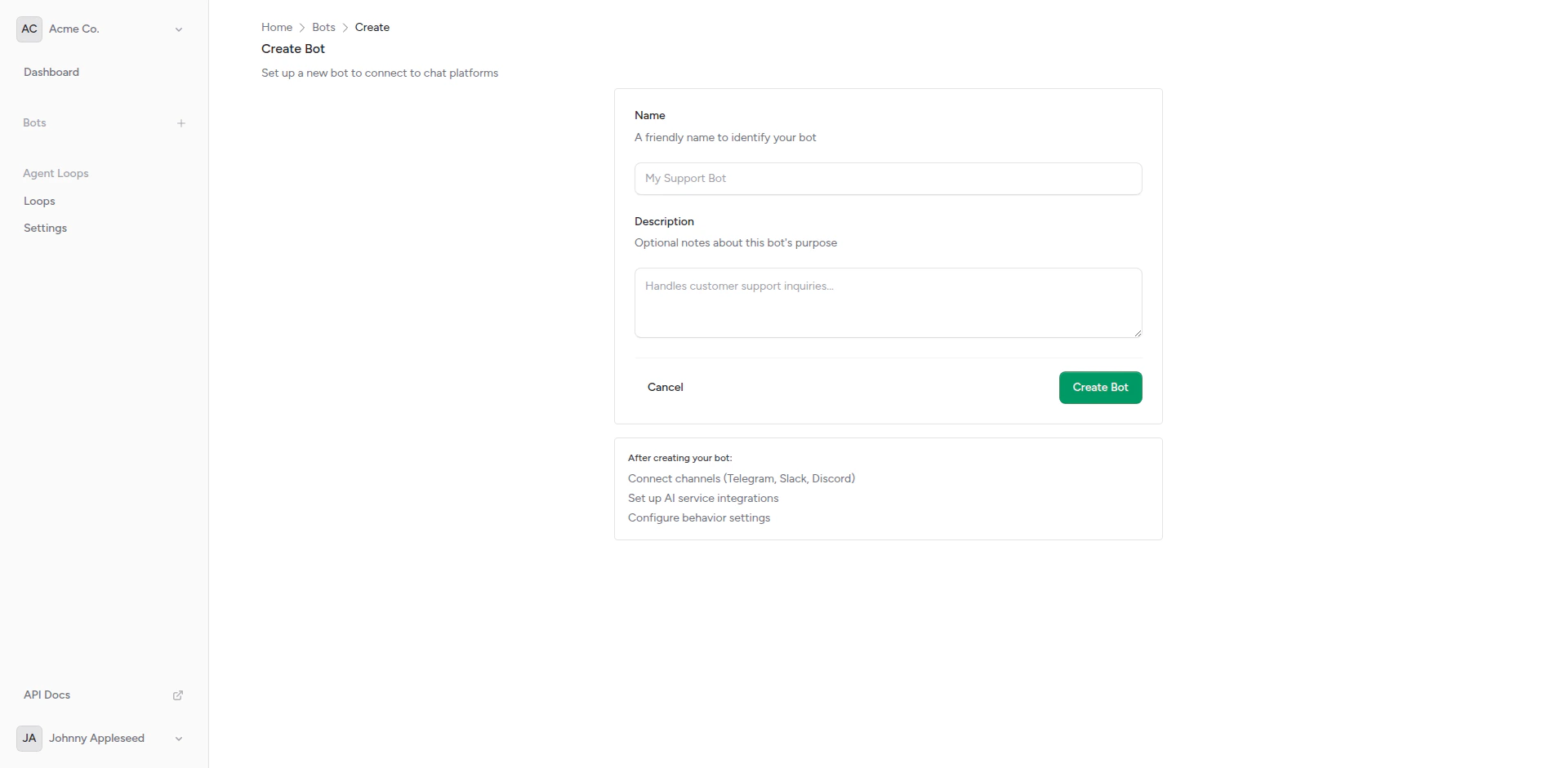
{"page":{"pagePath":"quickstart","slug":"/quickstart","pageMetadata":{"title":"Quickstart","description":"Create your first AI-powered chatbot in 5 minutes","href":"/quickstart"},"description":{"compiledSource":"\"use strict\";\nconst {jsx: _jsx} = arguments[0];\nconst {useMDXComponents: _provideComponents} = arguments[0];\nfunction _createMdxContent(props) {\n const _components = {\n p: \"p\",\n ..._provideComponents(),\n ...props.components\n };\n return _jsx(_components.p, {\n children: \"Create your first AI-powered chatbot in 5 minutes\"\n });\n}\nfunction MDXContent(props = {}) {\n const {wrapper: MDXLayout} = {\n ..._provideComponents(),\n ...props.components\n };\n return MDXLayout ? _jsx(MDXLayout, {\n ...props,\n children: _jsx(_createMdxContent, {\n ...props\n })\n }) : _createMdxContent(props);\n}\nreturn {\n default: MDXContent\n};\n","frontmatter":{},"scope":{}},"pageType":"default","mdx":{"mdxSource":{"compiledSource":"\"use strict\";const{Fragment:_Fragment,jsx:_jsx,jsxs:_jsxs}=arguments[0];const{useMDXComponents:_provideComponents}=arguments[0];function _createMdxContent(props){const _components={a:`a`,code:`code`,li:`li`,ol:`ol`,p:`p`,strong:`strong`,ul:`ul`,..._provideComponents(),...props.components},{Callout,Card,CardGroup,Frame,Heading,OptimizedImage,Step,Steps}=_components;if(!Callout)_missingMdxReference(`Callout`,true);if(!Card)_missingMdxReference(`Card`,true);if(!CardGroup)_missingMdxReference(`CardGroup`,true);if(!Frame)_missingMdxReference(`Frame`,true);if(!Heading)_missingMdxReference(`Heading`,true);if(!OptimizedImage)_missingMdxReference(`OptimizedImage`,true);if(!Step)_missingMdxReference(`Step`,true);if(!Steps)_missingMdxReference(`Steps`,true);return _jsxs(_Fragment,{children:[_jsx(Heading,{level:`2`,id:`create-your-first-bot`,children:`Create Your First Bot`}),`\n`,_jsx(_components.p,{children:`This quickstart guide walks you through creating a basic chatbot, connecting it to Telegram, and setting up an AI integration.`}),`\n`,_jsxs(Steps,{children:[_jsx(Step,{title:`Sign up for an account`,children:_jsxs(_components.p,{children:[`Go to `,_jsx(_components.a,{href:`https://app.chatbotplatform.io/register`,children:`app.chatbotplatform.io/register`}),` and create your account. You’ll be prompted to create a team during signup.`]})}),_jsxs(Step,{title:`Create a bot`,children:[_jsxs(_components.ol,{children:[`\n`,_jsx(_components.li,{children:`Navigate to the Bots page from your dashboard`}),`\n`,_jsx(_components.li,{children:`Click “Create Bot”`}),`\n`,_jsx(_components.li,{children:`Enter a name and description for your bot`}),`\n`,_jsx(_components.li,{children:`Click “Create”`}),`\n`]}),_jsx(Frame,{caption:`Create bot form`,children:_jsx(OptimizedImage,{src:`https://mintcdn.com/chatbotplatform/QhGUbEN05MzAjt2K/images/screenshots/01-getting-started/03_create_bot_form.png?fit=max\u0026auto=format\u0026n=QhGUbEN05MzAjt2K\u0026q=85\u0026s=0d7a8d37b31f44d34d8a24661a1763c9`,alt:`Create bot form`,\"data-og-width\":`1920`,width:`1920`,\"data-og-height\":`941`,height:`941`,\"data-path\":`images/screenshots/01-getting-started/03_create_bot_form.png`,\"data-optimize\":`true`,\"data-opv\":`3`,srcset:`https://mintcdn.com/chatbotplatform/QhGUbEN05MzAjt2K/images/screenshots/01-getting-started/03_create_bot_form.png?w=280\u0026fit=max\u0026auto=format\u0026n=QhGUbEN05MzAjt2K\u0026q=85\u0026s=4904fec314d4c251177c4a45b622e466 280w, https://mintcdn.com/chatbotplatform/QhGUbEN05MzAjt2K/images/screenshots/01-getting-started/03_create_bot_form.png?w=560\u0026fit=max\u0026auto=format\u0026n=QhGUbEN05MzAjt2K\u0026q=85\u0026s=c900047babc1ab6f8356325670dc7e18 560w, https://mintcdn.com/chatbotplatform/QhGUbEN05MzAjt2K/images/screenshots/01-getting-started/03_create_bot_form.png?w=840\u0026fit=max\u0026auto=format\u0026n=QhGUbEN05MzAjt2K\u0026q=85\u0026s=35ef45f77211424fc97de523526f7bbc 840w, https://mintcdn.com/chatbotplatform/QhGUbEN05MzAjt2K/images/screenshots/01-getting-started/03_create_bot_form.png?w=1100\u0026fit=max\u0026auto=format\u0026n=QhGUbEN05MzAjt2K\u0026q=85\u0026s=5313ce91dedd7d6e276b16dfd533e73e 1100w, https://mintcdn.com/chatbotplatform/QhGUbEN05MzAjt2K/images/screenshots/01-getting-started/03_create_bot_form.png?w=1650\u0026fit=max\u0026auto=format\u0026n=QhGUbEN05MzAjt2K\u0026q=85\u0026s=30ad69e5fba8a5607247af5213ad38a5 1650w, https://mintcdn.com/chatbotplatform/QhGUbEN05MzAjt2K/images/screenshots/01-getting-started/03_create_bot_form.png?w=2500\u0026fit=max\u0026auto=format\u0026n=QhGUbEN05MzAjt2K\u0026q=85\u0026s=b1df3af79ce698b6aee0ca82901bab00 2500w`})})]}),_jsxs(Step,{title:`Connect to Telegram`,children:[_jsxs(_components.ol,{children:[`\n`,_jsxs(_components.li,{children:[`Create a Telegram bot via `,_jsx(_components.a,{href:`https://t.me/botfather`,children:`@BotFather`})]}),`\n`,_jsx(_components.li,{children:`Copy the bot token BotFather provides`}),`\n`,_jsx(_components.li,{children:`In Chatbot Platform, go to your bot’s Channels tab`}),`\n`,_jsx(_components.li,{children:`Click “Add Channel” and select Telegram`}),`\n`,_jsx(_components.li,{children:`Paste your bot token and click “Connect”`}),`\n`]}),_jsx(_components.p,{children:`Your bot is now live on Telegram! Try sending it a message.`}),_jsx(Callout,{type:`info`,children:_jsx(_components.p,{children:`Your bot won’t respond yet because we haven’t set up an integration. Let’s do that next.`})})]}),_jsxs(Step,{title:`Add an AI integration`,children:[_jsx(_components.p,{children:`Integrations are webhook endpoints that process incoming messages and generate responses.`}),_jsxs(_components.ol,{children:[`\n`,_jsx(_components.li,{children:`Go to your bot’s Integrations tab`}),`\n`,_jsx(_components.li,{children:`Click “Create Integration”`}),`\n`,_jsxs(_components.li,{children:[`Enter these details:`,`\n`,_jsxs(_components.ul,{children:[`\n`,_jsxs(_components.li,{children:[_jsx(_components.strong,{children:`Name`}),`: “OpenAI GPT-4”`]}),`\n`,_jsxs(_components.li,{children:[_jsx(_components.strong,{children:`URL`}),`: Your AI service webhook (e.g., OpenAI, Anthropic, or custom endpoint)`]}),`\n`,_jsxs(_components.li,{children:[_jsx(_components.strong,{children:`Weight`}),`: 100 (use this integration 100% of the time)`]}),`\n`]}),`\n`]}),`\n`,_jsxs(_components.li,{children:[`Add headers if needed (e.g., `,_jsx(_components.code,{children:`Authorization: Bearer YOUR_API_KEY`}),`)`]}),`\n`,_jsx(_components.li,{children:`Click “Create”`}),`\n`]}),_jsx(Frame,{caption:`Integration setup`,children:_jsx(OptimizedImage,{src:`https://mintcdn.com/chatbotplatform/IwOyuSig9ydzaHpG/images/screenshots/02-integrations/03_integration_basic_info.png?fit=max\u0026auto=format\u0026n=IwOyuSig9ydzaHpG\u0026q=85\u0026s=fe9bedac25887b9547a1faf26518a754`,alt:`Integration setup`,\"data-og-width\":`1920`,width:`1920`,\"data-og-height\":`941`,height:`941`,\"data-path\":`images/screenshots/02-integrations/03_integration_basic_info.png`,\"data-optimize\":`true`,\"data-opv\":`3`,srcset:`https://mintcdn.com/chatbotplatform/IwOyuSig9ydzaHpG/images/screenshots/02-integrations/03_integration_basic_info.png?w=280\u0026fit=max\u0026auto=format\u0026n=IwOyuSig9ydzaHpG\u0026q=85\u0026s=38325905eb660a9020dea66619d7cd7a 280w, https://mintcdn.com/chatbotplatform/IwOyuSig9ydzaHpG/images/screenshots/02-integrations/03_integration_basic_info.png?w=560\u0026fit=max\u0026auto=format\u0026n=IwOyuSig9ydzaHpG\u0026q=85\u0026s=321df56de5bdab6e115a6403ff6996df 560w, https://mintcdn.com/chatbotplatform/IwOyuSig9ydzaHpG/images/screenshots/02-integrations/03_integration_basic_info.png?w=840\u0026fit=max\u0026auto=format\u0026n=IwOyuSig9ydzaHpG\u0026q=85\u0026s=4b46ad368b140bba0ab73ecef889f81d 840w, https://mintcdn.com/chatbotplatform/IwOyuSig9ydzaHpG/images/screenshots/02-integrations/03_integration_basic_info.png?w=1100\u0026fit=max\u0026auto=format\u0026n=IwOyuSig9ydzaHpG\u0026q=85\u0026s=5c5d9aa1640678ab4c68c82620d875a2 1100w, https://mintcdn.com/chatbotplatform/IwOyuSig9ydzaHpG/images/screenshots/02-integrations/03_integration_basic_info.png?w=1650\u0026fit=max\u0026auto=format\u0026n=IwOyuSig9ydzaHpG\u0026q=85\u0026s=fbea84ab7100ade57717ad7c34a854eb 1650w, https://mintcdn.com/chatbotplatform/IwOyuSig9ydzaHpG/images/screenshots/02-integrations/03_integration_basic_info.png?w=2500\u0026fit=max\u0026auto=format\u0026n=IwOyuSig9ydzaHpG\u0026q=85\u0026s=d4c5aa00a59e098637b29b5642ad268c 2500w`})})]}),_jsxs(Step,{title:`Test your bot`,children:[_jsx(_components.p,{children:`Send a message to your bot on Telegram. It should:`}),_jsxs(_components.ol,{children:[`\n`,_jsx(_components.li,{children:`Show typing indicator`}),`\n`,_jsx(_components.li,{children:`Process your message through the integration`}),`\n`,_jsx(_components.li,{children:`Reply with a response from your AI service`}),`\n`]}),_jsx(Callout,{type:`success`,children:_jsx(_components.p,{children:`Congratulations! You’ve created your first AI-powered chatbot.`})})]})]}),`\n`,_jsx(Heading,{level:`2`,id:`what-you-built`,children:`What You Built`}),`\n`,_jsx(_components.p,{children:`You now have:`}),`\n`,_jsxs(_components.ul,{children:[`\n`,_jsx(_components.li,{children:`✅ A bot instance owned by your team`}),`\n`,_jsx(_components.li,{children:`✅ A Telegram channel connection`}),`\n`,_jsx(_components.li,{children:`✅ An AI integration that processes messages`}),`\n`,_jsx(_components.li,{children:`✅ Automatic message history tracking`}),`\n`,_jsx(_components.li,{children:`✅ Typing indicators for natural conversation flow`}),`\n`]}),`\n`,_jsx(Heading,{level:`2`,id:`next-steps`,children:`Next Steps`}),`\n`,_jsxs(CardGroup,{cols:2,children:[_jsx(Card,{title:`Configure Bot Behaviors`,icon:`sliders`,href:`/bots/behaviors/index`,children:_jsx(_components.p,{children:`Customize typing indicators, response timing, and reply detection`})}),_jsx(Card,{title:`Add More Channels`,icon:`globe`,href:`/bots/channels/index`,children:_jsx(_components.p,{children:`Deploy your bot to Slack, Discord, and other platforms`})}),_jsx(Card,{title:`Set Up A/B Testing`,icon:`flask`,href:`/bots/integrations/index`,children:_jsx(_components.p,{children:`Run multiple AI models with weighted selection`})}),_jsx(Card,{title:`Add Tool Calling`,icon:`wrench`,href:`/agentic-loops/overview`,children:_jsx(_components.p,{children:`Ground responses with Agentic Loops and MCP servers`})})]}),`\n`,_jsx(Heading,{level:`2`,id:`need-help`,children:`Need Help?`}),`\n`,_jsxs(_components.ul,{children:[`\n`,_jsxs(_components.li,{children:[_jsx(_components.a,{href:`/bots/overview`,children:`Bot Documentation`}),` - Complete bot setup guide`]}),`\n`,_jsxs(_components.li,{children:[_jsx(_components.a,{href:`https://app.chatbotplatform.io/openapi`,children:`API Reference`}),` - Full API documentation`]}),`\n`,_jsxs(_components.li,{children:[_jsx(_components.a,{href:`mailto:support@chatbotplatform.io`,children:`Support`}),` - Contact our team`]}),`\n`]})]})}function MDXContent(props={}){const{wrapper:MDXLayout}={..._provideComponents(),...props.components};return MDXLayout?_jsx(MDXLayout,{...props,children:_jsx(_createMdxContent,{...props})}):_createMdxContent(props)}return{default:MDXContent};function _missingMdxReference(id,component){throw new Error(`Expected `+(component?`component`:`object`)+\" `\"+id+\"` to be defined: you likely forgot to import, pass, or provide it.\")}","frontmatter":{},"scope":{"config":{},"pageMetadata":{"title":"Quickstart","description":"Create your first AI-powered chatbot in 5 minutes","href":"/quickstart"}}},"mdxSourceWithNoJs":null},"mdxExtracts":{"tableOfContents":[{"title":"Create Your First Bot","slug":"create-your-first-bot","depth":2,"children":[]},{"title":"What You Built","slug":"what-you-built","depth":2,"children":[]},{"title":"Next Steps","slug":"next-steps","depth":2,"children":[]},{"title":"Need Help?","slug":"need-help","depth":2,"children":[]}],"codeExamples":{}},"jsLinks":[],"subdomain":"chatbotplatform","siteName":"Chatbot Platform Documentation","title":"Quickstart - Chatbot Platform Documentation","contextualStarterQuestions":[],"navMaps":{"firstHrefInVersion":{},"firstHrefInLanguage":{}},"lastModified":"2026-10-28T19:20:14.771Z","originalFileLocation":"quickstart.mdx"},"headHtml":"\u003cscript data-mint-head>(function(){var d=document.documentElement,p=null;if(!p){try{p=localStorage.getItem(\"isDarkMode\")}catch(e){}if(p==='true')p='dark';else if(p==='false')p='light';if(p!=='light'\u0026\u0026p!=='dark'\u0026\u0026p!=='system')p=\"system\"}var r=p==='system'?(matchMedia(\"(prefers-color-scheme: dark)\").matches?'dark':'light'):p;d.classList.remove(r==='dark'?'light':'dark');d.classList.add(r);d.setAttribute(\"data-theme-preference\",p)})();\u003c/script>\u003cmeta data-mint-head name=\"description\" content=\"Create your first AI-powered chatbot in 5 minutes\">\u003cmeta data-mint-head name=\"application-name\" content=\"Chatbot Platform Documentation\">\u003cmeta data-mint-head name=\"generator\" content=\"Mintlify\">\u003clink data-mint-head rel=\"apple-touch-icon\" type=\"image/png\" sizes=\"180x180\" href=\"https://mintlify.s3.us-west-1.amazonaws.com/chatbotplatform/_generated/favicon/apple-touch-icon.png?v=3\">\u003clink data-mint-head rel=\"icon\" type=\"image/png\" sizes=\"32x32\" href=\"https://mintlify.s3.us-west-1.amazonaws.com/chatbotplatform/_generated/favicon/favicon-32x32.png?v=3\">\u003clink data-mint-head rel=\"icon\" type=\"image/png\" sizes=\"16x16\" href=\"https://mintlify.s3.us-west-1.amazonaws.com/chatbotplatform/_generated/favicon/favicon-16x16.png?v=3\">\u003clink data-mint-head rel=\"shortcut icon\" type=\"image/x-icon\" href=\"https://mintlify.s3.us-west-1.amazonaws.com/chatbotplatform/_generated/favicon/favicon.ico?v=3\">\u003cmeta data-mint-head property=\"og:title\" content=\"Quickstart - Chatbot Platform Documentation\">\u003cmeta data-mint-head property=\"og:description\" content=\"Create your first AI-powered chatbot in 5 minutes\">\u003cmeta data-mint-head property=\"og:site_name\" content=\"Chatbot Platform Documentation\">\u003cmeta data-mint-head property=\"og:url\" content=\"https://docs.chatbotplatform.io/quickstart\">\u003cmeta data-mint-head property=\"og:type\" content=\"website\">\u003cmeta data-mint-head property=\"og:image\" content=\"https://chatbotplatform.mintlify.site/_mintlify/api/og/v2?division=Getting+Started\u0026amp;title=Quickstart\u0026amp;description=Create+your+first+AI-powered+chatbot+in+5+minutes\u0026amp;theme=c1a9ad670a5314018887f4f9\u0026amp;signature=8fb700857cbb47a6c32ad027e8cd56e9da6a10a78d6b033cdc9eadea013dd0f7\">\u003cmeta data-mint-head property=\"og:image:width\" content=\"1200\">\u003cmeta data-mint-head property=\"og:image:height\" content=\"630\">\u003cmeta data-mint-head name=\"twitter:card\" content=\"summary_large_image\">\u003cmeta data-mint-head name=\"twitter:title\" content=\"Quickstart - Chatbot Platform Documentation\">\u003cmeta data-mint-head name=\"twitter:description\" content=\"Create your first AI-powered chatbot in 5 minutes\">\u003cmeta data-mint-head name=\"twitter:image\" content=\"https://chatbotplatform.mintlify.site/_mintlify/api/og/v2?division=Getting+Started\u0026amp;title=Quickstart\u0026amp;description=Create+your+first+AI-powered+chatbot+in+5+minutes\u0026amp;theme=c1a9ad670a5314018887f4f9\u0026amp;signature=8fb700857cbb47a6c32ad027e8cd56e9da6a10a78d6b033cdc9eadea013dd0f7\">\u003cmeta data-mint-head name=\"twitter:image:width\" content=\"1200\">\u003cmeta data-mint-head name=\"twitter:image:height\" content=\"630\">\u003cmeta data-mint-head name=\"msapplication-config\" content=\"https://mintlify.s3.us-west-1.amazonaws.com/chatbotplatform/_generated/favicon/browserconfig.xml?v=3\">\u003cmeta data-mint-head name=\"apple-mobile-web-app-title\" content=\"Chatbot Platform Documentation\">\u003cmeta data-mint-head name=\"msapplication-TileColor\" content=\"#6366F1\">\u003clink data-mint-head rel=\"canonical\" href=\"https://docs.chatbotplatform.io/quickstart\">\u003clink data-mint-head rel=\"alternate\" type=\"application/xml\" href=\"/sitemap.xml\">\u003clink data-mint-head rel=\"alternate\" type=\"text/markdown\" href=\"/quickstart.md\">\u003cscript data-mint-head type=\"application/ld+json\">{\"@context\":\"https://schema.org\",\"@graph\":[{\"@type\":\"Organization\",\"@id\":\"https://docs.chatbotplatform.io/#organization\",\"name\":\"Chatbot Platform Documentation\",\"url\":\"https://docs.chatbotplatform.io\"},{\"@type\":\"WebSite\",\"@id\":\"https://docs.chatbotplatform.io#website\",\"name\":\"Chatbot Platform Documentation\",\"url\":\"https://docs.chatbotplatform.io\",\"publisher\":{\"@id\":\"https://docs.chatbotplatform.io/#organization\"}},{\"@type\":\"WebPage\",\"@id\":\"https://docs.chatbotplatform.io/quickstart#webpage\",\"url\":\"https://docs.chatbotplatform.io/quickstart\",\"name\":\"Quickstart\",\"description\":\"Create your first AI-powered chatbot in 5 minutes\",\"dateModified\":\"2026-10-28T19:20:14.771Z\",\"isPartOf\":{\"@id\":\"https://docs.chatbotplatform.io#website\"},\"breadcrumb\":{\"@id\":\"https://docs.chatbotplatform.io/quickstart#breadcrumb\"}},{\"@type\":\"BreadcrumbList\",\"@id\":\"https://docs.chatbotplatform.io/quickstart#breadcrumb\",\"itemListElement\":[{\"@type\":\"ListItem\",\"position\":1,\"name\":\"Getting Started\",\"item\":\"https://docs.chatbotplatform.io/introduction\"},{\"@type\":\"ListItem\",\"position\":2,\"name\":\"Quickstart\",\"item\":\"https://docs.chatbotplatform.io/quickstart\"}]},{\"@type\":[\"Article\",\"TechArticle\"],\"@id\":\"https://docs.chatbotplatform.io/quickstart#article\",\"headline\":\"Quickstart\",\"name\":\"Quickstart\",\"description\":\"Create your first AI-powered chatbot in 5 minutes\",\"url\":\"https://docs.chatbotplatform.io/quickstart\",\"mainEntityOfPage\":{\"@id\":\"https://docs.chatbotplatform.io/quickstart#webpage\"},\"dateModified\":\"2026-10-28T19:20:14.771Z\",\"publisher\":{\"@id\":\"https://docs.chatbotplatform.io/#organization\"},\"isPartOf\":{\"@id\":\"https://docs.chatbotplatform.io#website\"}}]}\u003c/script>\u003cscript data-mint-head type=\"application/ld+json\">{\"@context\":\"https://schema.org\",\"@type\":\"WebSite\",\"name\":\"Chatbot Platform Documentation\",\"publisher\":{\"@type\":\"Organization\",\"name\":\"Chatbot Platform Documentation\"},\"provider\":{\"@type\":\"Organization\",\"name\":\"Mintlify\",\"url\":\"https://mintlify.com\"}}\u003c/script>","agentPointerHref":"/quickstart.md","siteName":"Chatbot Platform Documentation","nav":{"global":null,"tabs":[{"tab":"Guides","groups":[{"group":"Getting Started","pages":[{"title":"Welcome to Chatbot Platform","description":"One bot, every channel: connect AI assistants to your website, Slack and Telegram, ground them in your data with agentic loops and MCP servers","href":"/introduction"},{"title":"Quickstart","href":"/quickstart"}]},{"group":"Guides","pages":[{"title":"Embed an AI assistant backed by your product's MCP server","description":"An agent-executable guide: put a web chat on any product that has an MCP server, powered by an agentic loop that uses tools authorized for the signed-in user","href":"/guides/embedded-assistant-with-mcp"},{"title":"Building a Basic Support Bot","href":"/guides/support-bot-basics"},{"title":"Building a Grounded Support Bot","href":"/guides/grounded-support-bot"},{"title":"Building a Personal Assistant Bot","href":"/guides/personal-assistant"},{"title":"Multi-Channel Bot Deployment","href":"/guides/multi-channel-deployment"},{"title":"Webhook Integration Guide","href":"/guides/webhook-integration-guide"},{"title":"Managing Conversation Context","href":"/guides/conversation-context"}]}]},{"tab":"Bots","pages":[{"title":"Bots","href":"/bots/overview"}]},{"tab":"Agentic Loops","pages":[{"title":"Agentic Loops","href":"/agentic-loops/overview"}]},{"tab":"MCP Servers","pages":[{"title":"MCP Servers","href":"/mcp-servers/overview"}]}]},"basePath":"","title":"Quickstart - Chatbot Platform Documentation","deploymentId":"dpl_QQ3G2kinQNQFFK6Sh8dmX2teK74w","buildId":"dpl_QQ3G2kinQNQFFK6Sh8dmX2teK74w","dynamics":["07c022d89b","a74be98ba7"],"chunks":["Frame-CUYDhsh7.js","DynamicMarkdown-D8KwOkxZ.js","zoom-image-lightbox-lceUjs6n.js","lightbox-handle-r17bVUz3.js"]}