> ## Documentation Index
> Fetch the complete documentation index at: https://docs.chatbotplatform.io/llms.txt
> Use this file to discover all available pages before exploring further.
# Integrations
> Connect your bot to AI backends
Integrations connect your bots to AI backends that generate responses. An integration is a webhook configuration that defines how to communicate with services like OpenAI, Anthropic, or your own custom API.
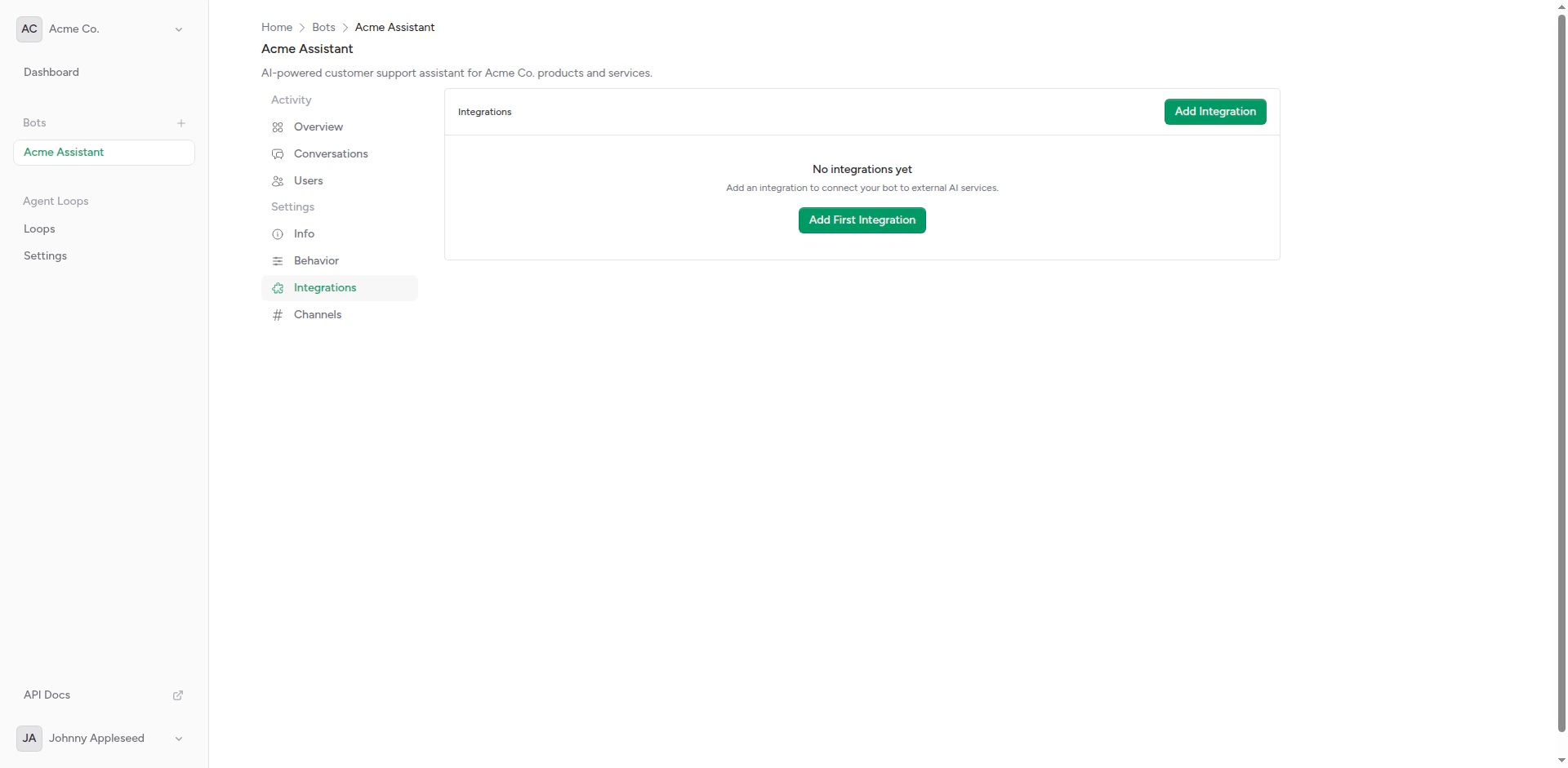 ## Overview
An integration consists of:
* **Webhook URL**: The endpoint to send messages to
* **HTTP Headers**: Authentication and custom headers
* **Timeout**: Maximum wait time for responses
* **Weight**: For A/B testing (optional)
* **Payload Format**: The request structure sent to your backend
## Overview
An integration consists of:
* **Webhook URL**: The endpoint to send messages to
* **HTTP Headers**: Authentication and custom headers
* **Timeout**: Maximum wait time for responses
* **Weight**: For A/B testing (optional)
* **Payload Format**: The request structure sent to your backend
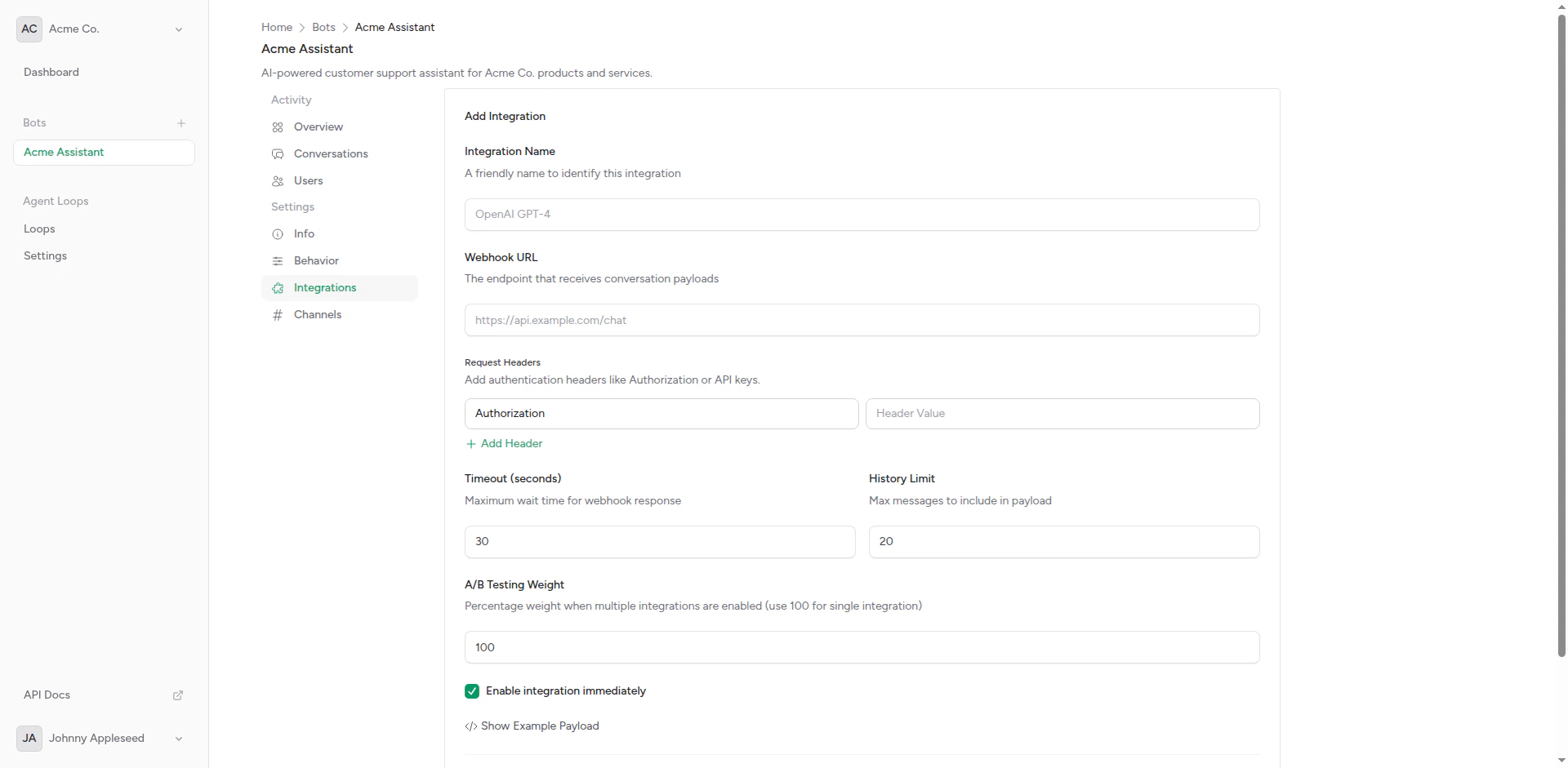 ## Creating an Integration
From your bot page, click **Integrations** in the sidebar.
Click the **Create Integration** button to open the form.
Enter the integration details:
## Creating an Integration
From your bot page, click **Integrations** in the sidebar.
Click the **Create Integration** button to open the form.
Enter the integration details:
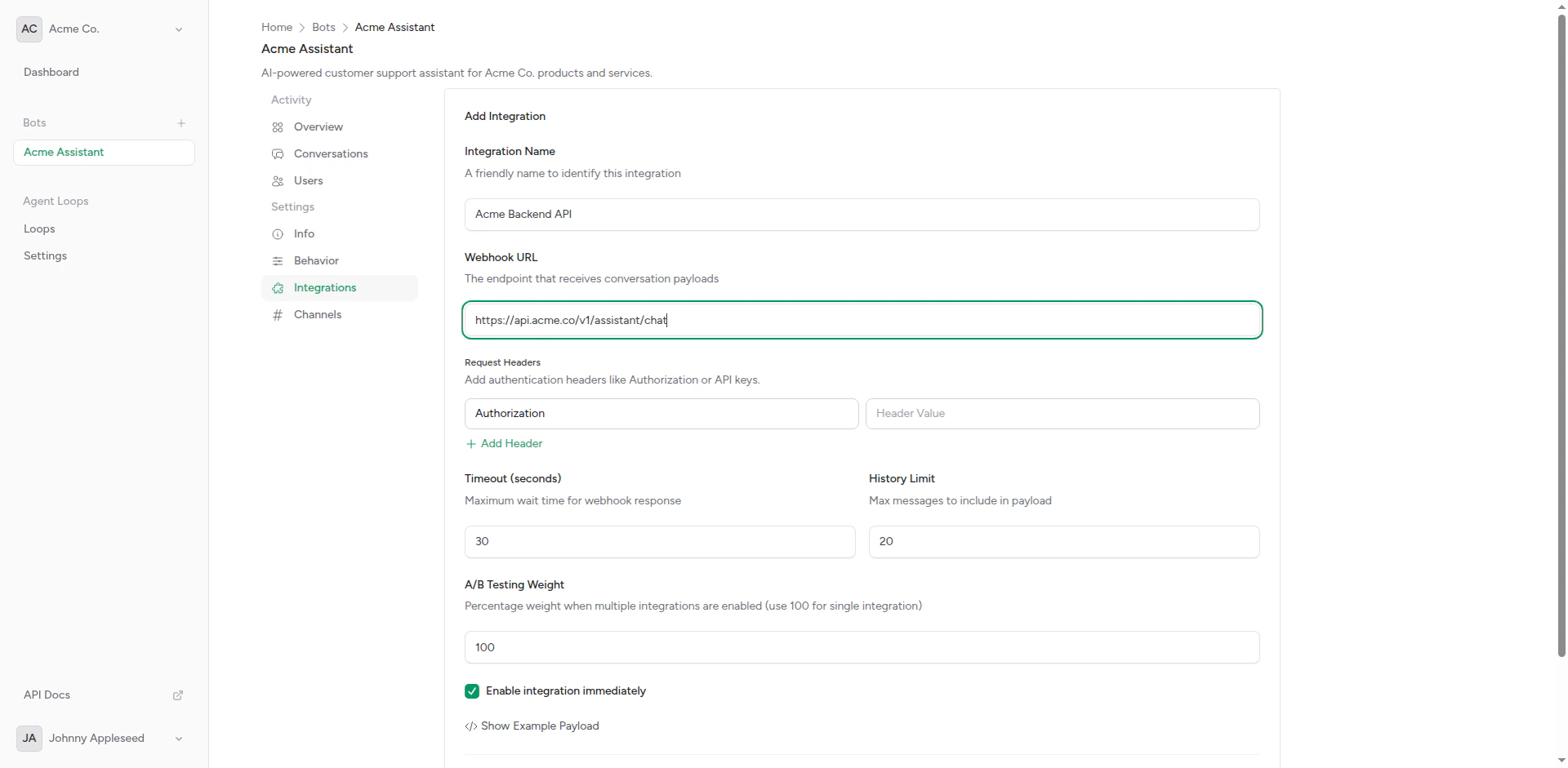 * **Name**: Friendly name (e.g., "OpenAI GPT-4")
* **Webhook URL**: Your AI backend endpoint
* **Timeout**: Response timeout in seconds (default: 30)
Add authentication or custom headers:
* **Name**: Friendly name (e.g., "OpenAI GPT-4")
* **Webhook URL**: Your AI backend endpoint
* **Timeout**: Response timeout in seconds (default: 30)
Add authentication or custom headers:
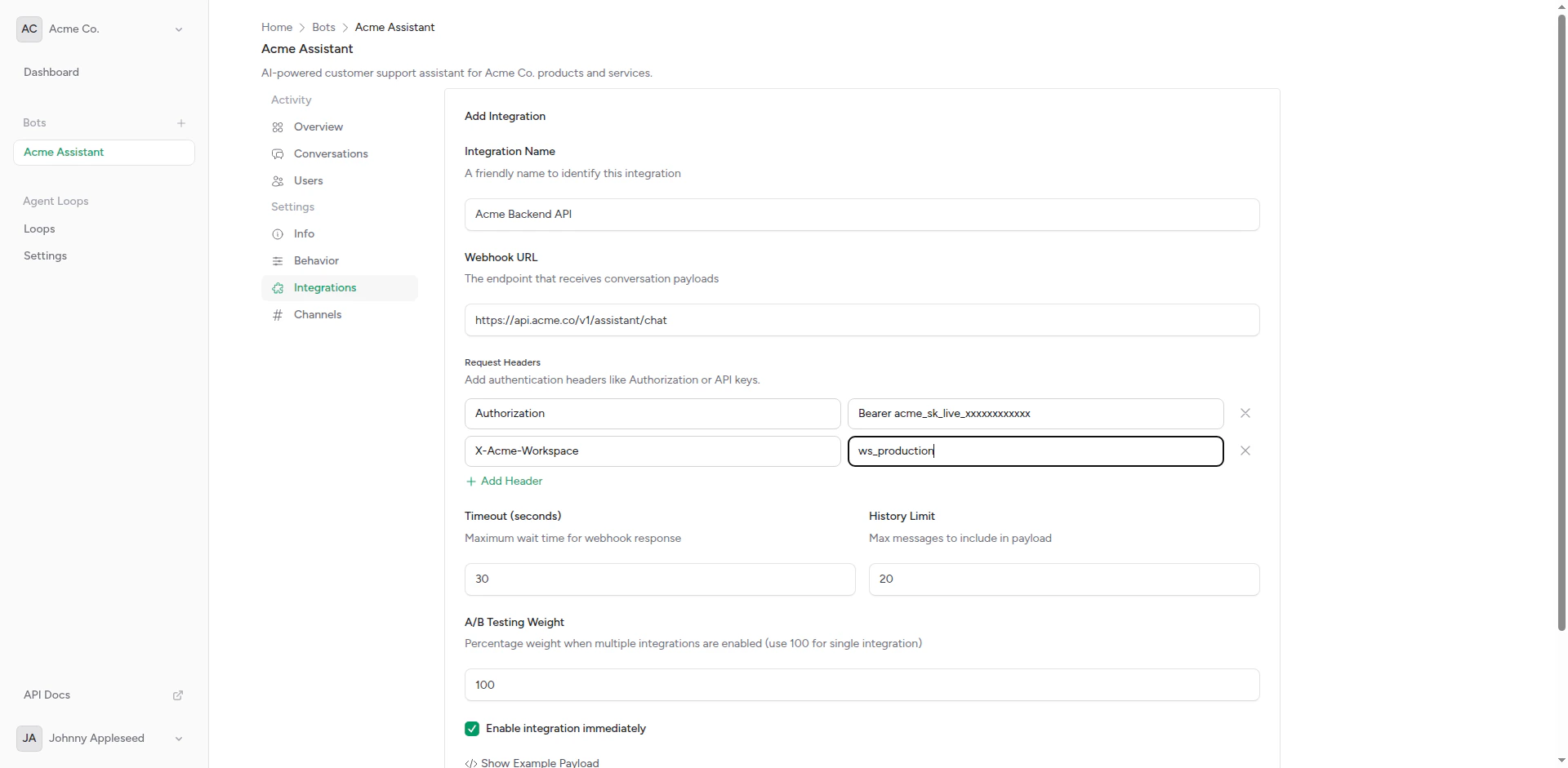 Example headers:
```
Authorization: Bearer sk-...
Content-Type: application/json
X-Custom-Header: value
```
Set additional options:
Example headers:
```
Authorization: Bearer sk-...
Content-Type: application/json
X-Custom-Header: value
```
Set additional options:
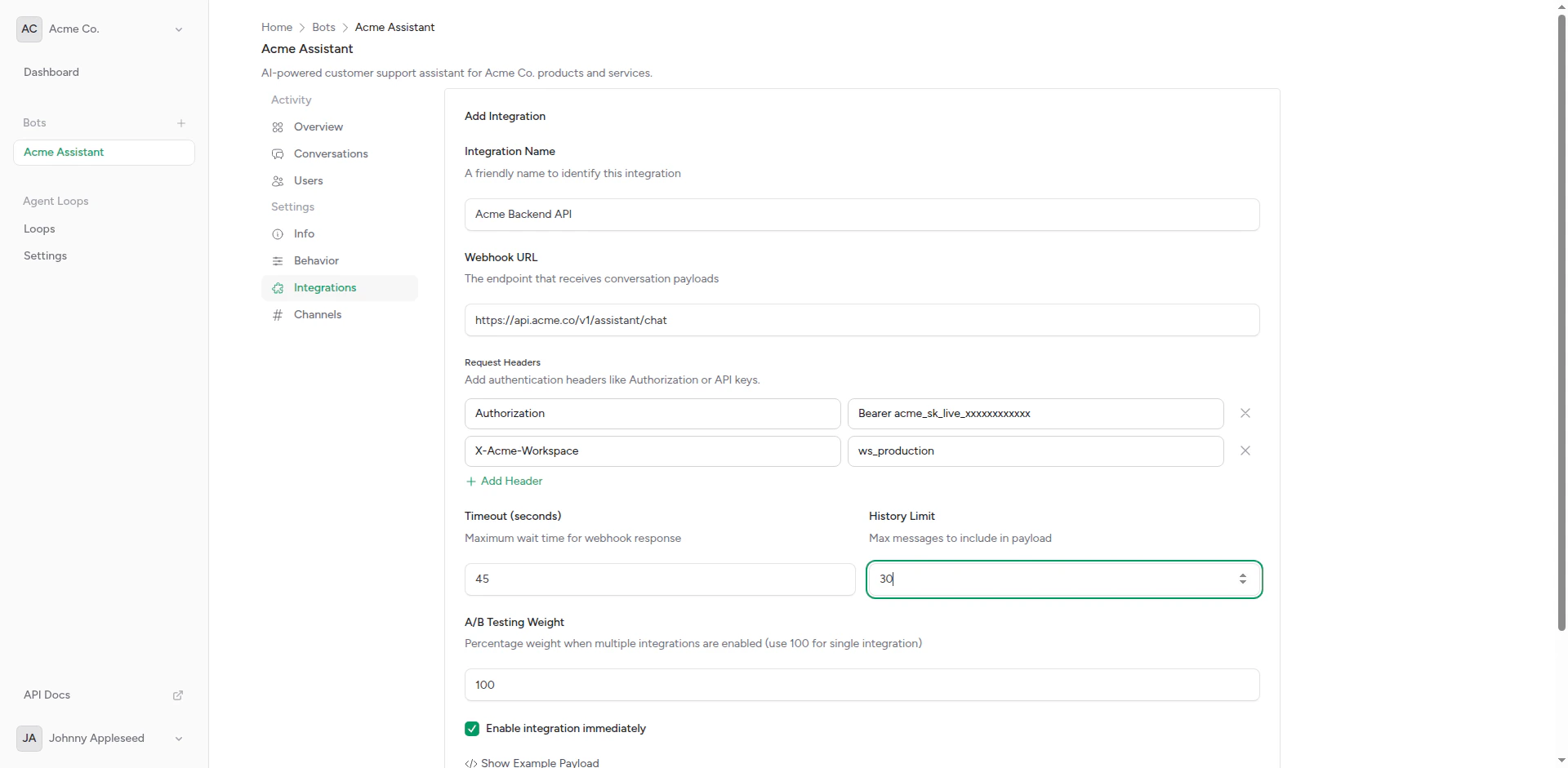 * **Weight**: For A/B testing (default: 1)
* **Fallback**: Mark as fallback integration
Review the payload format that will be sent:
* **Weight**: For A/B testing (default: 1)
* **Fallback**: Mark as fallback integration
Review the payload format that will be sent:
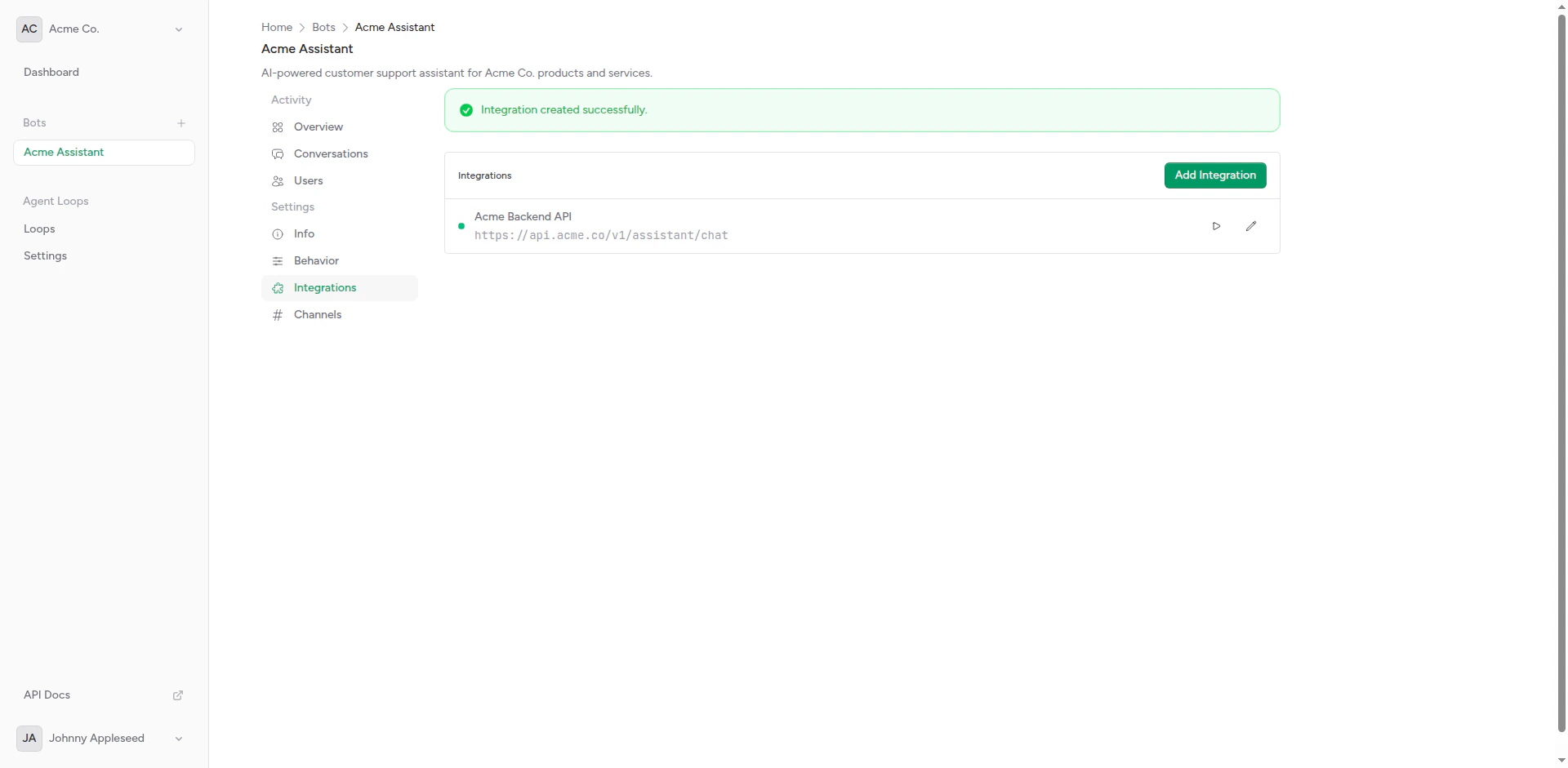
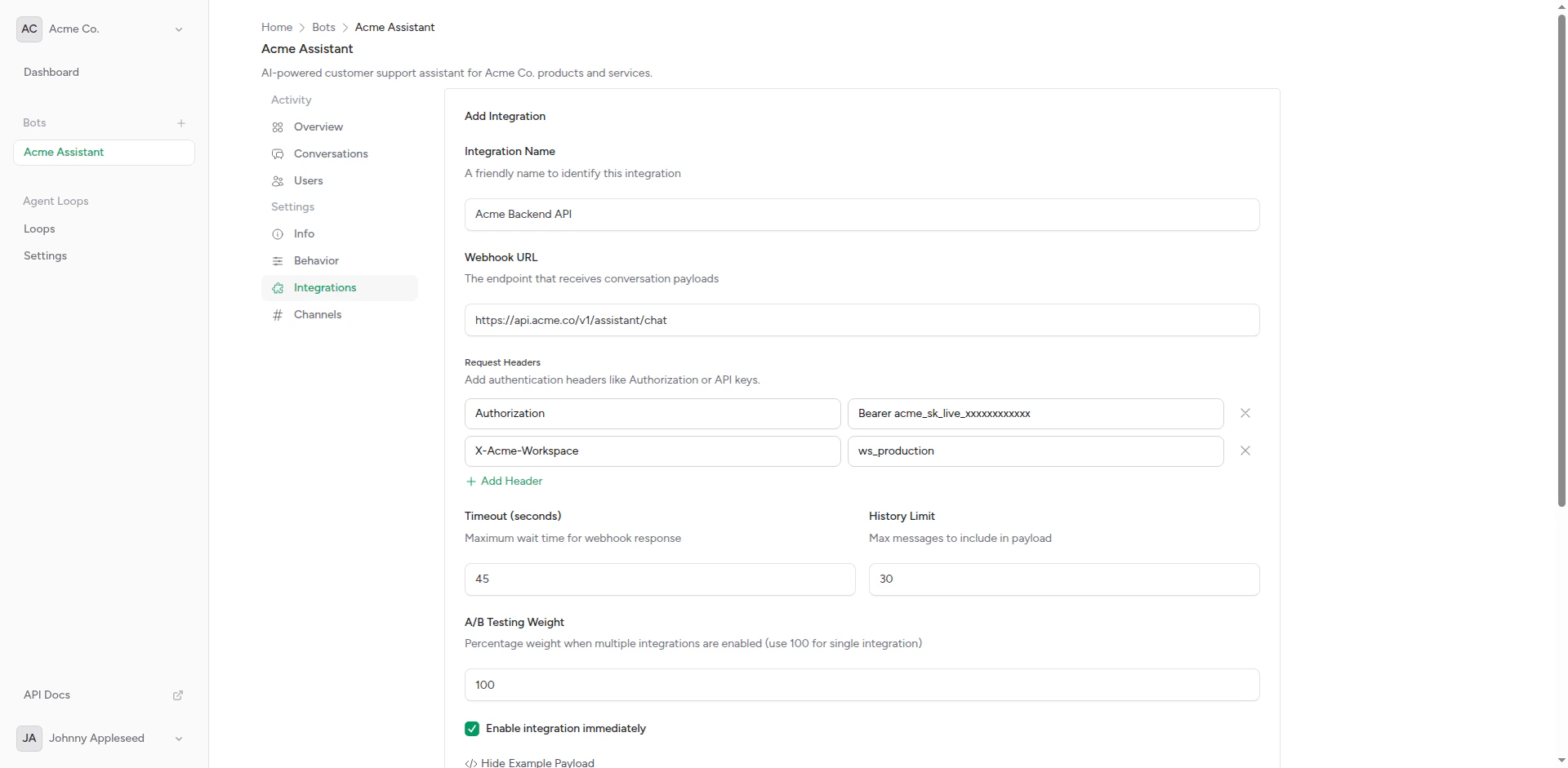 Click **Create** to save the integration.
 ## Request Payload Format
When a user sends a message, your integration receives a POST request with this structure:
```json theme={null}
{
"messages": [
{
"role": "user",
"content": "Hello, how are you?"
}
],
"conversation_id": "conv_123",
"user": {
"id": "user_456",
"platform": "telegram",
"name": "John Doe"
},
"bot": {
"id": "bot_789",
"name": "Support Bot"
},
"metadata": {
"channel": "telegram",
"chat_id": "123456789"
}
}
```
### Messages Array
The `messages` array contains conversation history based on your configured context window:
```json theme={null}
"messages": [
{
"role": "user",
"content": "What's the weather?"
},
{
"role": "assistant",
"content": "I'll check the weather for you."
},
{
"role": "user",
"content": "Thanks"
}
]
```
This follows the OpenAI/Anthropic message format for easy integration.
## Expected Response
Your backend should return JSON with this structure:
```json theme={null}
{
"content": "The response message to send to the user"
}
```
Or with metadata:
```json theme={null}
{
"content": "The response message",
"metadata": {
"model": "gpt-4",
"tokens": 150,
"custom_field": "value"
}
}
```
The `content` field is required. Everything else is optional and stored for your reference.
## Integration Types
### OpenAI Compatible
For OpenAI API or compatible services:
```
URL: https://api.openai.com/v1/chat/completions
Headers:
Authorization: Bearer YOUR_API_KEY
Content-Type: application/json
```
You'll need to transform the payload or use a proxy that accepts our format.
### Anthropic (Claude)
For Anthropic's API:
```
URL: https://api.anthropic.com/v1/messages
Headers:
x-api-key: YOUR_API_KEY
anthropic-version: 2023-06-01
```
Use a proxy to transform our payload to Anthropic's format.
### Custom Backend
For your own API:
```
URL: https://your-domain.com/api/chat
Headers:
Authorization: Bearer YOUR_TOKEN
X-Custom: value
```
Your backend receives our payload format and returns content as JSON.
## Fallback Integrations
Mark an integration as "fallback" to use it when the primary integration fails:
## Request Payload Format
When a user sends a message, your integration receives a POST request with this structure:
```json theme={null}
{
"messages": [
{
"role": "user",
"content": "Hello, how are you?"
}
],
"conversation_id": "conv_123",
"user": {
"id": "user_456",
"platform": "telegram",
"name": "John Doe"
},
"bot": {
"id": "bot_789",
"name": "Support Bot"
},
"metadata": {
"channel": "telegram",
"chat_id": "123456789"
}
}
```
### Messages Array
The `messages` array contains conversation history based on your configured context window:
```json theme={null}
"messages": [
{
"role": "user",
"content": "What's the weather?"
},
{
"role": "assistant",
"content": "I'll check the weather for you."
},
{
"role": "user",
"content": "Thanks"
}
]
```
This follows the OpenAI/Anthropic message format for easy integration.
## Expected Response
Your backend should return JSON with this structure:
```json theme={null}
{
"content": "The response message to send to the user"
}
```
Or with metadata:
```json theme={null}
{
"content": "The response message",
"metadata": {
"model": "gpt-4",
"tokens": 150,
"custom_field": "value"
}
}
```
The `content` field is required. Everything else is optional and stored for your reference.
## Integration Types
### OpenAI Compatible
For OpenAI API or compatible services:
```
URL: https://api.openai.com/v1/chat/completions
Headers:
Authorization: Bearer YOUR_API_KEY
Content-Type: application/json
```
You'll need to transform the payload or use a proxy that accepts our format.
### Anthropic (Claude)
For Anthropic's API:
```
URL: https://api.anthropic.com/v1/messages
Headers:
x-api-key: YOUR_API_KEY
anthropic-version: 2023-06-01
```
Use a proxy to transform our payload to Anthropic's format.
### Custom Backend
For your own API:
```
URL: https://your-domain.com/api/chat
Headers:
Authorization: Bearer YOUR_TOKEN
X-Custom: value
```
Your backend receives our payload format and returns content as JSON.
## Fallback Integrations
Mark an integration as "fallback" to use it when the primary integration fails:
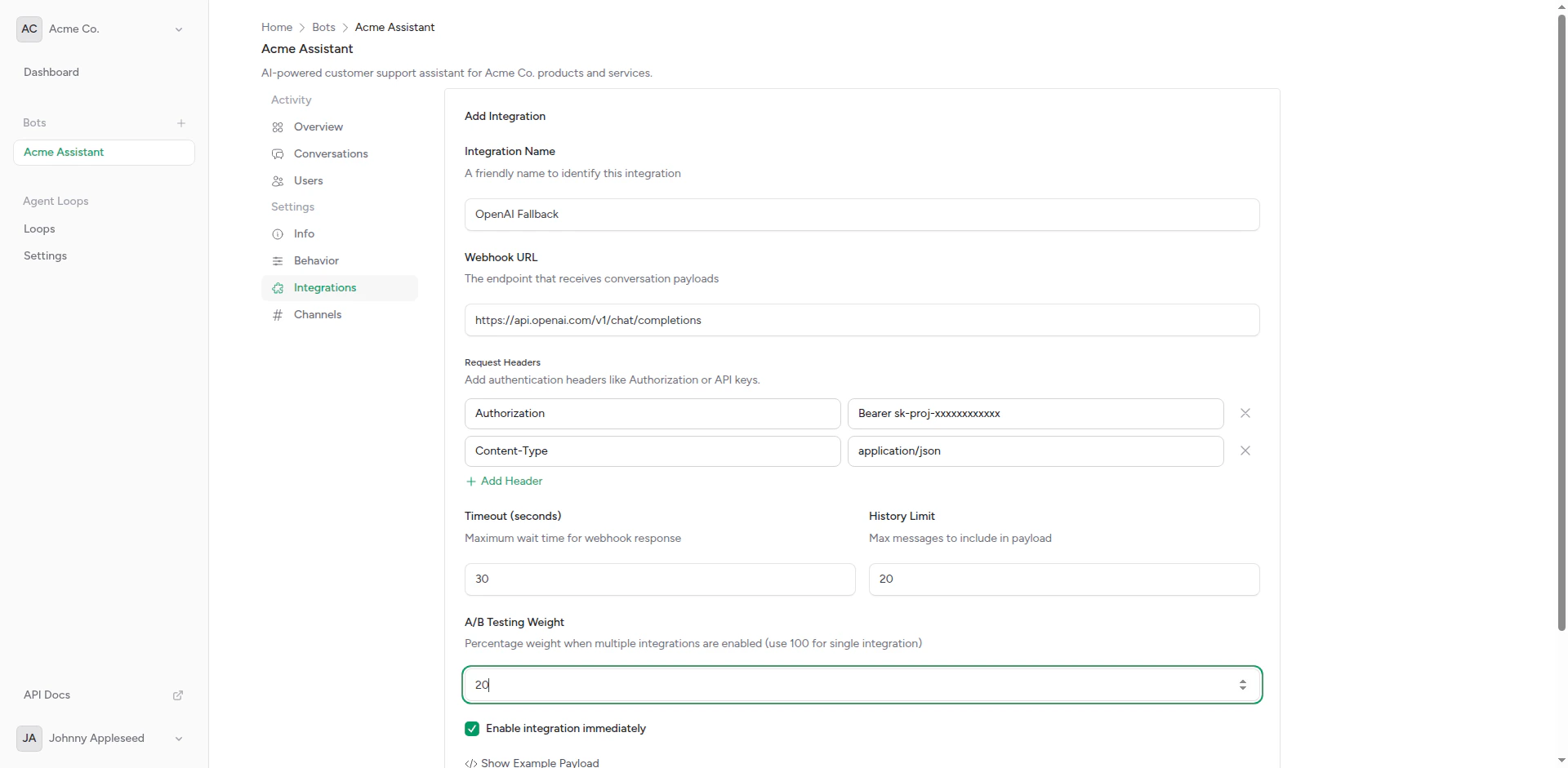 **Fallback behavior**:
1. Bot tries primary integration (highest weight)
2. If it times out or errors, tries fallback
3. If fallback also fails, sends error message to user
This provides reliability for production bots.
## Related Topics
Detailed webhook configuration guide
Compare multiple AI backends
Authentication and custom headers
## Testing Your Integration
Use the built-in test feature:
Open the integration you want to test.
Click the **Test** button.
Enter a test message and submit.
Check the response from your backend. Look for errors or unexpected behavior.
## Troubleshooting
### Timeout Errors
If requests timeout:
* Increase timeout value
* Optimize your backend for faster responses
* Check network connectivity
### Authentication Errors
If you get 401/403 errors:
* Verify API keys are correct
* Check header format
* Ensure headers include required authentication
### Invalid Response Format
If the bot can't parse responses:
* Ensure response is valid JSON
* Include required `content` field
* Check for encoding issues
## API Access
Manage integrations programmatically using the API.
```bash theme={null}
curl -X POST https://api.chatbotplatform.io/v1/bots/bot_123/integrations \
-H "Authorization: Bearer YOUR_API_KEY" \
-H "Content-Type: application/json" \
-d '{
"name": "OpenAI GPT-4",
"webhook_url": "https://api.openai.com/v1/chat/completions",
"headers": {
"Authorization": "Bearer sk-...",
"Content-Type": "application/json"
},
"timeout": 30,
"weight": 1
}'
```
```javascript theme={null}
const response = await fetch('https://api.chatbotplatform.io/v1/bots/bot_123/integrations', {
method: 'POST',
headers: {
'Authorization': 'Bearer YOUR_API_KEY',
'Content-Type': 'application/json'
},
body: JSON.stringify({
name: 'OpenAI GPT-4',
webhook_url: 'https://api.openai.com/v1/chat/completions',
headers: {
'Authorization': 'Bearer sk-...',
'Content-Type': 'application/json'
},
timeout: 30,
weight: 1
})
});
const data = await response.json();
```
```php theme={null}
$response = Http::withToken('YOUR_API_KEY')
->post('https://api.chatbotplatform.io/v1/bots/bot_123/integrations', [
'name' => 'OpenAI GPT-4',
'webhook_url' => 'https://api.openai.com/v1/chat/completions',
'headers' => [
'Authorization' => 'Bearer sk-...',
'Content-Type' => 'application/json'
],
'timeout' => 30,
'weight' => 1
]);
$integration = $response->json();
```
```python theme={null}
response = requests.post(
'https://api.chatbotplatform.io/v1/bots/bot_123/integrations',
headers={'Authorization': 'Bearer YOUR_API_KEY'},
json={
'name': 'OpenAI GPT-4',
'webhook_url': 'https://api.openai.com/v1/chat/completions',
'headers': {
'Authorization': 'Bearer sk-...',
'Content-Type': 'application/json'
},
'timeout': 30,
'weight': 1
}
)
integration = response.json()
```
```bash theme={null}
curl https://api.chatbotplatform.io/v1/bots/bot_123/integrations \
-H "Authorization: Bearer YOUR_API_KEY"
```
```javascript theme={null}
const response = await fetch('https://api.chatbotplatform.io/v1/bots/bot_123/integrations', {
headers: {
'Authorization': 'Bearer YOUR_API_KEY'
}
});
const { data } = await response.json();
```
```php theme={null}
$response = Http::withToken('YOUR_API_KEY')
->get('https://api.chatbotplatform.io/v1/bots/bot_123/integrations');
$integrations = $response->json('data');
```
```python theme={null}
response = requests.get(
'https://api.chatbotplatform.io/v1/bots/bot_123/integrations',
headers={'Authorization': 'Bearer YOUR_API_KEY'}
)
integrations = response.json()['data']
```
```bash theme={null}
curl -X PATCH https://api.chatbotplatform.io/v1/integrations/int_123 \
-H "Authorization: Bearer YOUR_API_KEY" \
-H "Content-Type: application/json" \
-d '{
"timeout": 60,
"weight": 2
}'
```
```javascript theme={null}
await fetch('https://api.chatbotplatform.io/v1/integrations/int_123', {
method: 'PATCH',
headers: {
'Authorization': 'Bearer YOUR_API_KEY',
'Content-Type': 'application/json'
},
body: JSON.stringify({
timeout: 60,
weight: 2
})
});
```
```php theme={null}
Http::withToken('YOUR_API_KEY')
->patch('https://api.chatbotplatform.io/v1/integrations/int_123', [
'timeout' => 60,
'weight' => 2
]);
```
```python theme={null}
requests.patch(
'https://api.chatbotplatform.io/v1/integrations/int_123',
headers={'Authorization': 'Bearer YOUR_API_KEY'},
json={'timeout': 60, 'weight': 2}
)
```
View the full API specification with all endpoints, parameters, and response schemas.
## Next Steps
Detailed setup instructions
Configure multiple integrations
**Fallback behavior**:
1. Bot tries primary integration (highest weight)
2. If it times out or errors, tries fallback
3. If fallback also fails, sends error message to user
This provides reliability for production bots.
## Related Topics
Detailed webhook configuration guide
Compare multiple AI backends
Authentication and custom headers
## Testing Your Integration
Use the built-in test feature:
Open the integration you want to test.
Click the **Test** button.
Enter a test message and submit.
Check the response from your backend. Look for errors or unexpected behavior.
## Troubleshooting
### Timeout Errors
If requests timeout:
* Increase timeout value
* Optimize your backend for faster responses
* Check network connectivity
### Authentication Errors
If you get 401/403 errors:
* Verify API keys are correct
* Check header format
* Ensure headers include required authentication
### Invalid Response Format
If the bot can't parse responses:
* Ensure response is valid JSON
* Include required `content` field
* Check for encoding issues
## API Access
Manage integrations programmatically using the API.
```bash theme={null}
curl -X POST https://api.chatbotplatform.io/v1/bots/bot_123/integrations \
-H "Authorization: Bearer YOUR_API_KEY" \
-H "Content-Type: application/json" \
-d '{
"name": "OpenAI GPT-4",
"webhook_url": "https://api.openai.com/v1/chat/completions",
"headers": {
"Authorization": "Bearer sk-...",
"Content-Type": "application/json"
},
"timeout": 30,
"weight": 1
}'
```
```javascript theme={null}
const response = await fetch('https://api.chatbotplatform.io/v1/bots/bot_123/integrations', {
method: 'POST',
headers: {
'Authorization': 'Bearer YOUR_API_KEY',
'Content-Type': 'application/json'
},
body: JSON.stringify({
name: 'OpenAI GPT-4',
webhook_url: 'https://api.openai.com/v1/chat/completions',
headers: {
'Authorization': 'Bearer sk-...',
'Content-Type': 'application/json'
},
timeout: 30,
weight: 1
})
});
const data = await response.json();
```
```php theme={null}
$response = Http::withToken('YOUR_API_KEY')
->post('https://api.chatbotplatform.io/v1/bots/bot_123/integrations', [
'name' => 'OpenAI GPT-4',
'webhook_url' => 'https://api.openai.com/v1/chat/completions',
'headers' => [
'Authorization' => 'Bearer sk-...',
'Content-Type' => 'application/json'
],
'timeout' => 30,
'weight' => 1
]);
$integration = $response->json();
```
```python theme={null}
response = requests.post(
'https://api.chatbotplatform.io/v1/bots/bot_123/integrations',
headers={'Authorization': 'Bearer YOUR_API_KEY'},
json={
'name': 'OpenAI GPT-4',
'webhook_url': 'https://api.openai.com/v1/chat/completions',
'headers': {
'Authorization': 'Bearer sk-...',
'Content-Type': 'application/json'
},
'timeout': 30,
'weight': 1
}
)
integration = response.json()
```
```bash theme={null}
curl https://api.chatbotplatform.io/v1/bots/bot_123/integrations \
-H "Authorization: Bearer YOUR_API_KEY"
```
```javascript theme={null}
const response = await fetch('https://api.chatbotplatform.io/v1/bots/bot_123/integrations', {
headers: {
'Authorization': 'Bearer YOUR_API_KEY'
}
});
const { data } = await response.json();
```
```php theme={null}
$response = Http::withToken('YOUR_API_KEY')
->get('https://api.chatbotplatform.io/v1/bots/bot_123/integrations');
$integrations = $response->json('data');
```
```python theme={null}
response = requests.get(
'https://api.chatbotplatform.io/v1/bots/bot_123/integrations',
headers={'Authorization': 'Bearer YOUR_API_KEY'}
)
integrations = response.json()['data']
```
```bash theme={null}
curl -X PATCH https://api.chatbotplatform.io/v1/integrations/int_123 \
-H "Authorization: Bearer YOUR_API_KEY" \
-H "Content-Type: application/json" \
-d '{
"timeout": 60,
"weight": 2
}'
```
```javascript theme={null}
await fetch('https://api.chatbotplatform.io/v1/integrations/int_123', {
method: 'PATCH',
headers: {
'Authorization': 'Bearer YOUR_API_KEY',
'Content-Type': 'application/json'
},
body: JSON.stringify({
timeout: 60,
weight: 2
})
});
```
```php theme={null}
Http::withToken('YOUR_API_KEY')
->patch('https://api.chatbotplatform.io/v1/integrations/int_123', [
'timeout' => 60,
'weight' => 2
]);
```
```python theme={null}
requests.patch(
'https://api.chatbotplatform.io/v1/integrations/int_123',
headers={'Authorization': 'Bearer YOUR_API_KEY'},
json={'timeout': 60, 'weight': 2}
)
```
View the full API specification with all endpoints, parameters, and response schemas.
## Next Steps
Detailed setup instructions
Configure multiple integrations