> ## Documentation Index
> Fetch the complete documentation index at: https://docs.chatbotplatform.io/llms.txt
> Use this file to discover all available pages before exploring further.
# Agent Loops
> Create autonomous AI workflows with tool access
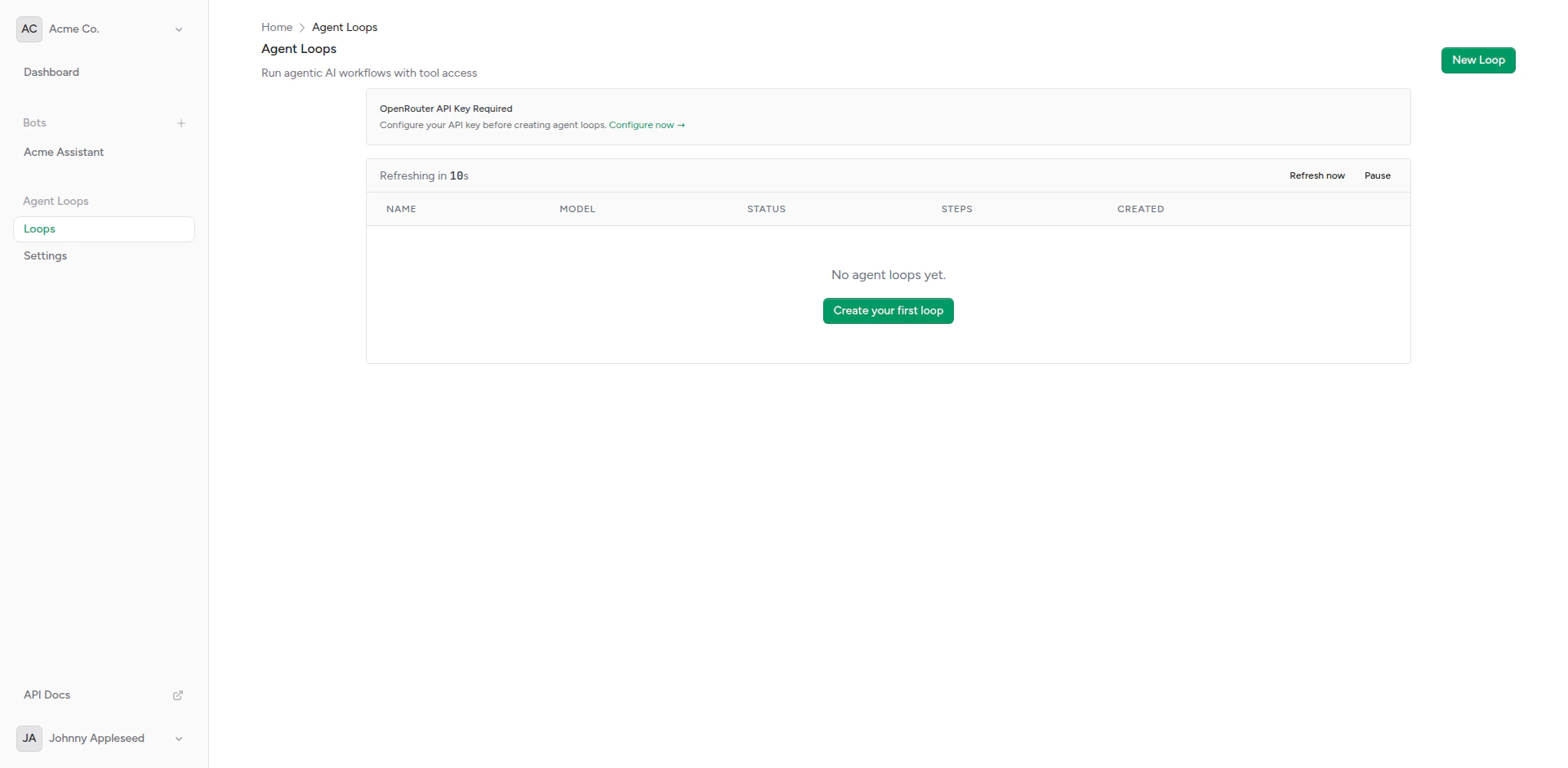
Agent Loops are autonomous AI workflows that can execute multi-step tasks, access tools via MCP (Model Context Protocol) servers, and operate without direct user interaction.
 ## Overview
An Agent Loop is an AI agent that:
* **Runs Autonomously**: Executes tasks without user messages
* **Uses Tools**: Accesses MCP servers for capabilities like file systems, databases, APIs
* **Makes Decisions**: Determines which tools to use and when
* **Sends Results**: Delivers output via callback webhooks
* **Iterates**: Can run multiple reasoning steps to complete tasks
Unlike bots (which respond to user messages), Agent Loops are proactive and task-oriented.
## Use Cases
Generate and send daily/weekly reports automatically
Process files, databases, or API data on schedule
Check systems and alert on issues
Create blog posts, summaries, or documentation
## Agent Loop Components
### System Prompt
Instructions that define the agent's behavior:
```
You are a data analyst. Every day at 9 AM, you:
1. Fetch yesterday's sales data from the database
2. Calculate key metrics (total sales, top products)
3. Generate a summary report
4. Send the report via webhook
```
## Overview
An Agent Loop is an AI agent that:
* **Runs Autonomously**: Executes tasks without user messages
* **Uses Tools**: Accesses MCP servers for capabilities like file systems, databases, APIs
* **Makes Decisions**: Determines which tools to use and when
* **Sends Results**: Delivers output via callback webhooks
* **Iterates**: Can run multiple reasoning steps to complete tasks
Unlike bots (which respond to user messages), Agent Loops are proactive and task-oriented.
## Use Cases
Generate and send daily/weekly reports automatically
Process files, databases, or API data on schedule
Check systems and alert on issues
Create blog posts, summaries, or documentation
## Agent Loop Components
### System Prompt
Instructions that define the agent's behavior:
```
You are a data analyst. Every day at 9 AM, you:
1. Fetch yesterday's sales data from the database
2. Calculate key metrics (total sales, top products)
3. Generate a summary report
4. Send the report via webhook
```
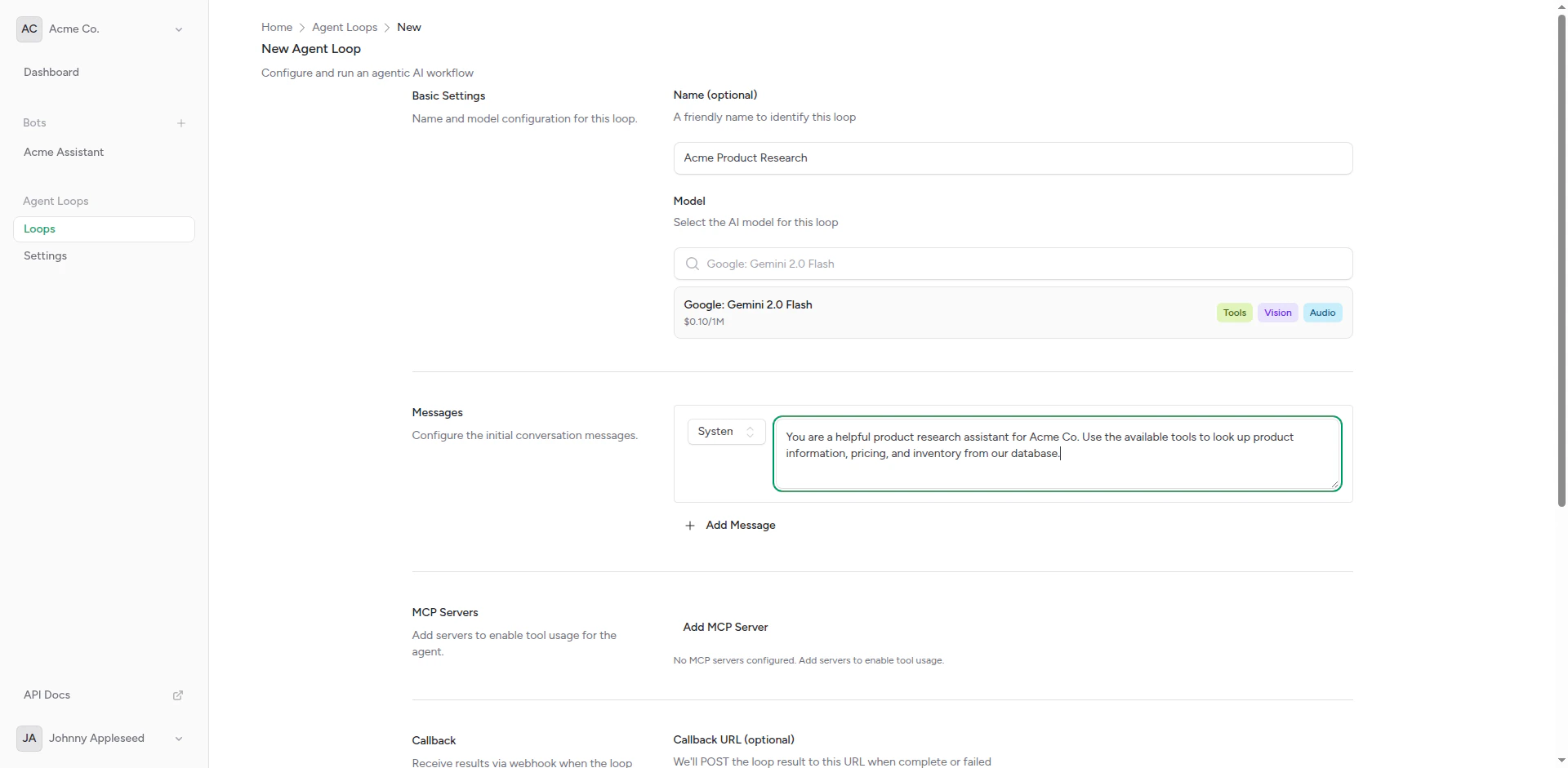 ### User Message
The task or question given to the agent:
```
Generate today's sales report and send it to the team.
```
### User Message
The task or question given to the agent:
```
Generate today's sales report and send it to the team.
```
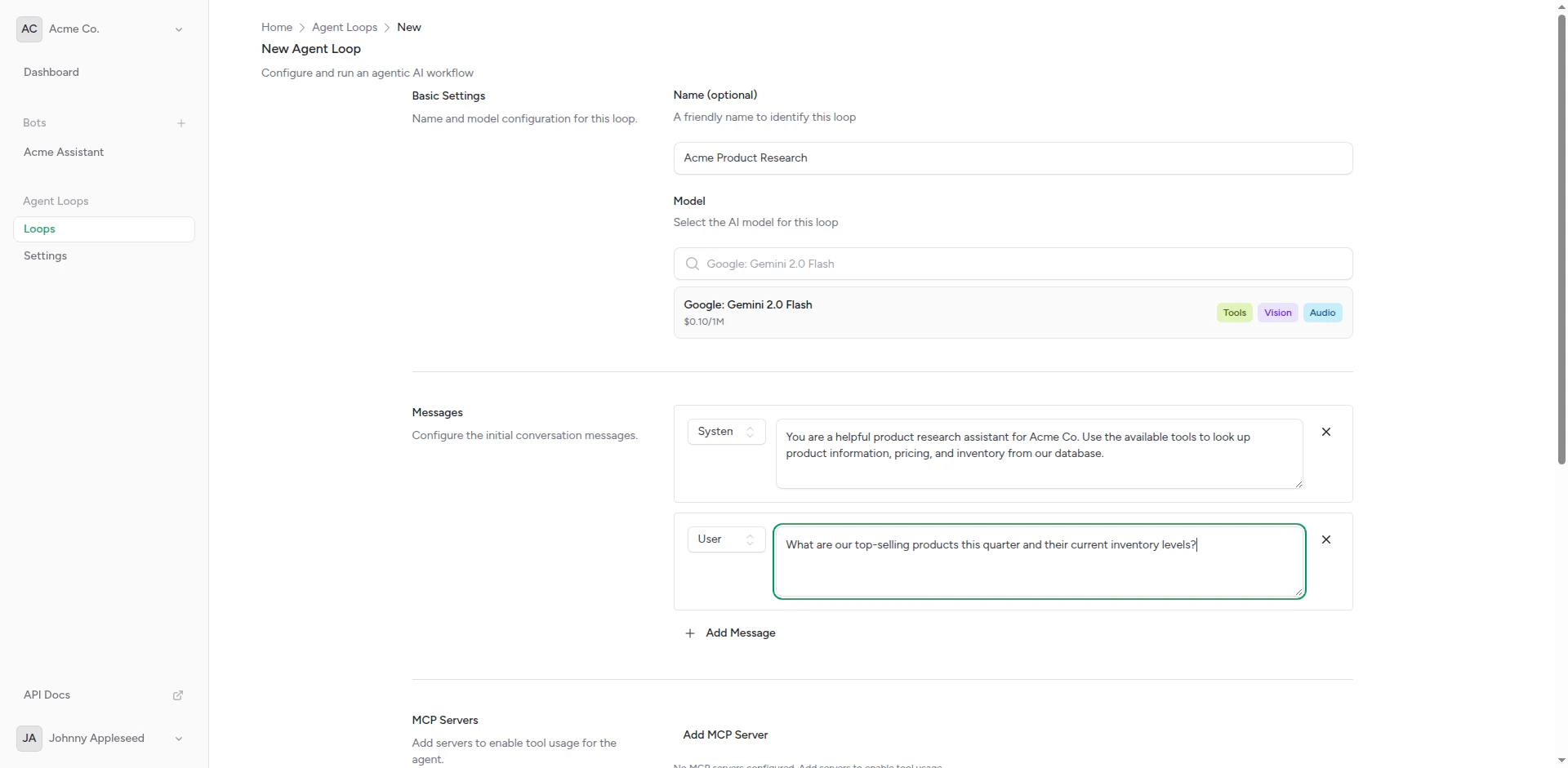 ### MCP Servers
Tools the agent can use:
* **File System**: Read/write files
* **Database**: Query SQL databases
* **HTTP**: Make API requests
* **Custom**: Your own tool implementations
### MCP Servers
Tools the agent can use:
* **File System**: Read/write files
* **Database**: Query SQL databases
* **HTTP**: Make API requests
* **Custom**: Your own tool implementations
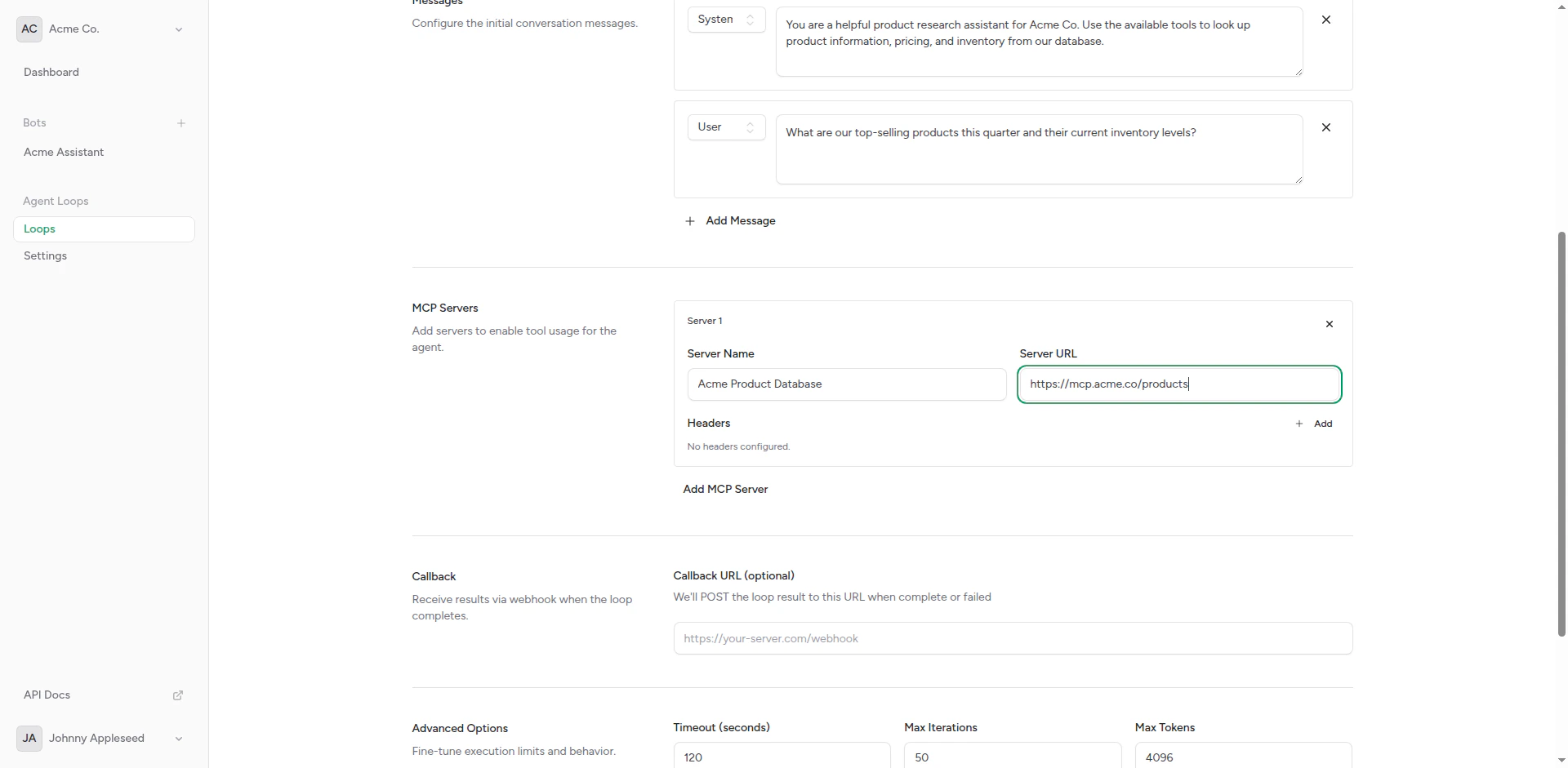 ### Callback Webhook
Where to send results when the agent completes its task:
### Callback Webhook
Where to send results when the agent completes its task:
 ## Creating an Agent Loop
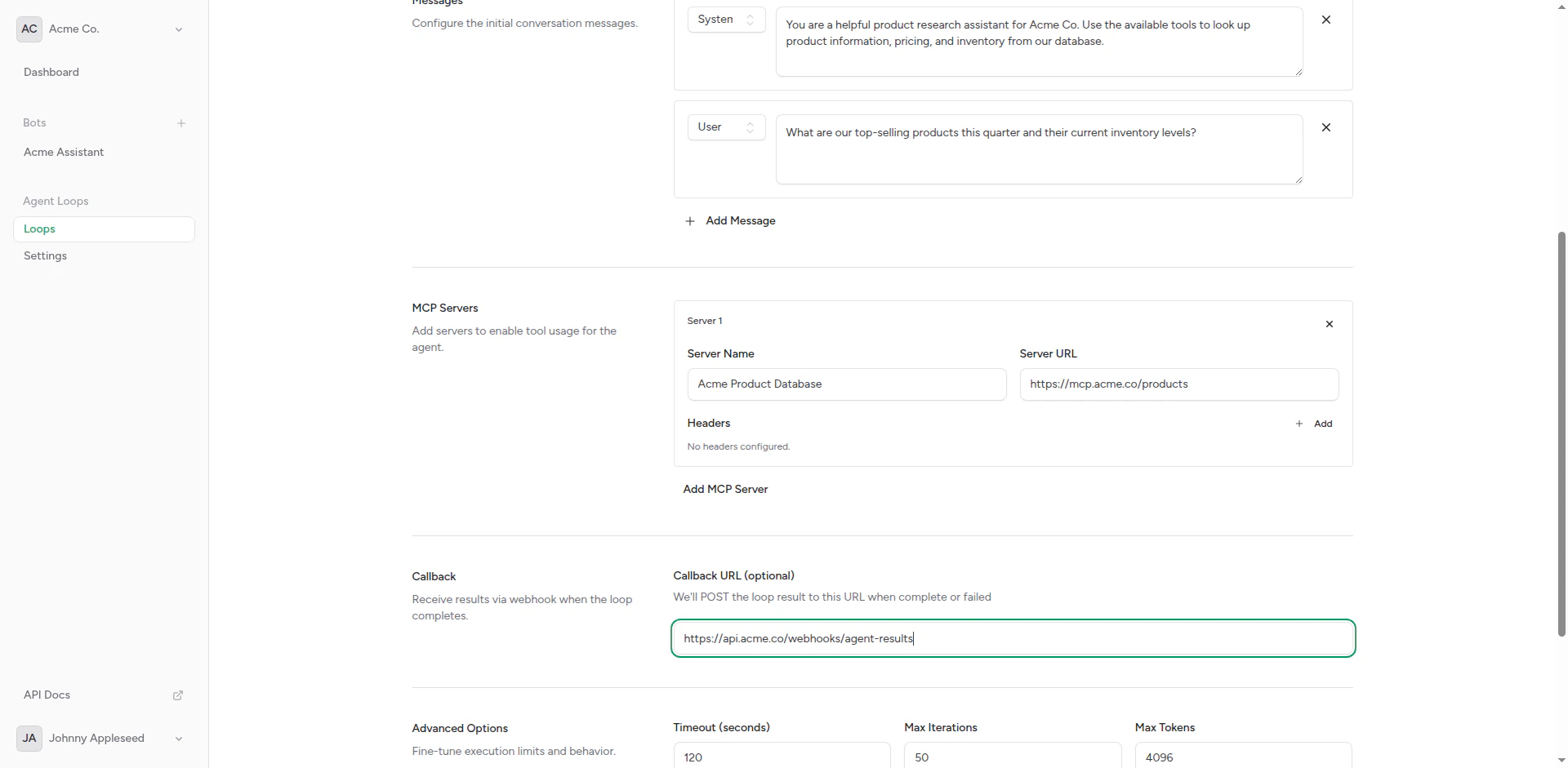
From your dashboard, click **Agent Loops** in the sidebar.
Click **Create Agent Loop** to open the form.
## Creating an Agent Loop
From your dashboard, click **Agent Loops** in the sidebar.
Click **Create Agent Loop** to open the form.
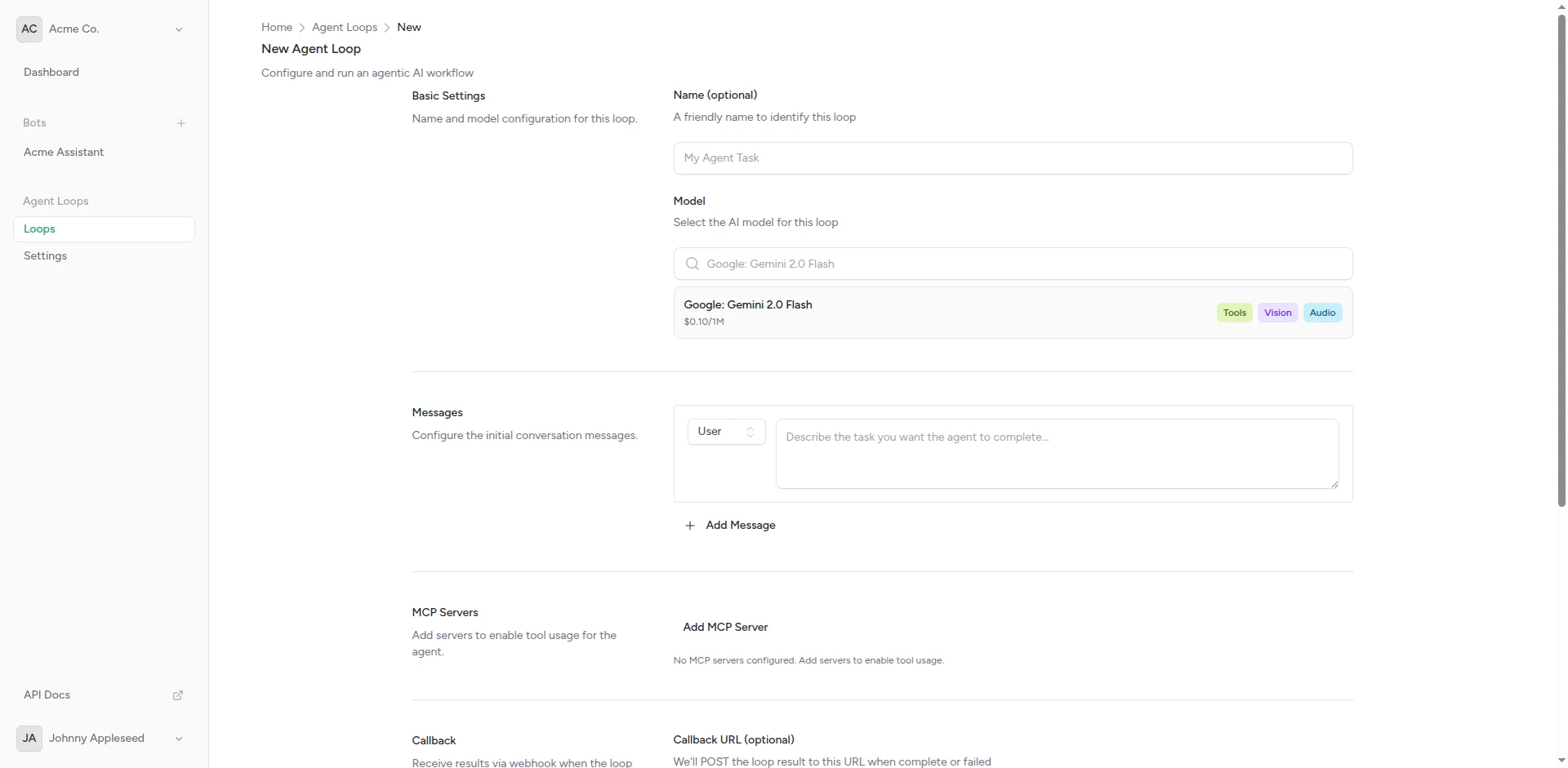 Give it a descriptive name:
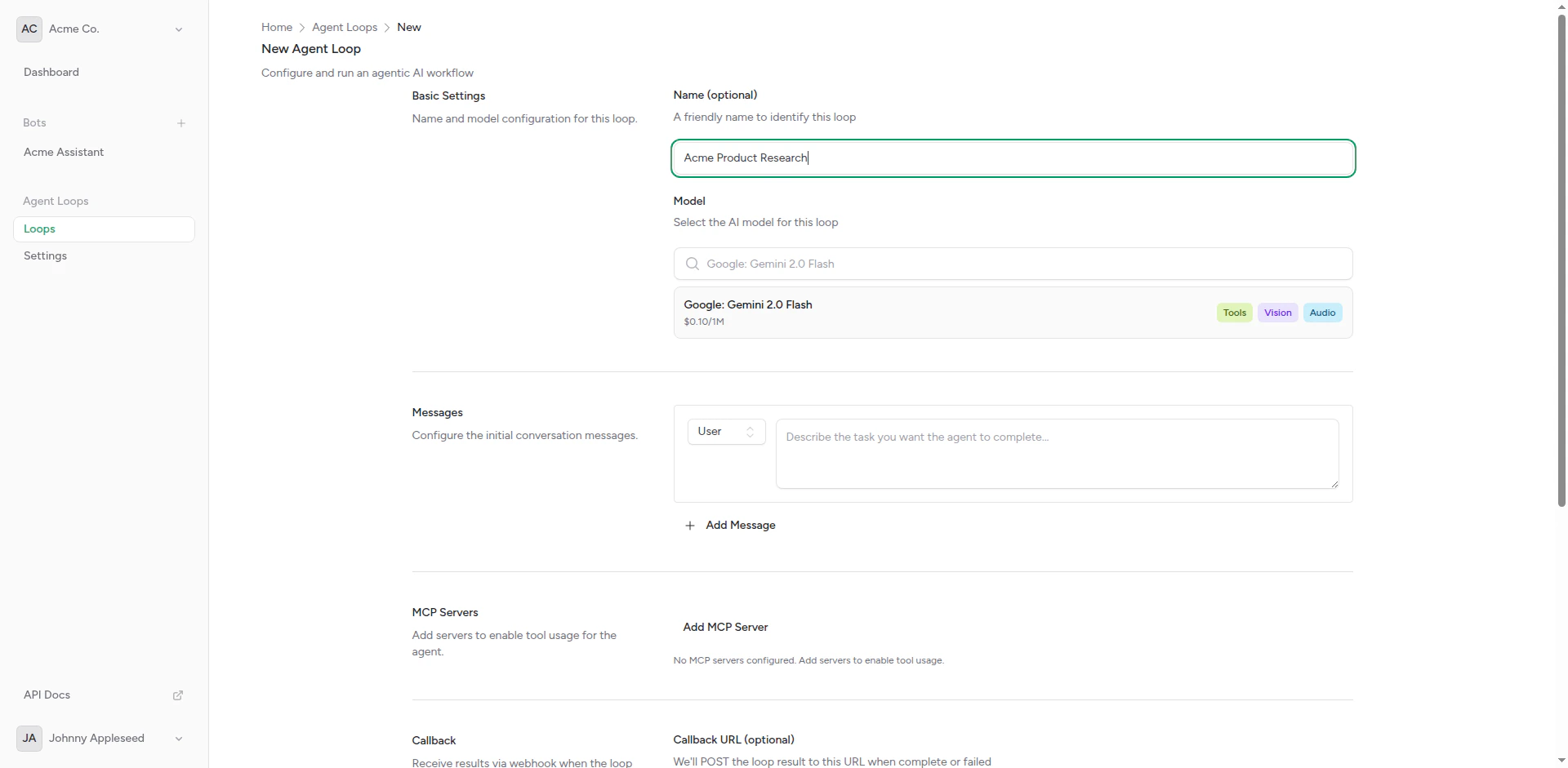 Define the agent's role and behavior.
Provide the task or question.
Add any tools the agent needs (optional but recommended).
Specify where to send results (optional).
Set model, max iterations, timeout, etc.
Define the agent's role and behavior.
Provide the task or question.
Add any tools the agent needs (optional but recommended).
Specify where to send results (optional).
Set model, max iterations, timeout, etc.
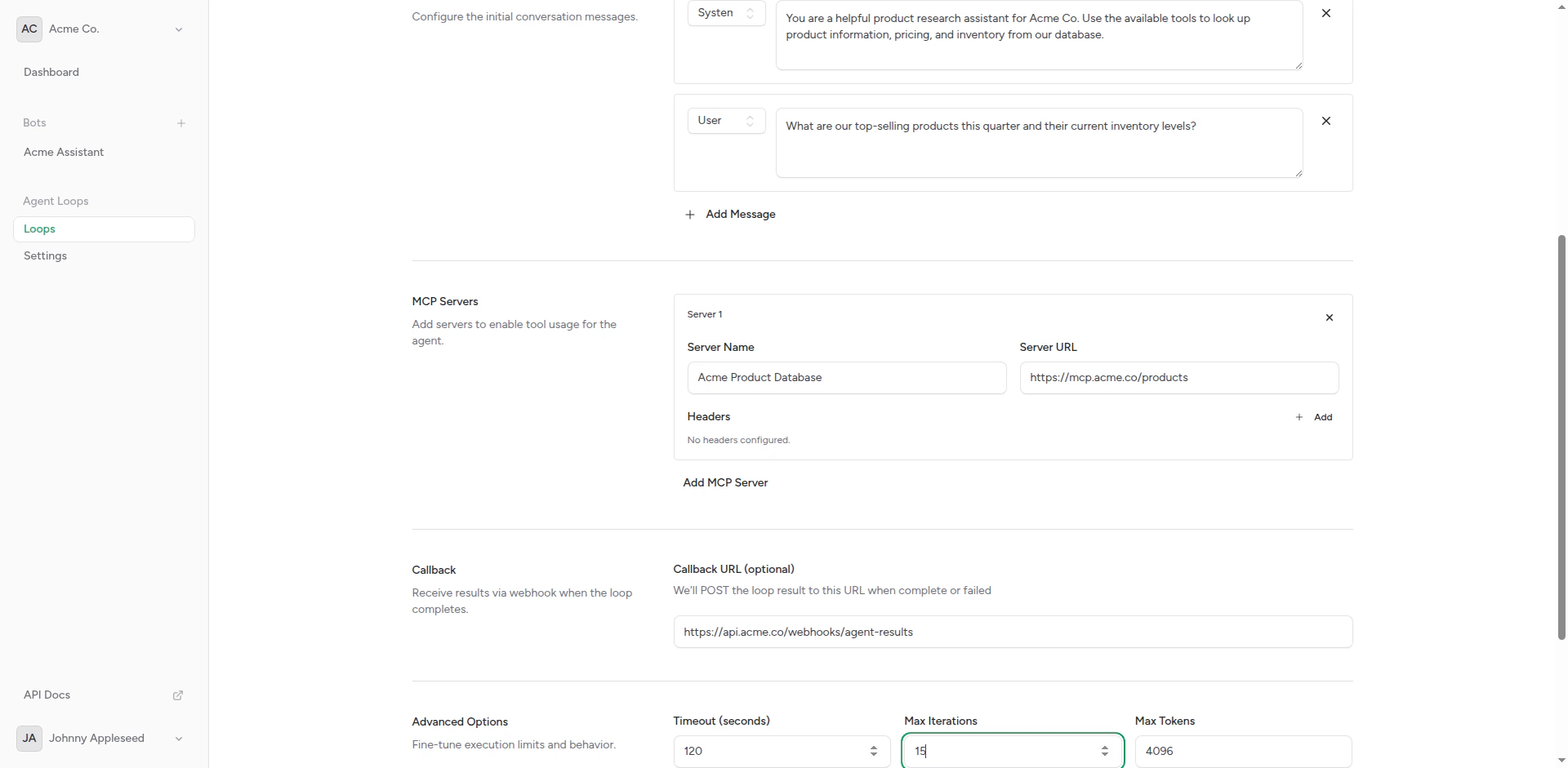 Click **Create** to save the agent loop.
 ## Running Agent Loops
### Manual Execution
Run an agent loop on demand:
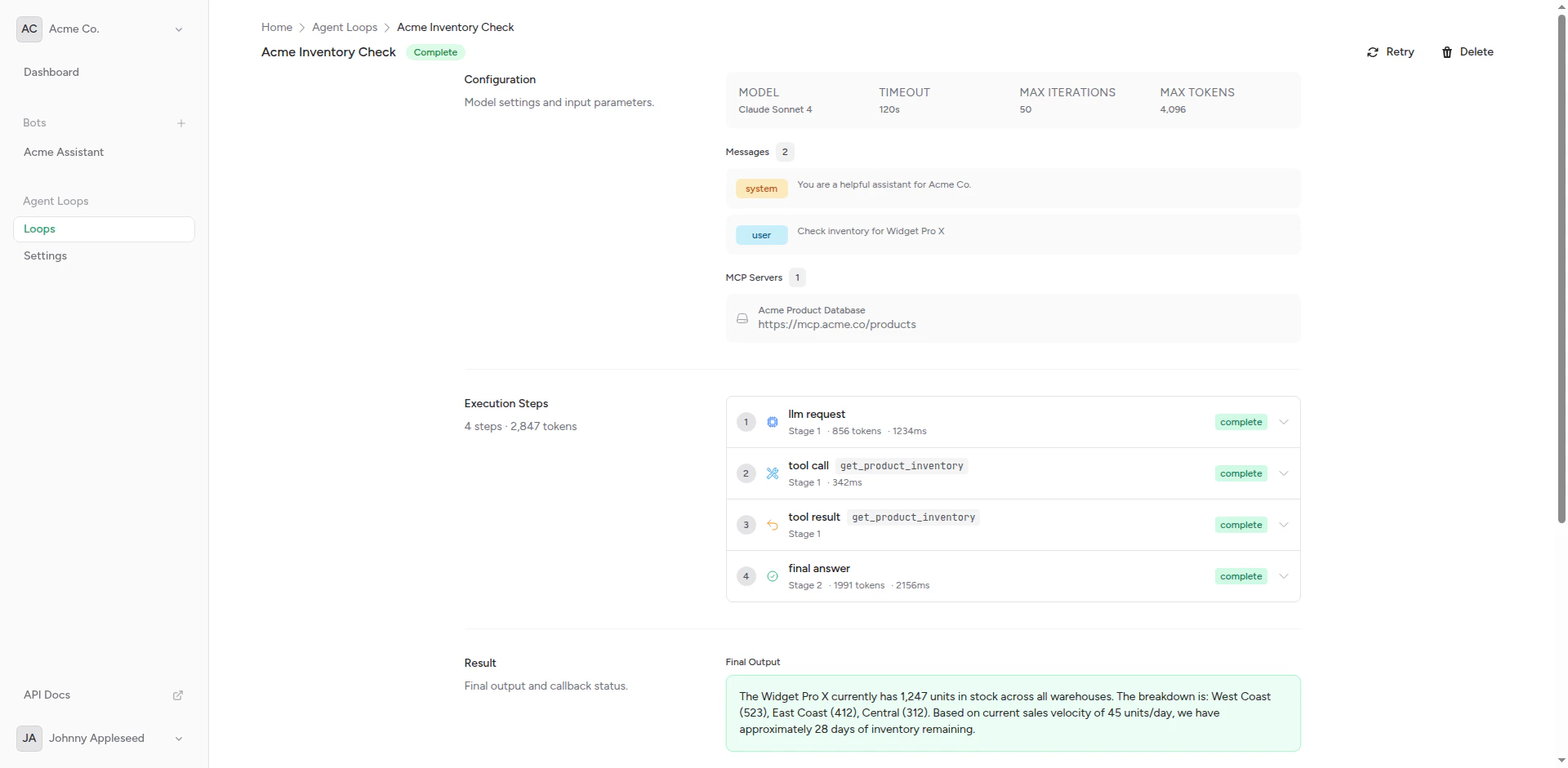
Navigate to the agent loop details page.
Click the **Run** button to start execution.
Watch the execution log for status updates.
Check the output and any callback webhook responses.
### Scheduled Execution (Coming Soon)
Future support for:
* Cron-based schedules (daily, weekly, monthly)
* Interval-based triggers (every N minutes/hours)
* Event-based triggers (webhook received, file uploaded)
### API Execution
Trigger agent loops via API:
```bash theme={null}
curl -X POST https://api.chatbotplatform.io/v1/agent-loops/{id}/run \
-H "Authorization: Bearer YOUR_API_KEY" \
-H "Content-Type: application/json"
```
See [API Reference](/api-reference/introduction) for details.
## MCP Servers
Model Context Protocol (MCP) servers provide tools for agents:
### Built-in MCP Servers
**File System**:
* Read files
* Write files
* List directories
**HTTP Client**:
* Make GET/POST/PUT/DELETE requests
* Handle authentication
* Parse responses
**Database** (Coming Soon):
* Query SQL databases
* Execute statements
* Transaction support
### Custom MCP Servers
Deploy your own MCP servers:
Follow the MCP specification to create a tool server.
Host your MCP server at a public endpoint.
Configure the MCP server URL in your agent loop settings.
Run the agent and verify tool calls work correctly.
Learn more in [MCP Servers](/agent-loops/mcp-servers).
## Callback Webhooks
Send agent results to external systems:
### Webhook Format
The callback webhook receives:
```json theme={null}
{
"agent_loop_id": "loop_abc123",
"execution_id": "exec_xyz789",
"status": "completed",
"result": {
"output": "The agent's final response",
"tool_calls": 5,
"iterations": 3
},
"metadata": {
"started_at": "2024-01-15T10:00:00Z",
"completed_at": "2024-01-15T10:02:30Z",
"duration_seconds": 150
}
}
```
### Response Expected
Your webhook should return:
```json theme={null}
{
"received": true
}
```
HTTP 200 status indicates success.
Learn more in [Callbacks](/agent-loops/callbacks).
## Advanced Settings
### Max Iterations
Limit how many reasoning steps the agent can take:
| Iterations | Use Case |
| ------------ | ------------------------ |
| 5 | Simple tasks |
| 10 (default) | Standard tasks |
| 20 | Complex multi-step tasks |
| 50+ | Very complex workflows |
More iterations = longer execution time.
### Timeout
Maximum execution time in seconds:
* 60s: Quick tasks
* 300s (5 min): Standard
* 900s (15 min): Long-running tasks
* 3600s (1 hour): Maximum
Agent stops if timeout is reached.
## Best Practices
Write explicit system prompts and tasks
Provide only necessary MCP servers
Use appropriate iteration and timeout limits
Run manually before scheduling
### System Prompt Tips
**Good**:
```
You are a sales analyst. Your task is to:
1. Query the database for yesterday's orders
2. Calculate total revenue and average order value
3. Identify top 5 products by sales
4. Format the results as a JSON report
5. Send the report via the callback webhook
```
**Bad**:
```
Analyze sales data.
```
Be specific about steps, data sources, and expected output.
## Troubleshooting
### Agent Doesn't Complete
**Check**:
* Max iterations is sufficient
* Timeout is long enough
* MCP servers are accessible
* System prompt is clear
### Tool Calls Fail
**Check**:
* MCP server URLs are correct
* Authentication is configured
* Server is running and responsive
* Agent has permission to access tools
### No Callback Received
**Check**:
* Callback URL is correct
* Webhook endpoint is accessible
* Agent loop completed successfully
* Check execution logs for errors
## API Access
Manage agent loops programmatically using the API.
```bash theme={null}
curl -X POST https://api.chatbotplatform.io/v1/agent-loops \
-H "Authorization: Bearer YOUR_API_KEY" \
-H "Content-Type: application/json" \
-d '{
"name": "Daily Sales Report",
"system_prompt": "You generate daily sales reports.",
"user_message": "Generate today\u0027s sales report.",
"mcp_servers": ["filesystem", "http"],
"callback_url": "https://your-app.com/webhook",
"max_iterations": 10,
"timeout": 300
}'
```
```javascript theme={null}
const response = await fetch('https://api.chatbotplatform.io/v1/agent-loops', {
method: 'POST',
headers: {
'Authorization': 'Bearer YOUR_API_KEY',
'Content-Type': 'application/json'
},
body: JSON.stringify({
name: 'Daily Sales Report',
system_prompt: 'You generate daily sales reports.',
user_message: 'Generate today\'s sales report.',
mcp_servers: ['filesystem', 'http'],
callback_url: 'https://your-app.com/webhook',
max_iterations: 10,
timeout: 300
})
});
const data = await response.json();
```
```php theme={null}
$response = Http::withToken('YOUR_API_KEY')
->post('https://api.chatbotplatform.io/v1/agent-loops', [
'name' => 'Daily Sales Report',
'system_prompt' => 'You generate daily sales reports.',
'user_message' => 'Generate today\'s sales report.',
'mcp_servers' => ['filesystem', 'http'],
'callback_url' => 'https://your-app.com/webhook',
'max_iterations' => 10,
'timeout' => 300
]);
$agentLoop = $response->json();
```
```python theme={null}
response = requests.post(
'https://api.chatbotplatform.io/v1/agent-loops',
headers={'Authorization': 'Bearer YOUR_API_KEY'},
json={
'name': 'Daily Sales Report',
'system_prompt': 'You generate daily sales reports.',
'user_message': 'Generate today\'s sales report.',
'mcp_servers': ['filesystem', 'http'],
'callback_url': 'https://your-app.com/webhook',
'max_iterations': 10,
'timeout': 300
}
)
agent_loop = response.json()
```
```bash theme={null}
curl -X POST https://api.chatbotplatform.io/v1/agent-loops/loop_123/run \
-H "Authorization: Bearer YOUR_API_KEY"
```
```javascript theme={null}
const response = await fetch('https://api.chatbotplatform.io/v1/agent-loops/loop_123/run', {
method: 'POST',
headers: {
'Authorization': 'Bearer YOUR_API_KEY'
}
});
const execution = await response.json();
```
```php theme={null}
$response = Http::withToken('YOUR_API_KEY')
->post('https://api.chatbotplatform.io/v1/agent-loops/loop_123/run');
$execution = $response->json();
```
```python theme={null}
response = requests.post(
'https://api.chatbotplatform.io/v1/agent-loops/loop_123/run',
headers={'Authorization': 'Bearer YOUR_API_KEY'}
)
execution = response.json()
```
```bash theme={null}
curl https://api.chatbotplatform.io/v1/agent-loops/loop_123/executions \
-H "Authorization: Bearer YOUR_API_KEY"
```
```javascript theme={null}
const response = await fetch('https://api.chatbotplatform.io/v1/agent-loops/loop_123/executions', {
headers: {
'Authorization': 'Bearer YOUR_API_KEY'
}
});
const { data } = await response.json();
```
```php theme={null}
$response = Http::withToken('YOUR_API_KEY')
->get('https://api.chatbotplatform.io/v1/agent-loops/loop_123/executions');
$executions = $response->json('data');
```
```python theme={null}
response = requests.get(
'https://api.chatbotplatform.io/v1/agent-loops/loop_123/executions',
headers={'Authorization': 'Bearer YOUR_API_KEY'}
)
executions = response.json()['data']
```
View the full API specification with all endpoints, parameters, and response schemas.
## Next Steps
Create your first agent loop
Configure tool access
Set up result webhooks
## Running Agent Loops
### Manual Execution
Run an agent loop on demand:
Navigate to the agent loop details page.
Click the **Run** button to start execution.
Watch the execution log for status updates.
Check the output and any callback webhook responses.
### Scheduled Execution (Coming Soon)
Future support for:
* Cron-based schedules (daily, weekly, monthly)
* Interval-based triggers (every N minutes/hours)
* Event-based triggers (webhook received, file uploaded)
### API Execution
Trigger agent loops via API:
```bash theme={null}
curl -X POST https://api.chatbotplatform.io/v1/agent-loops/{id}/run \
-H "Authorization: Bearer YOUR_API_KEY" \
-H "Content-Type: application/json"
```
See [API Reference](/api-reference/introduction) for details.
## MCP Servers
Model Context Protocol (MCP) servers provide tools for agents:
### Built-in MCP Servers
**File System**:
* Read files
* Write files
* List directories
**HTTP Client**:
* Make GET/POST/PUT/DELETE requests
* Handle authentication
* Parse responses
**Database** (Coming Soon):
* Query SQL databases
* Execute statements
* Transaction support
### Custom MCP Servers
Deploy your own MCP servers:
Follow the MCP specification to create a tool server.
Host your MCP server at a public endpoint.
Configure the MCP server URL in your agent loop settings.
Run the agent and verify tool calls work correctly.
Learn more in [MCP Servers](/agent-loops/mcp-servers).
## Callback Webhooks
Send agent results to external systems:
### Webhook Format
The callback webhook receives:
```json theme={null}
{
"agent_loop_id": "loop_abc123",
"execution_id": "exec_xyz789",
"status": "completed",
"result": {
"output": "The agent's final response",
"tool_calls": 5,
"iterations": 3
},
"metadata": {
"started_at": "2024-01-15T10:00:00Z",
"completed_at": "2024-01-15T10:02:30Z",
"duration_seconds": 150
}
}
```
### Response Expected
Your webhook should return:
```json theme={null}
{
"received": true
}
```
HTTP 200 status indicates success.
Learn more in [Callbacks](/agent-loops/callbacks).
## Advanced Settings
### Max Iterations
Limit how many reasoning steps the agent can take:
| Iterations | Use Case |
| ------------ | ------------------------ |
| 5 | Simple tasks |
| 10 (default) | Standard tasks |
| 20 | Complex multi-step tasks |
| 50+ | Very complex workflows |
More iterations = longer execution time.
### Timeout
Maximum execution time in seconds:
* 60s: Quick tasks
* 300s (5 min): Standard
* 900s (15 min): Long-running tasks
* 3600s (1 hour): Maximum
Agent stops if timeout is reached.
## Best Practices
Write explicit system prompts and tasks
Provide only necessary MCP servers
Use appropriate iteration and timeout limits
Run manually before scheduling
### System Prompt Tips
**Good**:
```
You are a sales analyst. Your task is to:
1. Query the database for yesterday's orders
2. Calculate total revenue and average order value
3. Identify top 5 products by sales
4. Format the results as a JSON report
5. Send the report via the callback webhook
```
**Bad**:
```
Analyze sales data.
```
Be specific about steps, data sources, and expected output.
## Troubleshooting
### Agent Doesn't Complete
**Check**:
* Max iterations is sufficient
* Timeout is long enough
* MCP servers are accessible
* System prompt is clear
### Tool Calls Fail
**Check**:
* MCP server URLs are correct
* Authentication is configured
* Server is running and responsive
* Agent has permission to access tools
### No Callback Received
**Check**:
* Callback URL is correct
* Webhook endpoint is accessible
* Agent loop completed successfully
* Check execution logs for errors
## API Access
Manage agent loops programmatically using the API.
```bash theme={null}
curl -X POST https://api.chatbotplatform.io/v1/agent-loops \
-H "Authorization: Bearer YOUR_API_KEY" \
-H "Content-Type: application/json" \
-d '{
"name": "Daily Sales Report",
"system_prompt": "You generate daily sales reports.",
"user_message": "Generate today\u0027s sales report.",
"mcp_servers": ["filesystem", "http"],
"callback_url": "https://your-app.com/webhook",
"max_iterations": 10,
"timeout": 300
}'
```
```javascript theme={null}
const response = await fetch('https://api.chatbotplatform.io/v1/agent-loops', {
method: 'POST',
headers: {
'Authorization': 'Bearer YOUR_API_KEY',
'Content-Type': 'application/json'
},
body: JSON.stringify({
name: 'Daily Sales Report',
system_prompt: 'You generate daily sales reports.',
user_message: 'Generate today\'s sales report.',
mcp_servers: ['filesystem', 'http'],
callback_url: 'https://your-app.com/webhook',
max_iterations: 10,
timeout: 300
})
});
const data = await response.json();
```
```php theme={null}
$response = Http::withToken('YOUR_API_KEY')
->post('https://api.chatbotplatform.io/v1/agent-loops', [
'name' => 'Daily Sales Report',
'system_prompt' => 'You generate daily sales reports.',
'user_message' => 'Generate today\'s sales report.',
'mcp_servers' => ['filesystem', 'http'],
'callback_url' => 'https://your-app.com/webhook',
'max_iterations' => 10,
'timeout' => 300
]);
$agentLoop = $response->json();
```
```python theme={null}
response = requests.post(
'https://api.chatbotplatform.io/v1/agent-loops',
headers={'Authorization': 'Bearer YOUR_API_KEY'},
json={
'name': 'Daily Sales Report',
'system_prompt': 'You generate daily sales reports.',
'user_message': 'Generate today\'s sales report.',
'mcp_servers': ['filesystem', 'http'],
'callback_url': 'https://your-app.com/webhook',
'max_iterations': 10,
'timeout': 300
}
)
agent_loop = response.json()
```
```bash theme={null}
curl -X POST https://api.chatbotplatform.io/v1/agent-loops/loop_123/run \
-H "Authorization: Bearer YOUR_API_KEY"
```
```javascript theme={null}
const response = await fetch('https://api.chatbotplatform.io/v1/agent-loops/loop_123/run', {
method: 'POST',
headers: {
'Authorization': 'Bearer YOUR_API_KEY'
}
});
const execution = await response.json();
```
```php theme={null}
$response = Http::withToken('YOUR_API_KEY')
->post('https://api.chatbotplatform.io/v1/agent-loops/loop_123/run');
$execution = $response->json();
```
```python theme={null}
response = requests.post(
'https://api.chatbotplatform.io/v1/agent-loops/loop_123/run',
headers={'Authorization': 'Bearer YOUR_API_KEY'}
)
execution = response.json()
```
```bash theme={null}
curl https://api.chatbotplatform.io/v1/agent-loops/loop_123/executions \
-H "Authorization: Bearer YOUR_API_KEY"
```
```javascript theme={null}
const response = await fetch('https://api.chatbotplatform.io/v1/agent-loops/loop_123/executions', {
headers: {
'Authorization': 'Bearer YOUR_API_KEY'
}
});
const { data } = await response.json();
```
```php theme={null}
$response = Http::withToken('YOUR_API_KEY')
->get('https://api.chatbotplatform.io/v1/agent-loops/loop_123/executions');
$executions = $response->json('data');
```
```python theme={null}
response = requests.get(
'https://api.chatbotplatform.io/v1/agent-loops/loop_123/executions',
headers={'Authorization': 'Bearer YOUR_API_KEY'}
)
executions = response.json()['data']
```
View the full API specification with all endpoints, parameters, and response schemas.
## Next Steps
Create your first agent loop
Configure tool access
Set up result webhooks